WordPress makes it easy for anyone to have a website quickly, but there is a lot of noise about how many security issues it has.
- Does WordPress have security issues? Yes
- Are they insurmountable? No
- Should it stop you from using WordPress? Most certainly not
WordPress is prone to hacks, because it is popular. In fact, WordPress has evolved into a very secure CMS. Many of the security issues WordPress has resolved over the years still exist on other platforms.
A WordPress security plugin is the best solution for all its security issues.
In this article, we will explain what to look out for, and more importantly, how to improve security for WordPress in general.
A good security plugin is the best solution for typical WordPress security issues. In one plugin, it will address most WordPress security flaws, and protect against new risks.
What are security concerns in WordPress?
WordPress security issues are weaknesses that hackers exploit to gain access to a site. These could be of any kind: vulnerabilities, malware, or even poor password security.
Once hackers have access to your site, they can use them in a botnet or redirect visitors to spam sites. These threats are dangerous to your site, its resources, and user information.
💡 A WordPress security plugin adds protective layers to block these attacks, safeguarding valuable data and maintaining site integrity.
Common WordPress security issues
1. No protection against WordPress attacks
A WordPress firewall is non-negotiable for your site’s security.
It acts as a barrier, blocking malicious attacks even before they reach your site. This protection reduces the risk of hacks and keeps your data safe. As a bonus, it reduces the load on your site resources.
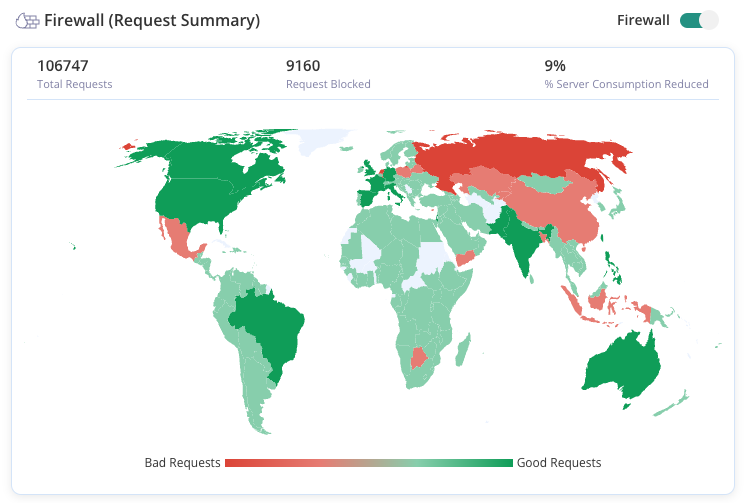
MalCare’s Atomic Security is designed specifically for WordPress, offering robust protection against even the most severe attacks. It stops threats like brute force attacks and malware intrusions, ensuring your site remains secure.
With a firewall, you prevent unauthorized access and protect sensitive information, keeping your website and users safe from harm.
2. Malware on your WordPress website
Malware is harmful code that can cause unauthorized actions on your website. There are lots of specific types like backdoors, phishing scams, and even website defacement attacks.
The main goal in WordPress security is to prevent malware. However, no system is foolproof. Even if you do everything right, hackers may still find a way in. So, what do you do if malware is already on your site?
The answer is to scan your site for malware daily.
A daily check ensures that no malware can remain undetected on your site. It can hide in files, folders, or databases. Sometimes it looks like WordPress core files or image files, or even plugins. Install MalCare to help with this.
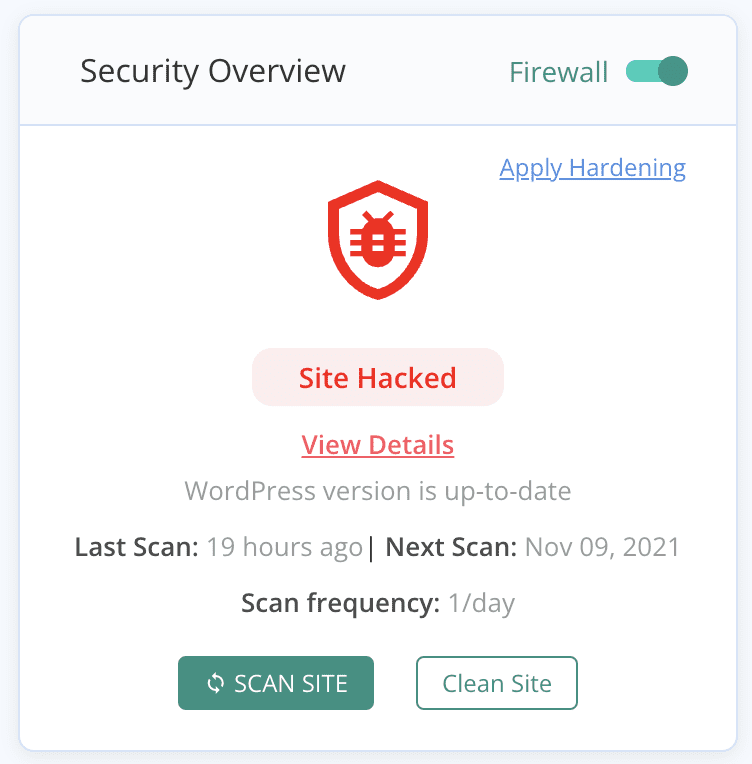
MalCare uses a unique method to find malware. Unlike other scanners that rely on file comparison, MalCare checks code behavior using over 100 signals. This approach avoids false positives and detects new malware versions. As a bonus, MalCare’s scanner is free to use.
3. Out-of-date plugins and themes
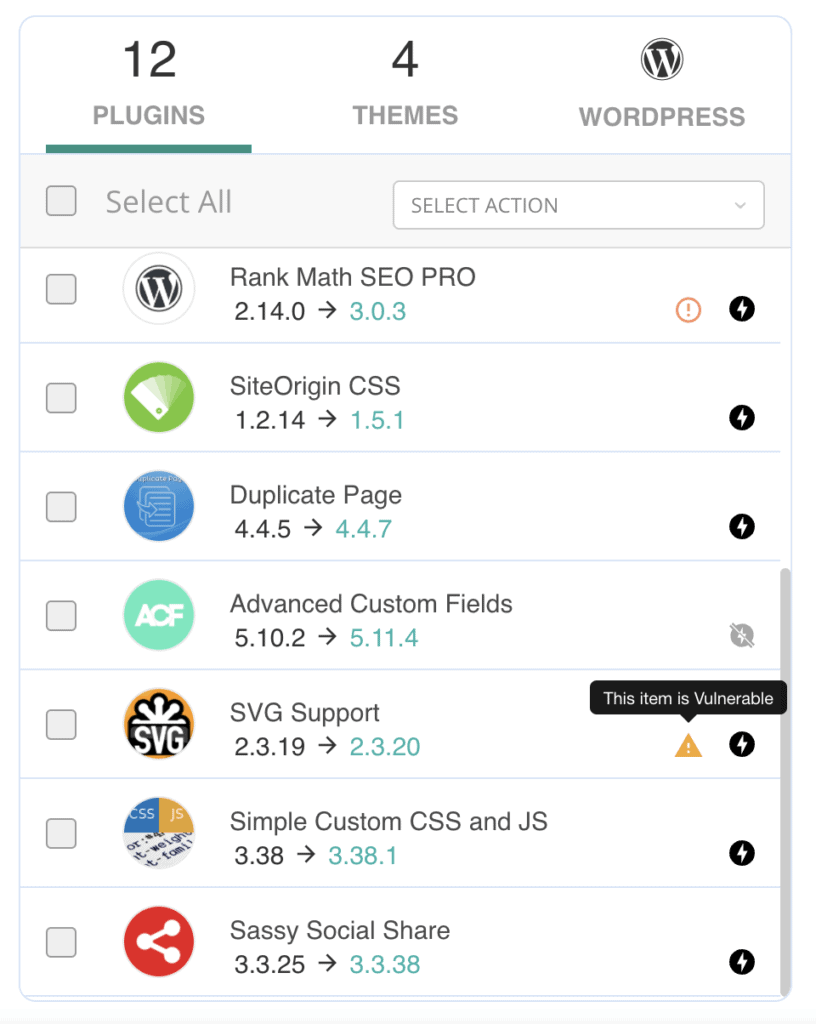
WordPress plugins and themes should always be kept up to date.
Plugins and themes, like WordPress itself, are all built with code. Developers sometimes make coding errors that create security vulnerabilities.
Security researchers find these flaws and inform developers to fix them.
Security updates act as patches to protect against these threats. Hackers exploit outdated versions, so staying updated is critical. Always backup your site before updating to avoid issues. Test changes on a staging site before applying them live.
4. Weak password security
Hackers use bots to attack login pages by trying many username and password combinations quickly. They aim to gain access, and once successful, they can control your website.
Strong passwords are vital but often hard to remember, leading admins to use simple ones like pet names or birthdays, making the site vulnerable.
To secure your site, use strong, unique passwords making them harder to crack.
Ensure all site accounts, including SFTP and database credentials, have strong passwords. You can also limit login attempts to prevent bots and accommodate human mistakes.

Reused passwords can be strong passwords, like we spoke about in the previous section, but they are not necessarily unique.
For instance, your social media account and website account have the same string of letters, characters, and numbers for a password. You’ve gotten used to typing it in, and you figure it can’t be guessed so it is a good password.
Well, you’re half right. It is a good password, but only for one account. The rule of thumb is to never reuse passwords across accounts. And the reason is the potential threat of data breaches.
5. Easily breached login
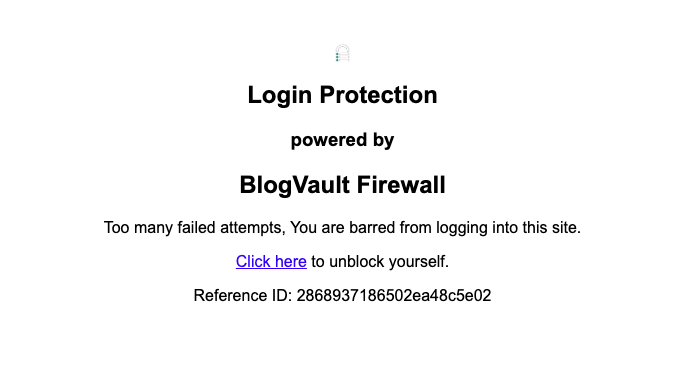
WordPress login security strengthens your site beyond just passwords. While passwords protect the human element, securing the login page blocks brute force attacks effectively.
Brute force attacks occur when a system is overwhelmed with username and password attempts to gain unauthorized access. So, how do you stop them?
Limit login attempts to restrict the number of failed logins. Implement CAPTCHA to ensure logins are by humans. These steps help fortify your system and prevent unauthorized access.
Don’t try changing the login URL. It is rarely useful or helpful in preventing attacks, and causes a lot of hassle if it is misplaced.
6. Nulled software
Nulled plugins and themes are premium versions with cracked licenses available for free online. Quite apart from the moral dimension of stealing from developers, nulled software is a huge WordPress security risk.
Most nulled themes and plugins come riddled with malware. Hackers rely on people to want a good deal on a premium product, and wait for them to install it. The website gets a dose of malware hand-delivered to it, and the site is now hacked. This is the only reason why anyone bothers to crack premium software in the first place. Robin Hood isn’t involved in the WordPress ecosystem.
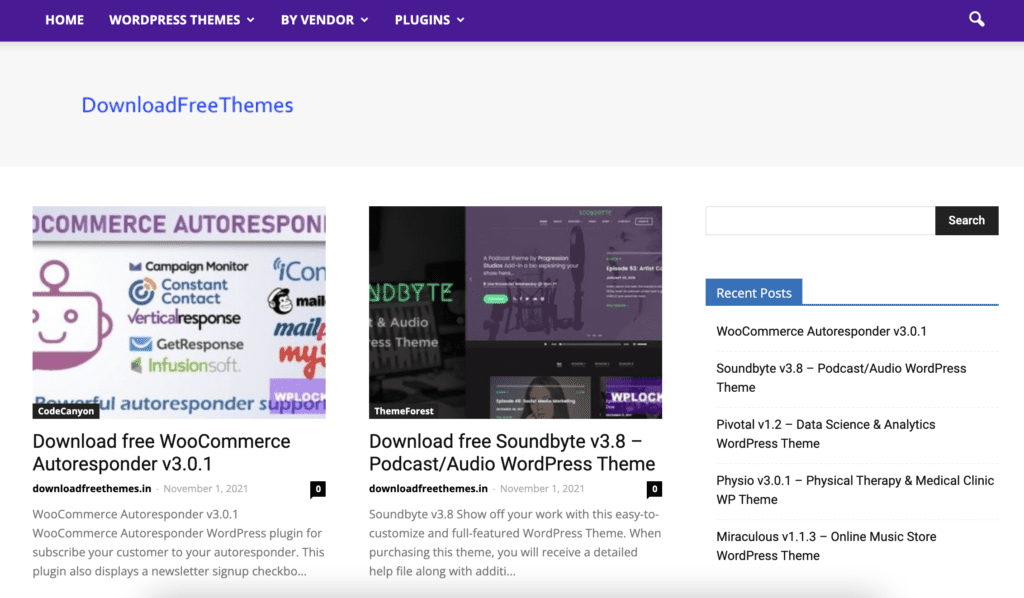
Even if the nulled themes and plugins didn’t have malware on them—which is very rare—you cannot update them. Because they are not official versions, they obviously don’t receive support from the developers. So if a vulnerability is discovered and the developers release a security patch, the nulled software is also out-of-date with a vulnerability, in addition to having malware installed on it.
7. Website uses HTTP instead of HTTPS
It is important to use HTTPS on your site. This is achieved by installing SSL, a security protocol that encrypts data exchanged with the site.
Think of SSL as a private conversation, like a coded phone call only you and one other person can understand. Even if someone taps into the call, they can’t decipher the data. SSL similarly encrypts data, protecting sensitive information from third parties.
The Internet now prioritizes data security and privacy, with SSL being crucial. Google also supports SSL and penalizes sites without it in search results.
8. Open XML-RPC
Blocking XML-RPC is important for WordPress security. XML-RPC is an alternative way to access your site, often targeted by hackers.
Hackers use it to perform brute force attacks or exploit vulnerabilities. By disabling XML-RPC, you close this potential backdoor, making your site more secure.
9. Insecure uploads folder
Blocking PHP execution in the uploads folder is vital for WordPress security. WordPress uses PHP to run dynamic features, but not all files need this capability.
Hackers can insert PHP code to gain control of your site. To prevent this, disable PHP execution in areas where it’s unnecessary.
You can do this manually by editing WordPress core files, or use MalCare to easily stop PHP execution in specific folders.
10. Unused user accounts
Website users change frequently.
In a multi-author blog, for example, new writers join and older ones leave.
Old user accounts that aren’t removed can become security risks. These inactive accounts often have outdated passwords, making them vulnerable.
Removing unused accounts is essential for security. It’s also important to track user activity. Unusual actions can indicate hacked accounts.
11. Shared hosting
Shared hosting can pose security risks due to shared management systems like cPanels and databases. Malware can easily transfer between sites on the same server.
If you manage multiple websites, keep their databases separate and stored in different locations. This way, if one site is compromised, others remain safe, provided they are individually secure.
While best done during installation, separating databases later is possible and worthwhile. It requires some knowledge of MySQL configurations.
Best practices to prevent WordPress security concerns

WordPress security issues are constantly evolving, and it is hard to stay on top of them in addition to all the other work that goes into running a website. Therefore, here are a few good security practices that can help you protect your website from malware and hackers, without extra effort on your part.
-
Install a security plugin: The best defence your WordPress has against hackers is a good security plugin like MalCare. A WordPress security plugin should have a malware scanner and cleaner. Ideally, it should also come with a firewall, brute force protection, bot protection and an activity log. MalCare has all this, and security experts readily available for any help. It is a hands-off solution, only alerting you when action is necessary, and doesn’t hog up server resources in the bargain. Install MalCare now, and breathe a sigh of relief.
-
Use a firewall: A web application firewall protects your website from all kinds of bad actors. Hackers want to exploit vulnerabilities on your website, in addition to other WordPress security issues. A firewall prevents that, by only letting in legitimate visitors. It is a must-have for your website, and it is even better if it comes bundled with your security plugin.
-
Keep everything updated: Ensure that WordPress core, plugins and themes are always updated. Updates often contain security patches for vulnerabilities, and therefore it is critical to update as soon as possible. However, we know that applying updates is not always straightforward. To minimise risk, safely update your website using BlogVault. Your site is backed up just before the update, and you can see how the update performs on staging first before updating your live website.
-
Have two-factor authentication: Passwords can get cracked, especially if they aren’t particularly strong or have been reused. Two-factor authentication generates a real-time login token in addition to passwords that is much harder to crack. You can enable two-factor authentication using a plugin, like WP 2FA or another one off of this list.
-
Enforce strong password policies: We cannot stress the importance of strong and unique passwords enough. We recommend using a password manager. In order to protect your website from security issues, like brute force attacks, your security plugin should limit login attempts as well.
-
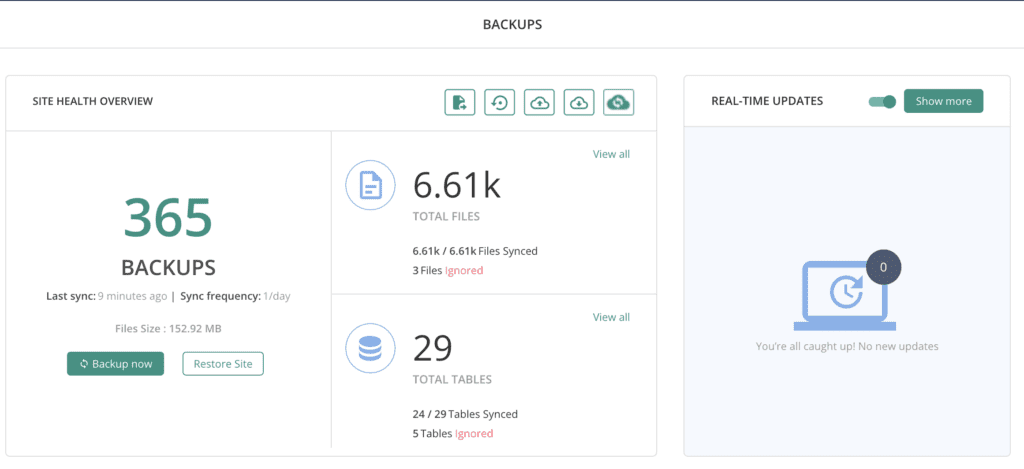
Regular backups: Sometimes backups are the last resort with a hack, and your website should always have a backup that is stored away from your website server. Learn more about how to backup your WordPress site.
-
Use SSL: Install an SSL certificate on your website to encrypt communication back and forth from it. SSL has become a de facto standard, and Google actively promotes its use for a safer browsing experience.
-
Conduct a security audit every few months: Review users and their actions on the website, with an activity log. Unusual activity can be an early warning signal of malware. It is also advisable to implement the least privileges policy for admin and user accounts. Finally, purge any unused plugins or themes on your website. Deactivated themes and plugins are overlooked for updates, and WordPess security vulnerabilities go unchecked causing websites to be hacked.
-
Choose reputable plugins and themes: This is slightly subjective as a security measure, but it is worth using the best plugins and themes on your website. Check if the developer regularly updates their product, for instance. In addition to online reviews and support experiences of other users, this is an important metric. Additionally, premium software is generally a better bet overall. But most crucially, never use nulled software. It often carries malware in the code, having been cracked for that very reason. It is just not a worthwhile risk.
You can also harden your WordPress website, and educate yourself on how WordPress security works.
Top causes of hacks on WordPress sites
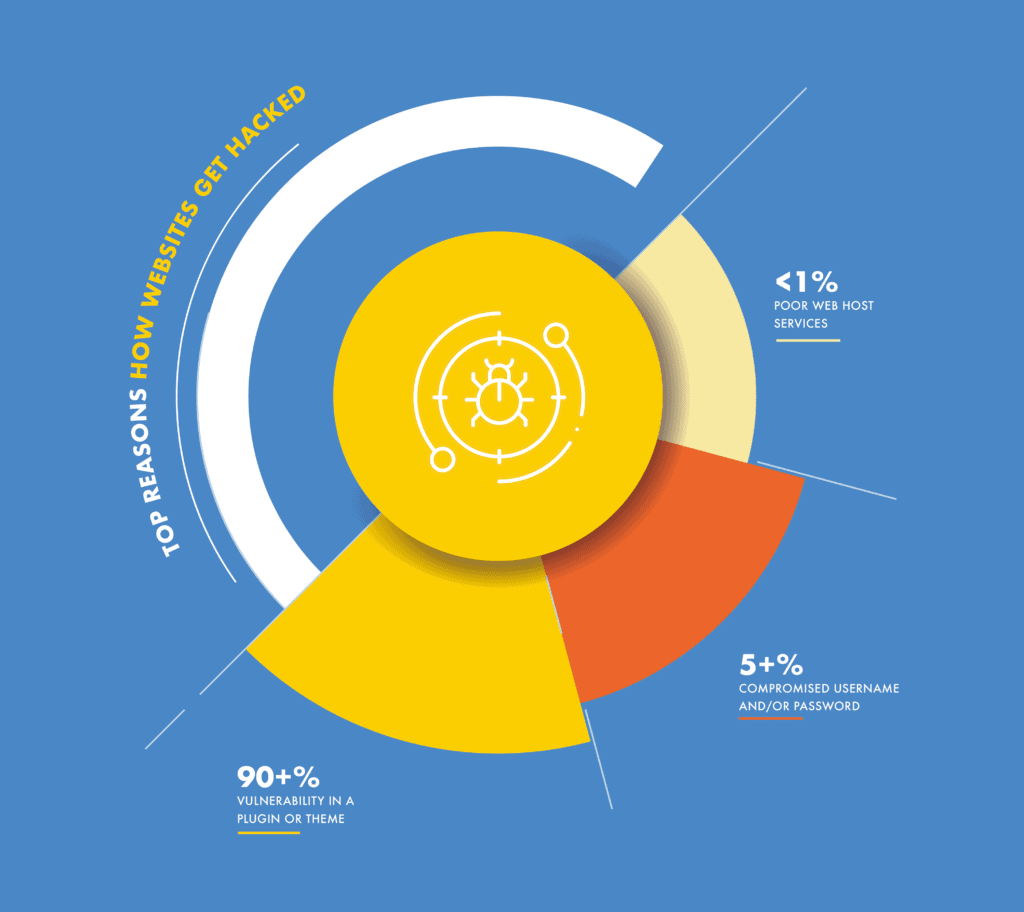
There are two weak links in the security of your WordPress site: vulnerabilities and passwords. 90%+ of malware is injected via vulnerabilities, 5%+ because of compromised or weak passwords, and fewer than 1% are because of other causes, like poor web host services.
Vulnerabilities
While WordPress itself is secure, websites are built with more than just core WordPress. We use plugins and themes to extend functionality of our websites, add features, have a nice design, and interact with website visitors. All this is achieved with plugins and themes.
Plugins and themes, like WordPress, are built with code. When developers write code, they can make mistakes that result in loopholes. Loopholes in code can be exploited by hackers to perform actions that were not intended by the developer.
For instance, if your website allows users to upload images, say for a profile picture, the upload should only be an image file. However, if the developer has not put in those constraints, a hacker can upload a PHP file full of malware instead. Once it is uploaded to the website, the hacker can then execute the file and the malware will spread to the rest of the site. These loopholes are vulnerabilities. There are other types, of course, but these are the major ones that afflict WordPress sites.
Key WordPress security vulnerabilities explained
WordPress is a powerful platform, but no codebase is immune to vulnerabilities.

One prominent example of a WordPress vulnerability is the cross-site scripting (XSS) vulnerability, which allows attackers to inject malware into pages. Older plugins often have XSS flaws because of to outdated sanitisation practices.
Another classic WordPress vulnerability is SQL injection—a loophole where malicious code is inserted into database queries. This vulnerability lets hackers extract, modify, or delete critical site information.
It’s important to note that while many vulnerabilities are discovered and resolved promptly, sites open to attack before that happens. That’s why you need a good firewall; to keep out threats even if vulnerabilities exist on your site.
Compromised passwords
If a hacker has your account credentials, they don’t need to hack your WordPress website. That’s why strong passwords are so important.
There are two principal ways that passwords become the weakest link in the WordPress security chain.
- Using easy-to-remember passwords, which are consequently easy for hackers and their bots to guess.
- Reusing passwords across websites and services.
Data breaches are all too common. For example, a user has the same password for two different accounts: an ecommerce website and their Twitter account. If the ecommerce website has a data breach, where user data is stolen, their Twitter account is now compromised. The hacker can log into the account and cause all manner of havoc.
Both vulnerabilities and compromised passwords are WordPress security risks you can deal with easily, with the right tools and the right advice. Fortunately, both of those things are here.
Common WordPress security flaws
Beyond vulnerabilities and passowrds, there are recurring security flaws in WordPress websites. Some are because of platform-wide conventions, others from user habits.
One of the most common WordPress security flaws is the use of predictable usernames, such as admin. Attackers can easily target these accounts in brute force attacks. To fix this flaw, always create a unique admin username.
Another widespread issue is improper file permissions. Many users mistakenly grant excessive privileges to files and directories, exposing their sites to malware. Also using the permissions at WordPress installation can be too lax. Fixing this flaw is as simple as assigning proper permissions.
Understanding WordPress security risks
The security risks of WordPress extend beyond code vulnerabilities and misconfigurations—they include social engineering, third-party integrations, and even human error. The sheer popularity of WordPress means millions of sites share similar architecture; when an exploit is discovered, hackers have a vast field of potential targets.
One profound risk is the interconnectedness of plugins and themes. A vulnerability in one small component can place the entire website at risk. Similarly, credentials stolen in unrelated data breaches are routinely tested by bots attempting unauthorised logins on WordPress sites.
Shared hosting environments also introduce significant WordPress security risks. If one site on a server gets infected, neighboring sites may be impacted due to insufficient isolation. This makes regular site monitoring and proactive protection even more vital.
Ultimately, the greatest security risk is complacency. Even simple oversights—such as postponing updates, using weak passwords, or neglecting backups—can have serious consequences. Vigilance, ongoing education, and a layered approach to security are the most effective tools for mitigating the evolving risks faced by WordPress website owners.
Conclusion
WordPress security issues can be daunting to an inexperienced admin, but that doesn’t mean there is no solution to them. Security issues can be resolved easily, by listening to expert advice. We, at MalCare, firmly believe that WordPress security should be a hands-off affair, leaving you free to do other things with peace of mind.
We hope that the article helped allay any fears. If there is something we have not addressed, please do let us know. We would love to hear from you.
FAQs
Yes, WordPress has security issues. Although WordPress is a secure system, but like any other system, it is not perfect. Plugins and themes add functionality and complexity to a website, but also bring in security concerns. However, there are ways to mitigate those successfully, so the important thing to remember is that they are not difficult to deal with.
WordPress is not easily hacked, however, some of its plugins and themes may not be as secure. Installing a security plugin with an integrated firewall, like MalCare will make a WordPress website much more secure.
WordPress is secure for commerce, if the website has a security plugin with a firewall installed. The security plugin will perform daily scans to alert users of malware. MalCare is a great security plugin that not only scans the website, but provides a 1-click auto-clean option as well. MalCare also comes with a firewall to keep away bad traffic from the commerce website, in addition to protecting the website from bots that scrape data.
The must-have WordPress security requirements are:
Malware scanner
Malware cleaner
WordPress firewall
Brute force protection
Bot protection
Activity log
Two-factor authentication
These features go a long way toward protecting websites from WordPress security issues.
Yes, outdated WordPress plugins are a security risk for a website. Plugin updates usually contain security patches that address errors in the plugin code. These errors are known as vulnerabilities and can be exploited by hackers to gain unauthorised access to a website. Therefore it is critically important to update WordPress plugins as soon as possible. Same goes for WordPress themes.
The most critical WordPress security vulnerabilities include cross-site scripting (XSS), SQL injection, file inclusion bugs, and vulnerabilities in outdated plugins or themes. These loopholes can allow attackers to inject code, steal data, or take control of your website if not addressed promptly.
To address security issues with WordPress, always keep your core, plugins, and themes updated, use a robust security plugin with a firewall, set strong unique passwords, and regularly back up your site. Proactive monitoring and timely action are crucial for staying protected.
Main WordPress security risks include weak passwords, installation of nulled (pirated) plugins or themes, shared hosting vulnerabilities, and lax update practices. Overlooking these risks can expose your website to hacks, data breaches, and downtime.
Top WordPress security flaws site owners should be aware of include using the default admin username, misconfigured file permissions, unprotected XML-RPC, and leaving inactive plugins or themes installed. Addressing these flaws reduces your risk profile and helps keep your site safe.
Yes, shared hosting can increase risks because multiple websites share the same server environment, and if one site is compromised, others may be affected. Using isolated hosting environments or VPS can reduce this risk.
WordPress security vulnerabilities can expose sensitive user information such as login credentials, payment details, and personal data to unauthorized access. This can result in data breaches, financial losses for users, and potential legal implications for site owners.
While HTTPS via SSL encrypts data transmitted between users and your website, it does not fix all WordPress security issues. Proper plugin management, strong passwords, and firewalls are still required for complete security.
The most common issues include outdated WordPress core files, themes, or plugins, weak login credentials, brute force login attempts, and vulnerabilities like XSS, SQL injection, and CSRF. Poor hosting setups and malicious third-party plugins also contribute significantly to security risks.