Brute force attacks can overwhelm sites, even before an attack is actually successful. These attacks on WordPress sites hammer the login page, attempting to break through to your site dashboard.
If you see a lot of requests on for wp-login.php or wp-admin, you may well be under a brute force attack.
Block brute force bots from WordPress. Deflect the bad requests, let the good ones through, and safeguard your site.
Many site admin sees their server resources depleting rapidly, their sites becoming unresponsive or even crashing. You can feel helpless as brute force bots send request after request to your site.
But you aren’t. If you see several unsuccessful login attempts for a single user, maybe coming in from multiple IPs, we’ve got the solution for you.
: Get a brute force bot shield for your WordPress sites. Bot protection firewall rules prevent brute force attacks in WordPress. Coupled with good login protection, it doubles up the defence of your site. MalCare, the best WordPress firewall available, also makes sure that real users are never locked out.
What is a WordPress brute force attack?
WordPress brute force attacks take place when a hacker tries to gain unauthorized access to your site by trying out various combinations of usernames and passwords.
Hackers use login bots to continuously try credentials.
That’s why good brute force bot protection is essential for WordPress. Without it, your site can rapidly become overwhelmed—and sometimes even crash altogether.
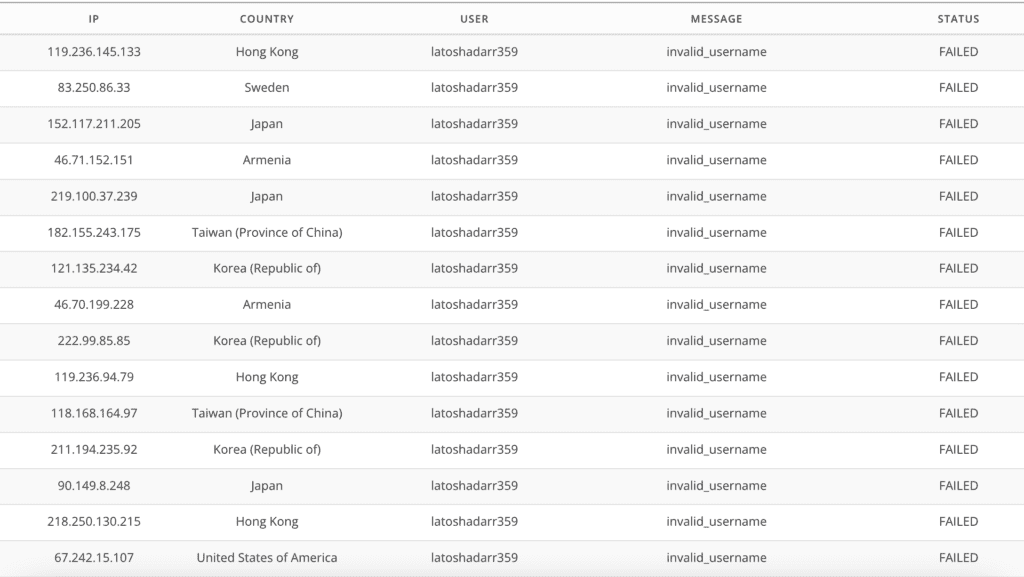
Brute force attacks are also known as dictionary attacks or password-guessing attacks. WordPress brute force attack bots use dictionary words as passwords. This is why many password policies suggest you use a pass-phrase instead of a word.
The more you know, right?
The bad news is that bots are super hard to pin down to IP addresses, because they use different ones all the time. WordPress firewalls that rely only on blocking malicious IPs will get fooled, once bots strike from another unknown IP. The good news is that there is a lot you can do to prevent brute force attacks in WordPress.
1. Get brute force bot protection
To stop WordPress brute force attacks, you need to stop the brute force bots. And you do that by getting intelligent bot protection.
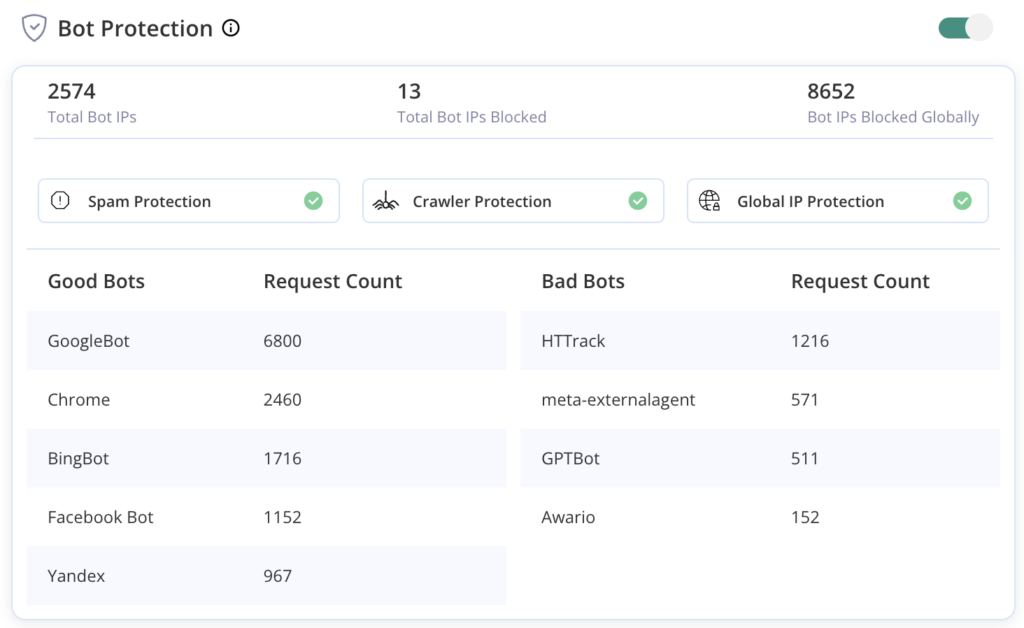
While there are many WordPress firewalls, not just any plugin will do; the right firewall needs to have great bot protection as well.
Why?
Because, realistically, over 25% of all website traffic is bots.
If your chosen firewall block all bots indiscriminately, it will also keep out good ones like search engine crawlers and uptime monitoring bots. All in One Security has been known to block Googlebot on many occasions. There go your SEO rankings, and all the traffic you get from Google.
That’s why we recommend MalCare. MalCare’s firewall is custom-built for WordPress, and has the best brute force attack protection you can get.
2. Limit login attempts
Another effective way to stop WordPress brute force attacks is to limit login attempts.
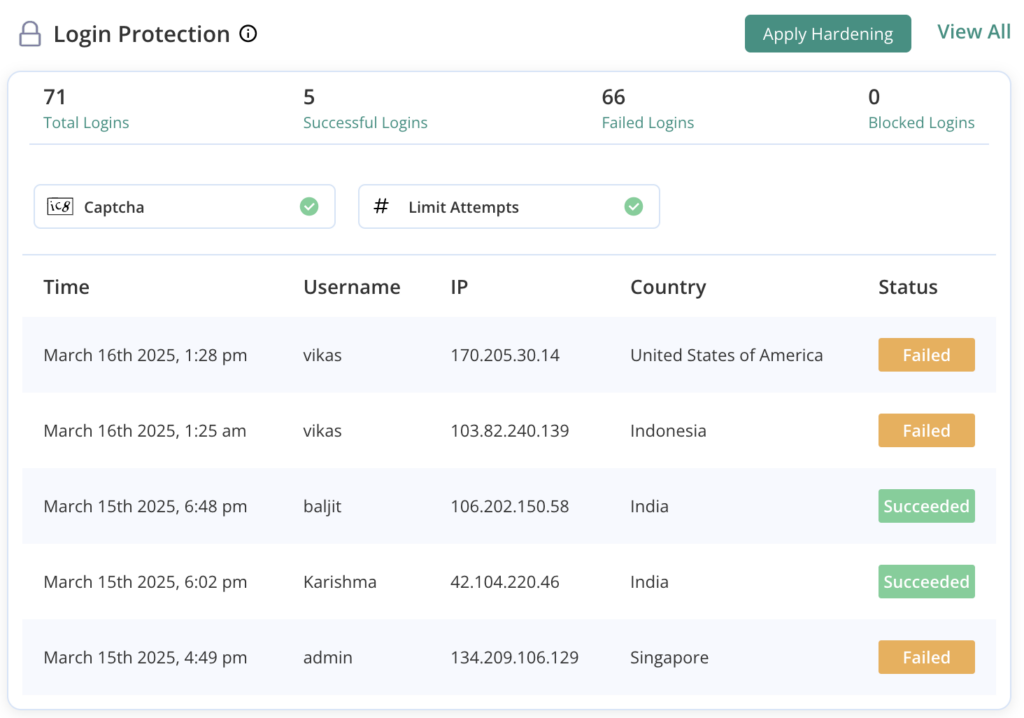
If an incorrect password is entered into the login page too many times, the account is temporarily blocked. This blocks the brute force bot’s effectiveness, as it relies on the trial-and-error method to guess credentials in a short span of time.
A bonus outcome is that limiting login attempts stops server resources being used up by these attempts. Since the bot cannot try out several thousand combinations, the requests are not sent to the server, and resources are not used up by the bot’s activity.
Win-win.
By default, WordPress allows unlimited login attempts, which is why it is susceptible to brute force attacks in the first place.
Luckily, MalCare has login protection automatically activated. So if you install the firewall, you’ve already got login protection.
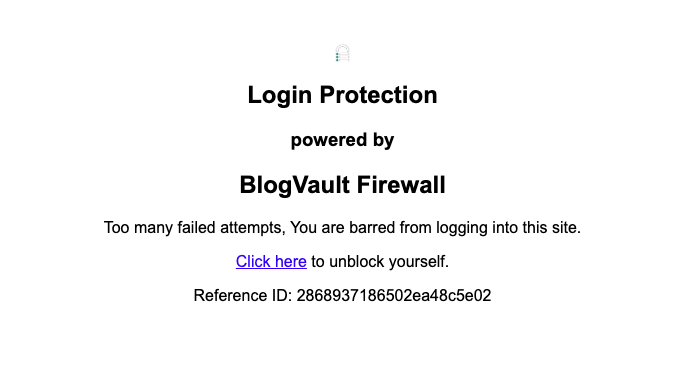
Bonus: If a real user has forgotten their password, they can solve a captcha to get past the block easily.
3. Get a WordPress firewall
WordPress brute force protection in firewalls deserves its own section, even though we already discussed them while blocking bad bots.
Firewalls are the first line of defence for a WordPress site. They block many kinds of WordPress attacks; not just brute force ones.
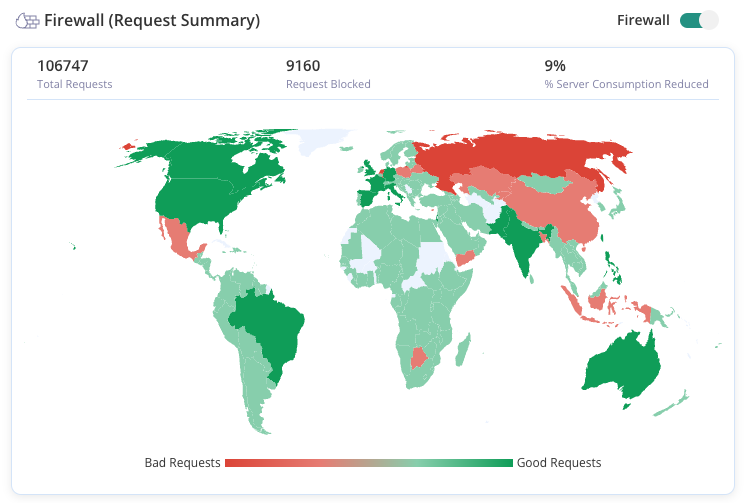
Attacks are often configured to attack from different IPs, and therefore can bypass most firewalls.
However, with MalCare’s firewall, your website becomes a part of global IP protection. The firewall learns which IPs are malicious from behaviour recorded from over 400,000 sites and proactively blocks traffic from them.
These measures significantly reduce the amount of bad traffic to your website in the first place, before the bot even has a chance to brute force your site’s login page.
Bonus: Firewalls mitigate one of the biggest issues with brute force attacks—the excessive load on server resources—by blocking out repeated bad requests.
4. Add two-factor authentication
Two-factor authentication is the addition of dynamic login token to a username-password combination.
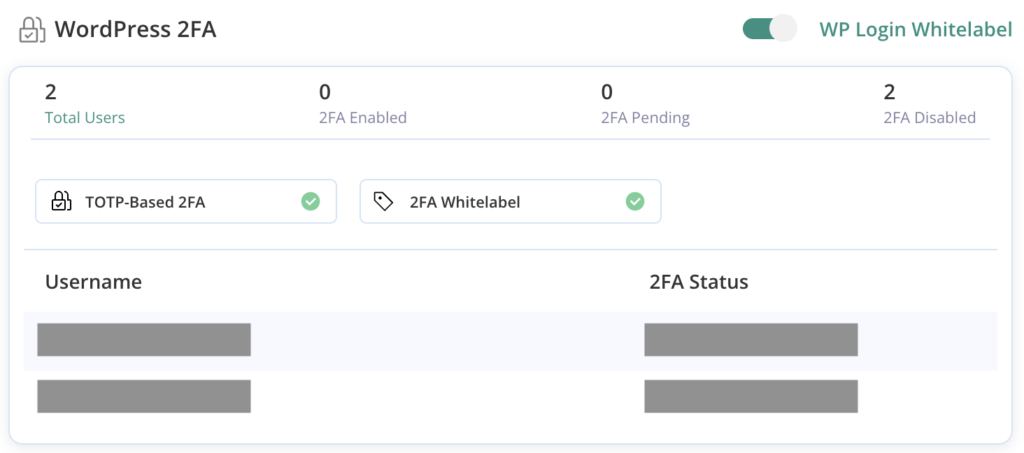
As we have seen, usernames and passwords can be guessed easily with dictionary attacks, or even password breaches.
Therefore, adding a real-time login token like an OTP or QR code secures logins even more. The token is shared with the user’s device, and has limited validity. Therefore, it can only authenticate a user for that session.
MalCare integrates 2FA in its security suite, so yet another security feature without adding another plugin.
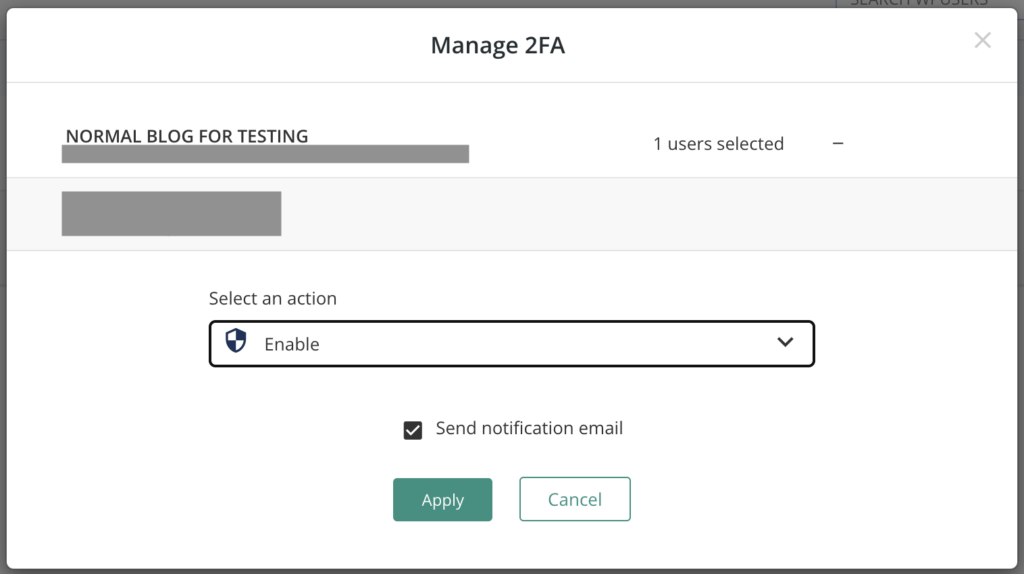
Simply go into the Site Overview page, and then Manage Users. From there, you can easily enable 2FA for users. We strongly recommend 2FA at least for admin users, as their accounts tend to be heavily targeted.
5. Use strong and unique passwords
The biggest flaw in security is the user themselves, and by extension the passwords they set.
Passwords are the biggest weakness in any security system because of the (understandable) human tendency to set easy-to-remember passwords and reuse them across different accounts. These are actually two separate and distinct problems with passwords.
Problem 1: Reused passwords. Never reuse passwords across different accounts. A lot of brute force bots use stolen passwords from data breaches to attack login pages.
Problem 2: Easy-to-guess passwords. As you can imagine, a password like ‘password’ is terribly easy to guess. Use a minimum of 12 characters of gibberish, or even better use a passphrase as a strong password.
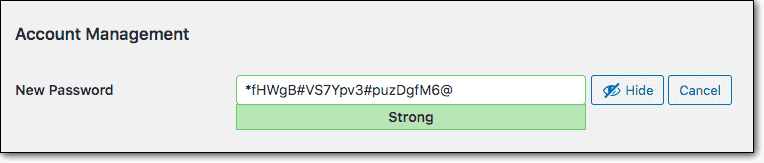
Solution: Use a password manager to avoid reusing passwords and generate strong ones as needed.
In case you suspect an account has been compromised, you can force reset all passwords from the hardening section of the MalCare dashboard.
6. Disable XML-RPC in WordPress
We strongly recommend you disable XML-RPC on your WordPress site.
XML-RPC is something of a relic in WordPress, and still included for backward compatibility reasons.
However, it is largely a login security issue at this point.
This is because the XML-RPC file is another way to authenticate users.
In other words, it is an alternative way to gain access to your admin dashboard, so is also susceptible to brute force attacks.
7. Review user accounts regularly
Dormant accounts are often prime targets for WordPress brute force attacks, because users won’t notice if their accounts are hijacked. Additionally, dormant accounts have the same passwords for long periods of time, making them easier to brute force.
Use an activity log to keep an eye out for unusual activity on your site, as a warning signal of something amiss.
Therefore, review user accounts regularly, and remove any that aren’t in active use.
For extra credit, ensure that each account has the bare minimum user privileges needed to manage their account. It is foolhardy to make everyone an admin, for instance.
8. Consider geoblocking in WordPress
If you see a lot of bot traffic from one location, you can consider blocking the entire country.
However, we advise discretion when using geoblocking. It is useful only if you don’t anticipate any legitimate users from that location at all.
Additionally, be warned that it can keep out good bots from that region. For instance, Googlebot can operate from any of its server locations in the world, and you definitely want Googlebot to access your site.
While there are many ways to block countries on WordPress websites, it is incredibly tedious to maintain. We strongly recommend using a firewall instead.
9. Disable directory browsing
Disable directory browsing as a safeguard, to avoid giving easy visibility into the structure of your site.
By default, most WordPress core folders and files are openly accessible via a browser. For instance, you can type yourwebsite.com/wp-includes into your browser URL bar, and the entire contents of the folder will be immediately visible.
Although directory browsing itself isn’t a vulnerability, it can reveal information about the site that can be in turn used to exploit vulnerabilities. The /wp-content folder has plugins and themes, and if a hacker can see which ones are installed and their version numbers, they can potentially find and exploit vulnerabilities, including ones like remote file inclusion attacks.
Disabling directory browsing prevents a less popular type of brute force attack called directory brute force.
Things that will not prevent brute force attacks
There is a ton of well-intentioned but poor WordPress security advice out there. So, in addition to our list of things to do, we’re listing what not to do just as well.
- Password protect wp-admin directory: Don’t do this at all. It appears in practically every brute force prevention article. Password protecting the wp-admin directory will break AJAX for non-logged in users, by restricting access to the admin-ajax.php file. AJAX is often used to power the dynamic aspects of websites. Suppose there is a search bar on your site. If a visitor uses it to search through products, only the search results will reload, not the entire website. This is a huge resource saver, and makes the user experience of websites significantly faster and better. You will also see a lot of workarounds for excluding the admin-ajax.php file, but they don’t always work seamlessly. The bottom line is that the effort that the workarounds entails does not reflect a commensurate amount of security. Therefore it is a huge step for little additional benefit.
- Changing your wp-login URL: You see this advice often in WordPress security or hardening articles. However, we strongly recommend against changing the login URL because it is next to impossible to recover if it gets lost.
- Avoid the use of admin as a username: Since brute force bots are effectively trying to guess username and password combinations, there is some value in avoiding obvious usernames like admin. WordPress doesn’t allow you to change usernames from the dashboard, so you will need to install a plugin to do so. However, this measure is of limited value, and we advise against spending too much time and effort here. There are other ways to recover usernames from certain types of sites, like membership ones. The effort needed to have unique usernames for members, enforce the policy, and then deal with the inevitable fallout when people forget their unique usernames is not worth the limited beneficial effect.
Signs of a brute force attack on WordPress
The goal of a WordPress brute force attack is to gain access to your wp-admin dashboard. Once an attempt succeeds, hackers typically install malware on your site.
Additionally, the effects of an attack are immediately visible. Most sites have limited server resources, which get used up rapidly, and often a site under attack will crash completely.

Spotting the signs early helps you keep your site safe. Here’s what to watch for:
- Repeated wrong passwords. See lots of failed logins? That’s a warning. This type of attack tries many passwords. Too many wrong attempts mean someone might be trying to break in.
- Slow site speed. Is your site suddenly slow? This attack can slow down your server. If pages take long to load, an attack might be using up your site’s power.
- Strange login times. Check when users log in. Unknown users or odd times can mean trouble. Someone may be trying to access your site without permission.
- Blocked notices. Some plugins let you know when an IP is blocked for too many tries. Lots of these notices can mean an attack is happening.
- Heavy server use. If you hear that your site’s power use is up, this could mean an attack. Attacks use a lot of your site’s power, causing a heavy load.
Stay alert for these signs. Protecting your site means being watchful and acting fast.
Impact of a brute force attack on WordPress
There are two ways to think about the effects of a brute force attack. Firstly, what happens during an attack, and secondly what happens if an attack is successful.
Generally, with WordPress attacks, the first question doesn’t often arise, because there is little to no impact to the website, as it experiences an attack. The consequences rear their heads once an attack is successful. However, that is not the case with a brute force attack.
What happens when your site is being brute forced?
You will see an immediate impact on server resources. Because the attack is bombarding your login page with requests, the server has to respond to each one. Therefore you will see all the effects of increased server usage on your website: a slower website, some users being unable to log in, downtime, inaccessibility, and so on. Web hosts are also quick to restrict server usage that is going through the roof, because this will impact their metrics, especially if you are using shared hosting.
What happens if the brute force attack is successful?
If the attack is successful, you can reasonably expect to see malware or defacement of some kind. There are several reasons why hackers want access to your website, and none of them are good.
If that wasn’t bad enough, your website can become part of a botnet, and be used to attack other websites without your consent. This can have major ramifications because other security systems will flag your website as malicious if it is part of a botnet.
How to deal with a hacked WordPress website
If a brute force attack has been successful, you should assume the worst: your website has been compromised. Therefore, your first priority is to scan your website.
Once you are certain that your site is clean of malware, implement the prevention measures listed above.
We strongly recommend installing MalCare, which takes care of login protection and bot protection, while also packing in a malware scanner, cleaner, and an advanced firewall for good measure. With MalCare installed, you can rest assured that your site is safe from WordPress attacks.
Is your site susceptible to brute force attacks?
Yes, all systems are vulnerable to brute force attacks. Because of the way they work, brute force attacks can be launched against any system with a login page. WordPress websites are no different.
The popularity of WordPress makes it a target for hackers. Firstly, this is because much of the Internet is powered by WordPress, and secondly because certain aspects of WordPress are well known. In an example particularly relevant to brute force attacks, WordPress doesn’t restrict incorrect login attempts. You can correct this with MalCare’s limit login feature, as we talked about in the measures section.
On top of this, many site owners tend to use usernames and passwords that are easy to remember. Common ones include admin as a username and password1234 or 12345678 set as a password.
These factors make your website susceptible to brute force attacks. That’s why a strong understanding of WordPress security is important.
Types of brute force attacks
Brute force attacks are different from other types of threats and attacks, like social engineering attacks or XSS attacks. Social engineering attacks, like phishing, manipulate people into sharing their credentials, by posing as a trusted entity, whereas XSS attacks exploit vulnerabilities on the website. Brute force attacks rely on weak or stolen credentials to succeed.
You’ll see a few flavours of brute force attacks in the wild. They all follow the same pattern of trial-and-error, but the credentials they try or the mechanism they use can vary. Here are a few of the most common types of brute force attacks:
- Simple attacks: Simple brute force attacks use logic to guess credentials based on their knowledge of the user, like pet names or birthdays gotten from social media sites for example.
- Credential stuffing: This type of attack uses data obtained from breaches, operating under the assumption that users tend to use the same usernames and passwords across multiple systems.
- Dictionary attack: As the name implies, these bots use dictionary files for passwords. This can be an actual dictionary, or one specially created for password guessing.
- Rainbow table attacks: Similar in concept to a dictionary attack, a rainbow table is a special kind of dictionary list. Instead of a list of passwords, a rainbow table contains a list of hashed passwords instead.
- Password spraying: This type of attack is logically a reverse brute force attack. In typical brute force attacks, a particular username is the target and the guessing game is played with the password. Conversely, with password spraying, a list of passwords is tried against multiple usernames to find a potential match. It is a more distributed attack, as compared to a targeted one.
If successful, brute force attacks can lead to severe consequences, including unauthorized access to your site and the potential for hackers to demand ransomin exchange for restoring control.
As a site admin, you may not need to know the differentiators between different types of brute force attacks. However, these terms are often used interchangeably, so it helps to have an understanding of the underlying mechanisms.
That’s a wrap
Brute force attacks can debilitate a website, even if they are not successful. The best way to deal with this potential threat is to install a firewall that has integrated bot protection, like MalCare.
Even if a brute force attack has been successful, MalCare will help you detect malware quickly and remove it. As is the case with all infections, quick action limits damage significantly.
FAQs
Frequently asked questions
A brute force attack in WordPress is when a hacker tries to gain access to the site’s wp-admin by trying to guess the login credentials of a legitimate user account. Brute force attacks make use of bots to try hundreds, thousands, and sometimes even millions of passwords on a wp-login page in an attempt to guess the right one.
Specifically, this attack exploits the platform’s default unlimited login attempts. These attacks use automated bots to brute force WordPress login forms, making specialised protection essential for every site owner.
Brute force attacks are not only dangerous for a site in case they are successful, but also have a huge impact on site performance. The attack uses up server resources and can even crash the site on occasion.
The most effective way to protect your site from brute force attacks is to have bot protection and to limit login attempts. By default, WordPress allows unlimited login attempts, so you can use MalCare to protect your site from brute force attacks. In addition to login protection, MalCare includes bot protection and an advanced firewall, both of which help protect your site, and mitigate the ill effects of a brute force attack.
Yes, plugins can help stop brute force attacks. They block multiple wrong logins and limit attempts to keep your site safe.
WordPress is not immune to these attacks. Using security plugins and strong passwords helps protect your site.
Yes, brute force attacks are illegal. They involve unauthorized attempts to access a site or system.
WordPress sites can be hacked through weak passwords, and vulnerable plugins or themes.
WordPress sites are particularly susceptible to WordPress brute force attacks because the platform doesn’t limit login attempts by default. This makes brute force WordPress attempts easier to execute, as attackers can try unlimited password combinations.