In its previous lifetime as iThemes Security, Solid Security looked like a great deal at just $199 for unlimited websites. It was because of that unbeatable price, it was a serious contender amongst the top security plugins for WordPress.
But when iThemes rebranded to Solid Security, we got a fresh coat of paint paired with an exponential price hike. Don’t get us wrong; subscriptions pay for development and maintenance costs for plugins, and much more besides.
We’ve updated this comparison for 2026 because a lot has changed, except, it seems, the core tech. While the packaging got prettier, does the engine actually deliver? We put both plugins through a gauntlet of new malware strains, database injections, and server-shredding performance tests to see if Solid Security (formerly iThemes) finally holds a candle to Wordfence.
In the other corner we have Wordfence, the undisputed heavyweight in this category. Wordfence is known for the feature-heavy free plugin, and their security research and resources. For the premium version, each site will set you back a minimum of $99 a year; which is still a good deal, considering the security works.
Wordfence’s free plugin is orders of magnitude better than Solid Security’s premium plugin. Wordfence may cause performance issues, but at least it has a firewall and a malware scanner. Solid Security only has 2FA in terms of WordPress security features. There is no real comparison between the two.
Summary of Solid Security vs Wordfence comparison
The comparison between Solid Security and Wordfence is not straightforward because they tackle different aspects of WordPress security. Wordfence focuses on active defense, while Solid Security focuses on site hardening.
WordPress security exists on a spectrum. On one side is a lack of protection, and on the other are frequent false positives and intrusive warnings. Solid Security often leans toward a preventative approach that can miss active infections, whereas Wordfence provides a high volume of security data that can become overwhelming for users.
The free Wordfence version provides significant protection through its firewall and scanner. It is the superior security tool for active defence.
Solid Security, even in its premium version, lacks several essential features required to detect and remove existing malware. While it has rebranded and hiked its prices, Solid Security remains a hardening plugin at heart. If you want a plugin that actually prevents attacks, Wordfence is the only free contender in this ring.
In our 2026 testing, neither security plugin is a perfect solution. We recommend evaluating a security plugin that balances prevention with deep-level detection and automated cleaning.
Solid Security in a nutshell
Solid Security is primarily a WordPress hardening plugin rather than a complete security suite. It includes useful features such as two-factor authentication, strong password enforcement, and a recently integrated virtual patching system via Patchstack in their Pro version.
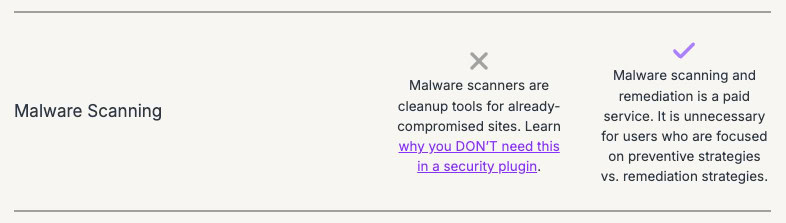
However, Solid Security does not include a malware scanner or a malware removal mechanism. When you set up Scheduled Site Scan in Solid Security, it primarily checks your website against the Google Safe Browsing blacklist. The problem it that, by the time Google blacklists you, your SEO is already in the morgue. Plus you can do the same thing you can do from the Transparency Report page, without needing to install a plugin. This is the why scans complete in seconds.
Back when the plugin was iThemes, the verbiage on their site implied that malware scanning was part of the deal. Not any longer, thankfully. Now the scans are meant to check for vulnerable plugins and themes. It does flag those clearly, with an indication of what the vulnerability is for good measure. The problem now is that
During our testing, brute force protection on the login page showed inconsistent results across different sites, and the activity log provided limited technical utility. On the positive side, the plugin offers granular user password management and security hardening features, such as blocking PHP execution in specific directories.
Therefore, the takeaway is that it may be a decent tool for locking doors, but if a thief is already in the house, Solid Security won’t even notice them.
Wordfence in a nutshell
Wordfence is a robust free security plugin. It is a suitable choice for websites with no budget for security services. The plugin includes a functional WordPress firewall (WAF) that blocks common attacks, a scanner that identifies file-based malware, and a repair feature for core WordPress files.
However, its effectiveness has specific limitations:
- Missed malware: Wordfence caught 99.3% of the file-based malware we threw at it, including several new 2025-vulnerability exploits. However, while the scanner identified file-based malware in our tests, it does not reliably detect database-based malware or infections within premium themes and plugins that are not in the WordPress.org repository.
- Resource hog: The plugin relies on server resources to perform scans and firewall checks. In our 2026 performance tests, deep scans caused noticeable spikes in CPU and memory usage , which can be problematic on shared hosting.
- Alert fatigue: The firewall generates frequent notifications for routine blocked attacks. This high volume of alerts can make it difficult to identify genuine, high-priority threats.
- Delayed protection: Free Wordfence users receive firewall rules and malware signatures 30 days after they are released to premium users. This creates a window of vulnerability to new exploits.
While Wordfence includes brute force protection and robust two-factor authentication, it lacks a refined activity log and dedicated bot protection. Furthermore, its high resource usage has led some web hosts to restrict its use. For users seeking a more efficient WordPress security plugin, a cloud-based scanner and firewall like MalCare provides better protection with less impact on site performance.
While Wordfence relies on its threat defence system to block exploits via the firewall, Solid Security Pro has pivoted to virtual patching via Patchstack. This means Solid Security can prevent exploits of a vulnerability before the developer even releases a fix. However, without a malware scanner to see if the vulnerability was already exploited, you’re essentially locking the door after the horse has bolted.
Security feature comparison
Malware scanning and detection
Scanning blindspots: database and premium code
Wordfence’s malware scanner detected most file-based backdoors in core WordPress files. It also scanned files for free plugins from the official repository. However, it had trouble with database injections. It missed hacked redirect malware inside the wp_options table. We saw that base64-encoded strings in custom tables remained hidden. This is a common way modern malware avoids file scanners.
Wordfence integrity checks depend on the official WordPress.org repository. It lacks a gold standard for premium plugins or themes. The scanner has no reference file for paid code. It might not flag malicious changes in a premium theme custom function.
We threw a lot of file-based malware at Wordfence, and it detected almost all of it. It has an extensive malware database for the signature-matching algorithm, so we expect that it will detect about 70 to 80% of malware. That is not as good as 95%, like with MalCare, but it is vastly better than all the other security plugins out there. Detection, after all, is half the battle.
The reality of signature-based scanning
After installing Wordfence, it sets up the first scan automatically. So far, so great. Left the scanner to finish, and explored the other features for a few hours. Only to see that it was still stuck at 60%. Considering the site was pretty small, what gives?
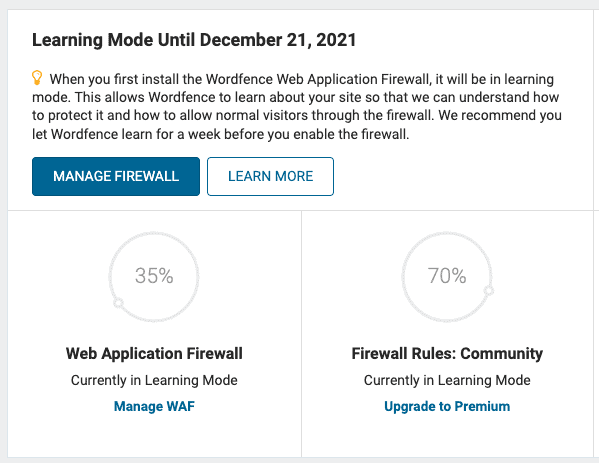
The 60% security level is not a progress bar for an active scan. It is a notice that the free version uses a limited signature set. You need a premium upgrade to unlock 30,000 extra signatures.
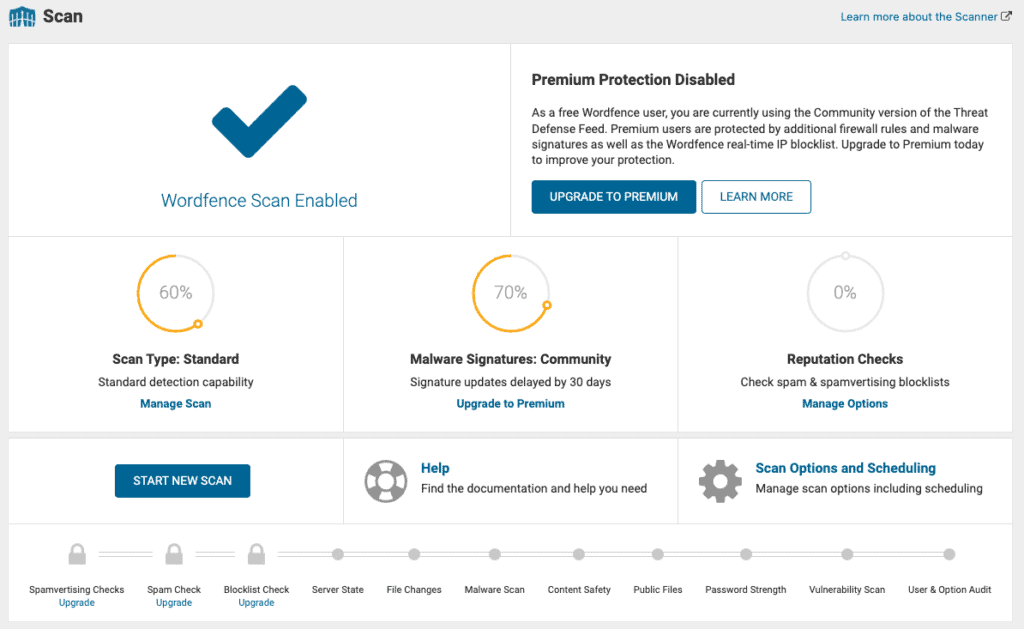
The 30-day delay
Wordfence free users face a 30-day delay for new protection. Premium users get malware signatures immediately. Free sites get them one month later. Automated exploits spread in hours. This delay leaves sites open to zero-day threats.
High resource intensity
Wordfence uses an endpoint scanner. This means it runs code directly on your server to check your files. The inspection is decent but uses a lot of server resources.
We tested for performance on a site, and a scan spiked memory usage. Low-cost shared hosting might kill the scan process or time out. This is why some scans seem to hang at certain percentages.
Alert fatigue
The caveats we have with Wordfence are that there are a ton of alerts and a high number of false positives. Both these factors can lead to alerts losing their impact over time, and then there is a real danger a genuine alert could slip through unremarked.
Solid Security: the remote blacklist check
Solid Security (formerly iThemes) does not scan for malware at all.
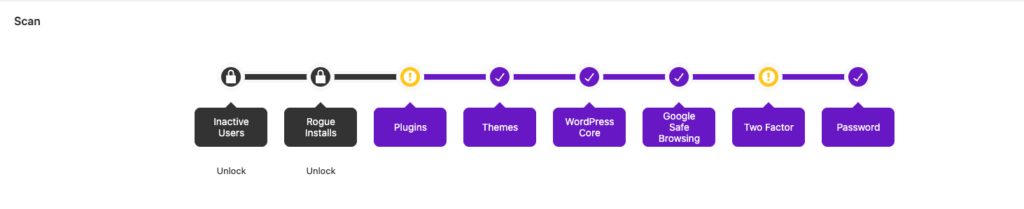
The scan often finishes in five seconds. It does not open your PHP files or look at your folders. It compares your URL against the Google Safe Browsing blacklist, and looks for vulnerable plugins and themes.
We put a shell.php backdoor in the uploads folder. Solid Security gave the site a clean report. The domain was not yet blacklisted. This proves Solid Security is for limited WordPress hardening, not detection.
Malware removal and repair
Malware removal is the most critical part of WordPress security. Solid Security does not provide any malware cleaning features, although they have a removal service. Wordfence can repair infected files but its success depends on the type of malware.
Wordfence: risky one-click repair process
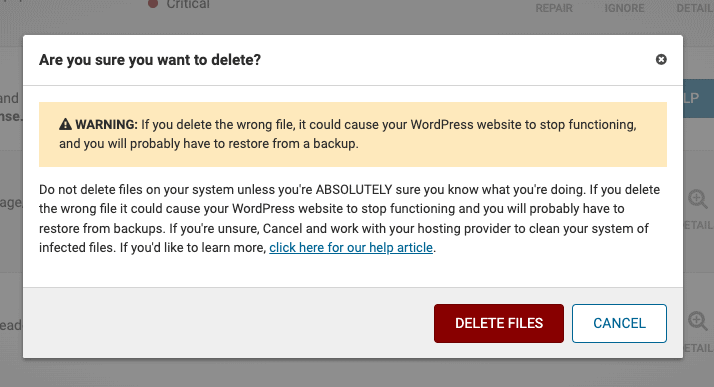
Wordfence offers two main options after a scan finds a threat. You can delete deletable files or repair repairable files. The plugin shows a warning that deleting files can break your website. In our test, the delete option removed one file successfully without errors.
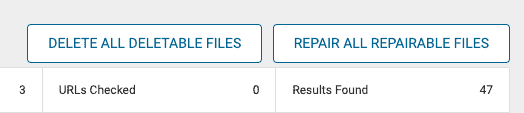
The repair option works by comparing your files to the official WordPress repository. It replaces modified core files with a fresh copy from the source. This successfully cleaned several infected files in our lab. After using this tool, a second scan from a dedicated malware scanner showed the site was clean. This is a strong result for a free tool.
We chose to ignore the terrifying message about how deleting files can break your website. It is true, but malware is also scary! The repair option had a similar warning, but we powered through and it was able to repair most of the files. When we ran the site through MalCare’s scanner, the site was free of malware.
Technical limits of automated cleaning
Most of the other security plugins failed at this juncture, so we didn’t have to test much further. We’d gotten our results. However, Wordfence’s malware signature database is comprehensive, so we widened the net.
Automated repair has specific technical boundaries. It only works if the Wordfence team has already seen and cataloged the malware signature. The tool also requires a clean reference file from the WordPress.org repository.
This means it cannot repair malware in premium plugins or themes.
Wordfence also fails to clean infections in the database. We tested this by adding a hacked redirect and the Japanese keyword hack to our database. We also hid malware inside premium plugin folders. The scanner and cleaner missed these threats. Wordfence is best for core file repairs but lacks the depth for complex database or premium code cleanup.
Professional malware removal services
Wordfence provides a professional removal service if the automated tools fail. In 2026, the cost for this service remains a significant investment. Wordfence Care now starts at $590 per year. For faster help, Wordfence Response costs $1,250 per year with a one-hour response time.
This service includes removing backdoors and checking for vulnerabilities. They also help remove your site from search engine blacklists. The cleanup is guaranteed for one year if you follow their post-hack instructions exactly. We did not test this service ourselves so we cannot verify its success rate.
Solid Security: a prevention-only model
Solid Security remains a hardening tool and does not clean malware. It has no mechanism to identify or remove malicious code from your server. The SolidWP team does however offer a professional cleanup service. Again, we did not test this, so cannot speak to its efficacy.
💡 In our experience, malware cleaning is the most critical aspect of WordPress security. It should definitely only ever be done by security experts, because there is huge potential for things to go horribly wrong. MalCare gives you the option to automatically clear malware, and access security experts to help with any issues that might crop up.
Firewall protection
A WordPress firewall is an essential defense layer. It uses specific rules to block malicious traffic before it reaches your site. Solid Security Basic does not include a web application firewall, although it partners with Patchstack to prove one in the Pro version. Wordfence provides a robust endpoint firewall in both its free and premium versions.
Wordfence: the endpoint firewall and learning mode
Wordfence runs as an endpoint firewall directly on your server. This allows it to understand your site’s user roles and access levels. When you first install Wordfence, the firewall enters learning mode. This phase is necessary for the firewall to understand your site’s normal traffic patterns. It helps prevent the plugin from accidentally blocking legitimate visitor actions.
Learning mode typically lasts for one week. During this time, Wordfence observes how you and your visitors interact with the site. It then creates a custom allowlist of safe actions. We turned this off in our lab because our test sites had no real traffic. For a live site, you should keep it active to avoid breaking plugin functions.
Protection levels and the optimisation step
Wordfence offers two protection levels: basic and extended. By default, the firewall runs as a regular plugin. This means it loads after the WordPress core and other plugins have already started. This creates a small window where a sophisticated attack could execute before the firewall is active.
To fix this, you must manually optimise the firewall. This process modifies your server’s .htaccess or .user.ini file. It tells the server to load the Wordfence firewall before any other php code. This is called extended protection. In our tests, both the basic and extended versions blocked common attacks. These included SQL injections, cross-site scripting, and remote code execution.
If you decide to uninstall Wordfence, this setting trips up the removal process. We have seen this often when people look for Wordfence alternatives.
The 30-day delay for free users
The primary difference between the free and premium Wordfence firewall is the timing of rule updates. Premium users receive real-time updates as new threats emerge. Free users receive these same rules after a 30-day delay.
In 2026, many exploits are automated within hours of a vulnerability being found. A 30-day gap can be a significant risk for high-traffic sites. The premium version also includes a real-time IP blocklist. This feature automatically blocks over 40,000 known malicious actors before they even reach your login page.
Solid Security: the virtual patching alternative
Solid Security does not have a traditional firewall to block traffic patterns. However, it has integrated with Patchstack to provide virtual patching. This feature automatically protects your site from specific known vulnerabilities in plugins and themes.
While virtual patching is helpful, it is not a complete firewall. It only protects against known software bugs. It does not stop generic attacks or brute force attempts as effectively as a dedicated WordPress firewall. Solid Security remains a hardening tool rather than a full traffic filter.
Endpoint vs. cloud architecture
The main advantage of Wordfence is its endpoint architecture. Cloud firewalls, like Cloudflare or Sucuri, live on a remote server. Attackers can sometimes bypass cloud firewalls if they discover your server’s direct IP address. An endpoint firewall like Wordfence cannot be bypassed because it lives on the same server as your site.
The trade-off is server load. Because Wordfence processes every request on your hosting, it uses more CPU and RAM than a cloud-based filter. On a site with 10,000 daily visitors, this can impact page load times. For smaller sites, the extra security of an endpoint firewall usually outweighs the performance cost.
Vulnerability detection
A vulnerability is a security hole in a plugin, theme, or the WordPress core. Hackers use these holes to bypass security and install malware. Both Wordfence and Solid Security now have strong systems to detect these threats.
Wordfence: depth and obscure plugin detection
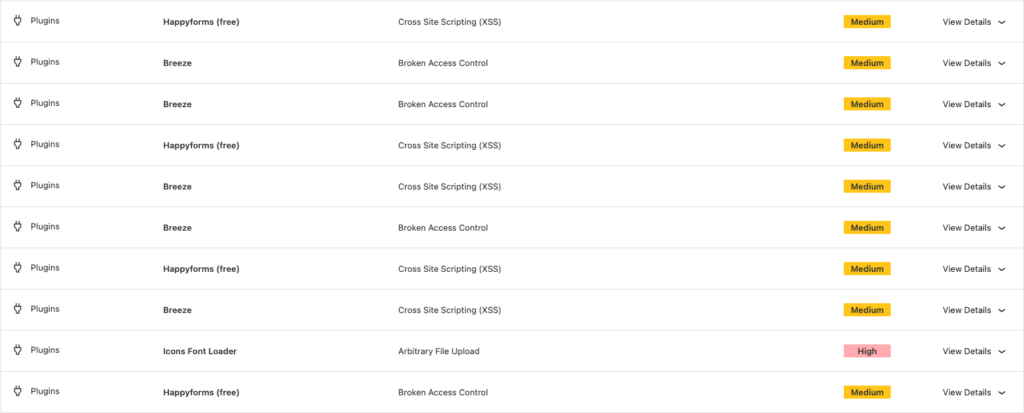
Wordfence uses a massive vulnerability database called Wordfence Intelligence. In our 2026 tests, it identified every vulnerability we added to the site. This included popular plugins and obscure ones with fewer than 200 users. Wordfence flags out-of-date plugins with known bugs as critical threats. It also marks regular out-of-date plugins as medium threats. This is helpful for keeping a site’s software inventory current.
You cannot fix vulnerabilities directly from the Wordfence dashboard. Wordfence provides a link to the standard WordPress updates page instead.

Solid Security: the Patchstack integration
Solid Security has improved its vulnerability detection significantly. It now integrates directly with Patchstack to identify vulnerable software.
Unlike site check scanner, the vulnerability scanner is effective. It runs daily scans to find plugins or themes with publicly disclosed bugs. Again, through their integration with Patchstack, Solid Security also offers virtual patching. If a plugin has a known bug but no official fix, Solid Security can block the specific exploit attempt.
The hidden life of vulnerabilities
The biggest risk to your site is not the day a vulnerability is announced. Research shows that vulnerabilities exist for an average of 14 months before they are discovered. This means a “fully updated” site can still have flaws that have existed for years.
Hackers are now using AI to find these hidden flaws faster than plugin developers can. Because updates are reactive, they only protect you after the world knows about the bug.
In 2026, many disclosed vulnerabilities never receive an official patch from the developer. If Wordfence flags a plugin that has no update available, your only safe option is to deactivate and uninstall it. Solid Security’s virtual patching offers a temporary middle ground. It can block the exploit while you look for an alternative plugin. Proactive WordPress security is better than reactive updates because it protects the site from the moment flawed code is first installed.
Brute force login protection
A brute force attack uses automated scripts to guess your username and password repeatedly. In 2026, these attacks are often powered by AI-developed bots that can cycle through thousands of leaked credentials in seconds. Solid Security and Wordfence handle these attacks with different levels of reliability.
Wordfence: consistent and data-driven defence
Wordfence provides a robust defense against brute force attempts by default. It allows you to set specific thresholds for lockouts based on failed login attempts. You can also specify a longer lockout duration for repeat offenders. In our tests, Wordfence blocked every automated attempt without exception.
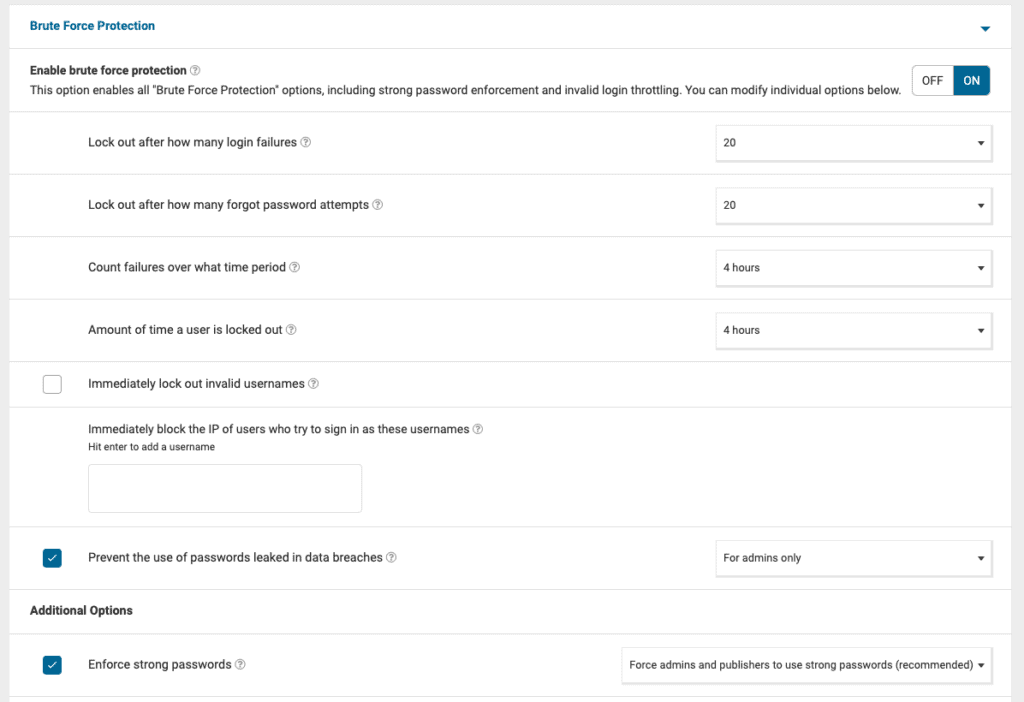
A key feature of Wordfence is the real-time IP blocklist. This list is generated by aggregating attack data from over 5 million WordPress sites. If a bot is caught attacking another site, it is blocked from yours before it even reaches your login page. Free users participate in a reactive network. This means the bot might get one attempt before the system identifies and blocks it.
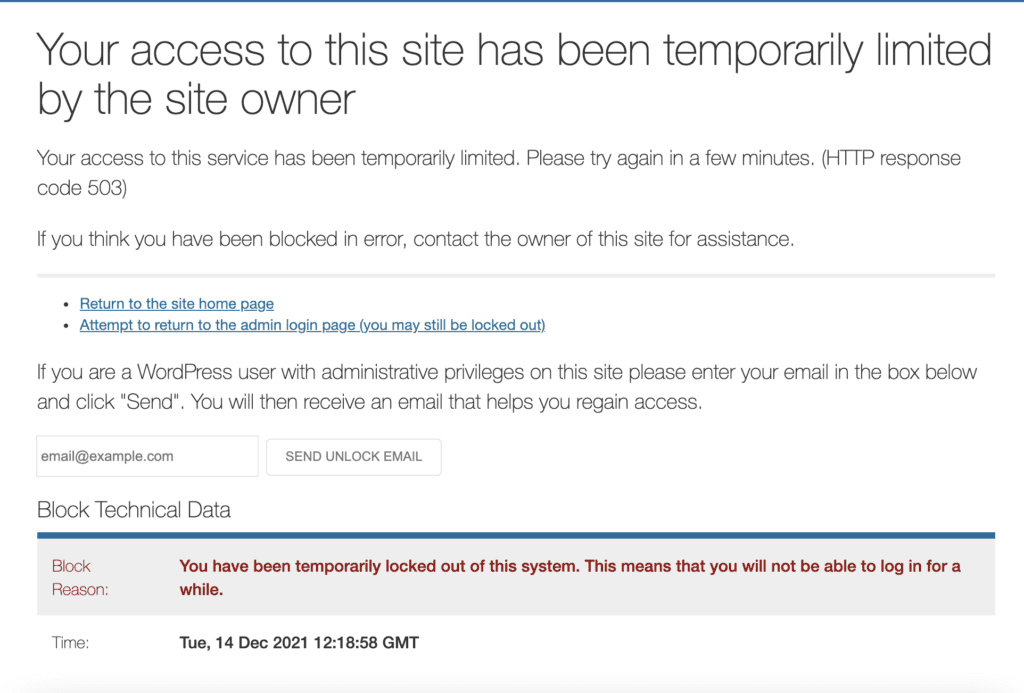
Sometimes Wordfence blocks real users. This is a common enough occurrence that it is worth understanding how to unblock yourself.
Solid Security: local vs. network protection
Solid Security uses two methods for brute force protection: local and network. Local protection locks out users after a set number of failed attempts on your specific site. Network protection bans IP addresses that have been flagged by the SolidWP community of over 1 million sites.
During our 2026 lab tests, we found Solid Security to be inconsistent. On one test site, it registered incorrect logins in the logs but failed to trigger a lockout. On a second site, it worked as expected. We also noticed that every single failed attempt was logged as a brute force attack, even if it was just a user forgetting their password. This makes the logs difficult to audit and leads to alert fatigue.
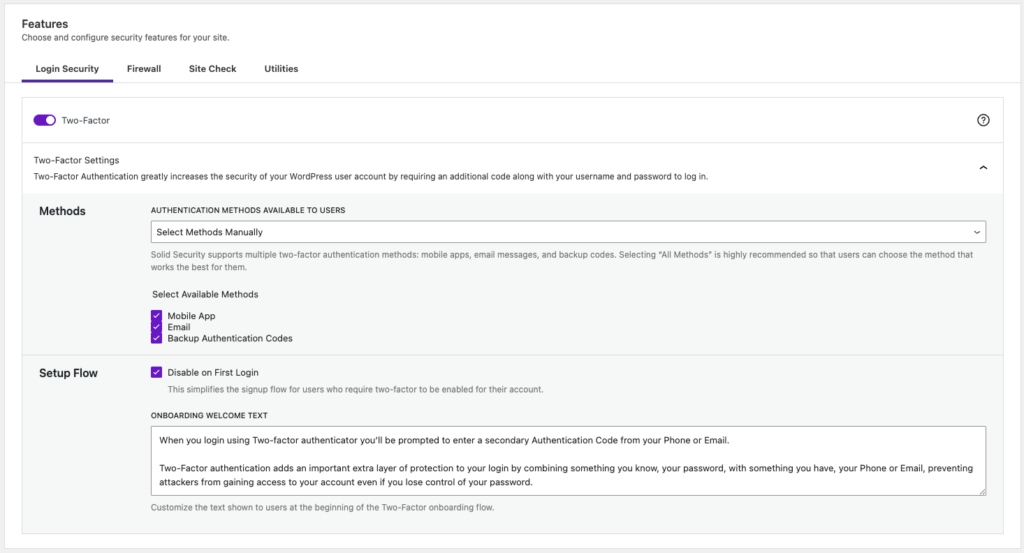
Credential stuffing and AI bots
In 2026, simple lockouts are often bypassed by credential stuffing. Hackers use bots to try a single login on thousands of different sites at once. This avoids triggering local lockout rules that look for many attempts on a single site. Wordfence’s global network is better at stopping this because it identifies the attacker across the entire web.
Newer AI-powered bots can also mimic human behaviour. They might wait minutes between attempts or change their IP address for every request. We found that Wordfence’s advanced rate limiting is more effective against these quiet attacks. It monitors how fast a visitor moves through your site, not just how many times they click the login button.
The danger of IP allowlists
Both plugins allow you to add your own IP address to an allowlist. This prevents you from accidentally locking yourself out of your site. However, most modern internet connections use dynamic IPs. This means your home or office IP changes frequently.
If you allowlist an IP today, it might belong to a different user next week. We recommend avoiding static allowlists unless you have a dedicated static IP from your service provider. Instead, use a bypass link or a secondary administrator account to regain access if you are locked out.
Activity logs
Activity logs act as the black box for your website. They record every major change and visitor interaction. This data is essential for finding the source of a hack after it happens. Wordfence and Solid Security provide very different ways to view this data.
Wordfence: live traffic and the premium audit log
Wordfence includes a feature called Live Traffic. It shows you a real-time feed of every visit to your site. This includes human visitors, search engine crawlers, and malicious bots. You can see the visitor’s location, IP address, and which page they tried to access.
Wordfence allows you to filter this view to show security-only traffic, which makes it easier to spot WordPress attack patterns without scrolling through thousands of regular visits.
For deeper tracking, Wordfence has a dedicated Audit Log. This is a premium-only feature in 2026. It records sensitive actions like plugin installations, theme changes, and user profile edits. To prevent hackers from deleting the evidence, Wordfence stores these logs off-site on Wordfence Central. This ensures that even if your server is compromised, the record of the attacker’s actions remains safe.
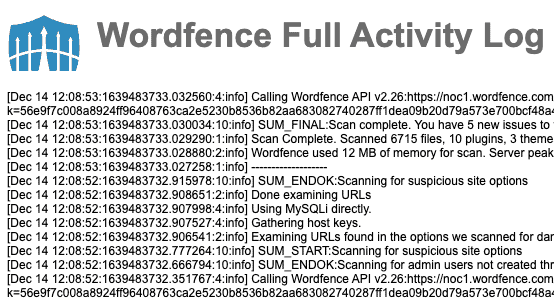
Solid Security: user logging and site hardening
Solid Security provides an activity log in both its free and pro versions. It focuses on user logging rather than raw traffic logs. It tracks when users log in, update content, or change site settings. This is helpful for monitoring a team of editors or authors. Solid Security also logs when its internal site hardening rules are triggered. For example, it will log if a user is locked out for a brute force attempt.
Unlike Wordfence, Solid Security does not show a live feed of all traffic. It only records events that relate to its specific security modules. This makes the plugin lighter on your server resources. However, it also means you might miss reconnaissance traffic from bots that haven’t triggered a specific rule yet.
Forensic vs. real-time logs
In 2026, the difference between these logs is their purpose. Wordfence logs are forensic. They record the full path of an attacker even before they try to log in. This helps you understand how a hacker found your site. Solid Security logs are behavioral. They focus on what your registered users are doing.
We noticed that Wordfence’s live traffic can grow very large and slow down your database. You should set the log to security only on shared hosting plans. Solid Security’s logs are easier to manage because they only store a few specific types of events.
Log retention and the whiteout risk
A common tactic for hackers of late is to flood your logs with fake data. This is called a log whiteout. It hides the actual malicious activity under thousands of fake entries. Wordfence helps prevent this by using cloud-based processing to identify and separate spam logs.
Another factor is retention. Wordfence Care users have their logs kept for 6 months. Standard pro users only have 30 days of history. Solid Security allows you to set your own retention period. Be careful not to set it too long. Storing years of log data can significantly increase your hosting costs and slow down your site backups.
Two-factor authentication
Two-factor authentication (2FA) adds a second layer of security to your login. Even if a hacker steals your password, they cannot enter without a unique code. Both Wordfence and Solid Security offer advanced 2FA, but their approaches to the user experience differ.
Wordfence: the standard authenticator approach
Wordfence includes 2FA in its free version. It uses a standard TOTP (time-based one-time password) system. This works with apps like Google Authenticator or Microsoft Authenticator. To set it up, you scan a QR code in your site’s dashboard. Wordfence also provides a set of recovery codes. You should download these immediately in case you lose your phone.
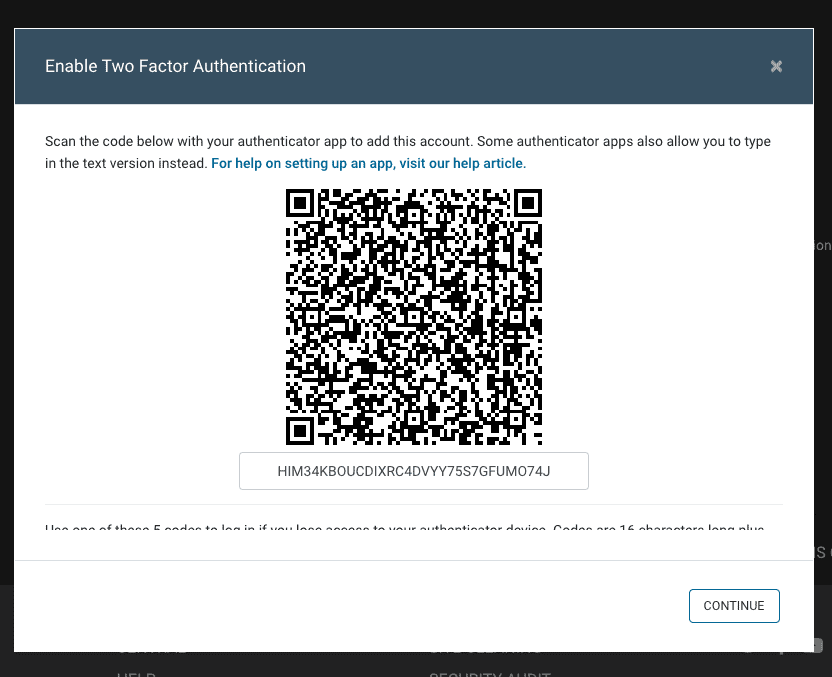
One standout feature in Wordfence is the WooCommerce integration. It allows you to enable 2FA for customer roles and adds a management tab to the user account page. This protects user data without requiring customers to access the WordPress backend. Wordfence also allows you to remember a device for 30 days to reduce friction for frequent users.
Wordfence’s 2FA is still very strong but remains vulnerable to sophisticated phishing. However, Wordfence handles session hijacking well. It can be set to require 2FA even if a hacker manages to steal your browser’s login cookie. This prevents an attacker from taking over an active session without a fresh code.
Solid Security: passkeys and magic links
Solid Security has embraced the shift toward passwordless login. It supports passkeys, which use biometrics to log in. This is more secure than traditional 2FA because it is resistant to WordPress phishing. If you prefer 2FA, it supports email codes and mobile authenticator apps.
Solid Security also offers Magic Links. If a user is locked out by brute force protection, the plugin can email them a one-time login link. This bypasses the lockout for legitimate users. We also liked the Trusted Devices feature. It tracks which browsers you normally use and sends an alert if a login occurs from an unrecognised device.
The recovery code trap
Most site owners forget to save their recovery codes. If you lose your phone and have no codes, you will be locked out of your own site. Wordfence allows you to disable 2FA via a special recovery file uploaded through FTP. Solid Security requires you to edit your wp-config.php file or use their Solid Central dashboard to regain access.
We recommend requiring 2FA only for administrator and editor roles. Requiring it for all subscribers can lead to a high volume of support requests from users who lose their devices. Solid Security’s role-based enforcement makes this easy to manage for different groups of users.
Practical considerations
Performance impact
Security plugins can slow down your website if they are not configured correctly. In 2026, web performance is a critical factor for both user experience and search engine rankings. Wordfence and Solid Security have very different impacts on your server’s resources.
Wordfence: the impact of endpoint scanning
Wordfence is an endpoint security solution. This means it uses your own server’s CPU and memory to run its firewall and scanner. Every visitor request must be processed by the Wordfence PHP code before the page loads. On high-traffic sites, this constant filtering can increase server load.
The malware scanner is the most resource-intensive part of Wordfence. During a scan, the plugin reads every file on your site to find malicious patterns. On entry-level shared hosting, this can cause the site to become sluggish or even crash. We found that scans on PHP 8.4 spiked memory usage significantly. To prevent this, you should limit scans to off-peak hours or reduce the maximum execution time in the performance settings.
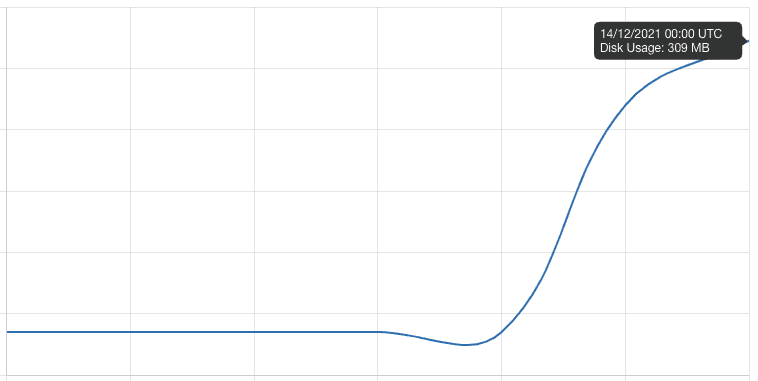
Solid Security: the lightweight hardening approach
Solid Security is much lighter on your server. It does not perform deep packet inspection of every request. Instead, it focuses on site hardening and configuration changes. Most of its features, like changing the login URL or disabling file editing, use almost no extra resources.
The plugin also offloads its malware scanning to the cloud. By using the Sucuri SiteCheck API, Solid Security pings your URL from an external server. This means your own hosting does not have to do the heavy lifting of a file-by-file scan. This architecture makes Solid Security an excellent choice for sites on limited hosting plans.
Database bloat and live traffic
A hidden performance killer in Wordfence is the Live Traffic log. This feature writes a new row to your database for every single visit, including bots. Over time, this table can grow to hundreds of megabytes. A large database makes your backups slower and can delay simple queries.
Solid Security avoids this by logging only specific security events. It does not track every routine visitor. We recommend disabling Live Traffic in Wordfence if you notice your database growing too quickly. You can also set Wordfence to security-only logging to reduce the number of database writes.
Alerts
Solid Security doesn’t send you any alerts. Wordfence sends far too many.
Alerts need to strike the sweet spot between none, and too many. Both are equally bad extremes, because the net result is that you have no clue what the security of your website actually is.
Wordfence’s malware scanner can generate a lot of false positives, so you don’t really know when your website is really hacked. After a point, it can become like the boy who cried wolf. Same with the firewall. The firewall should just block attacks without raising an alarm each time, as it doesn’t serve a purpose. Therefore, our opinion is that Wordfence generates too many alarms to be at all useful.
Solid Security sends a bunch of utterly banal, useless emails: file change notification reports, database backups, and other confirmations of our settings.
Wordfence extras
Wordfence extras are all strictly security-related. No adjacent helpful features, like updates or user management options. Having said that, there are a lot of extras.
After the initial installation, we saw a notifications section for site updates. On our test site, it showed us that 5 plugins needed to be updated.
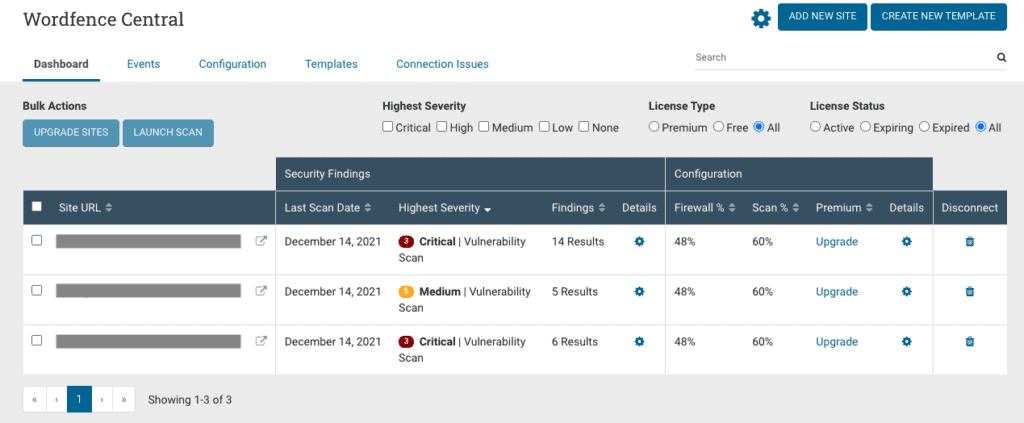
There is a Wordfence Central status which allows you to manage multiple sites from the wp-admin of each site. This makes sense if you have a few sites on the same account, but the space is limited and won’t work for agencies with hundreds of sites. Good thing there is an external dashboard. You have to create an account on the Wordfence website to access Wordfence Central. In our opinion, it doesn’t make sense in having the central box on the site dashboard.
We added all the test sites to Wordfence Central and got a bird’s eye view of all them. It isn’t the best layout for anything more than 20 sites. The idea is good, the execution is lacking.
Next we checked out the Tools section. There is a panel for live traffic, which at first glance, seemed like a version of Google Analytics, but turned out to be more than that. You can set the traffic logs to include all traffic or just security related traffic. The logs are great, because there is a clear legend to indicate what kind of traffic the website is getting: human, bot, warning, blocked.
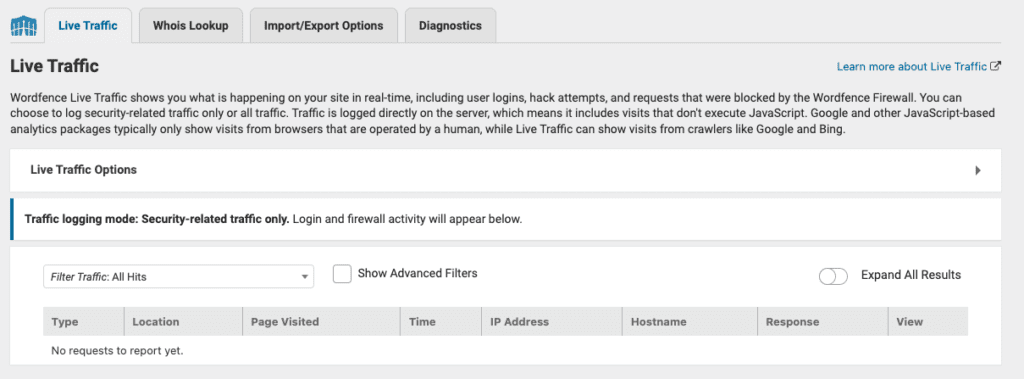
There is also a Whois lookup, in case you want to see who is attacking your website. This is a frill at best, because this feature is easily available online too.
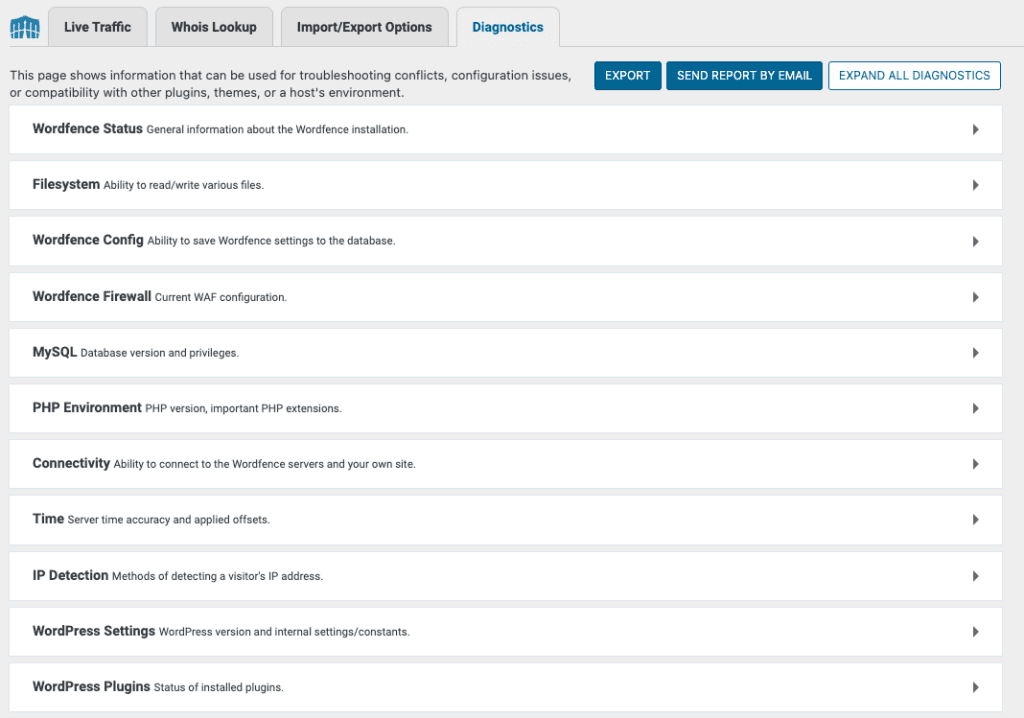
The Diagnostics one is an interesting feature. It contains a whole bunch of information about the website, right from process owners to database tables and more besides. It is like a spec of the website in one place, along with the status of each of those things. Hard to imagine how an ordinary user (non-dev) would use any of this info, but definitely useful for a developer.
Pricing
Wordfence Free is one of the most generous free security plugins available. It includes a functional firewall, malware scanner, and two-factor authentication. However, free users face a 30-day delay for all firewall rules and malware signatures.
For real-time protection, Wordfence Premium costs $149 per year for one site. This plan includes the real-time IP blocklist, country blocking, and an audit log. For business owners who need more help, Wordfence Care is $590 per year. This includes professional malware removal and a full security audit. For mission-critical sites, Wordfence Response is $1,250 per year and guarantees a one-hour response time for any incident.
Solid Security Pro uses a more traditional pricing model based on the number of sites you own. For a single site, the price is $99 per year. This unlocks passkey support, magic links, and the Patchstack vulnerability integration.
If you have multiple sites, the costs scale more affordably than Wordfence. A 5-site license is $199 per year, and a 10-site license is $299 per year. Solid Security also offers a Solid Suite for $199 to $949 per year. This bundle includes security, backups, and centralised management. This makes it a cost-effective (and security-ineffective) choice for freelancers or agencies managing many client sites.
What to look for in a security plugin
WordPress security can be a confusing beast to deal with especially with the considerable misinformation that is available online. One thing is for sure, hackers can cost you revenue, business, lawsuits, out-of-pocket expenses, branding, organic traffic and so much more. The right security plugin will counteract all of that, in addition to saving you time and money to invest in other areas of your business.
We often come across the question: how do you choose the right security plugin for your WordPress website?
The answer is usually a laundry list of features. Some are vital, some not so much. But every plugin wants to sell you on their 100+ features, most of which have little to no impact on your website security. But the list will confuse the issue long enough to make WordPress security a headache again.
So we compiled this essential—and short!—list of security features. You should look for a security plugin that ticks mostly everything on this list, and get other solutions for the features it doesn’t have.
- Essential security features
- Malware scanning
- Malware cleaning
- Firewall
- Good-to-have security features
- Vulnerability detection
- Brute force login protection
- Activity log
- Two-factor authentication
- Potential problems
- Impact on server resources
Final verdict
After testing every feature, we have a clear winner for different budgets. If you aren’t paying for security, there is no reason to look past Wordfence. If your site is a business-critical asset, MalCare is the superior choice. Solid Security, once a titan as iThemes, has remained a hardening-only tool that lacks the essential malware and firewall depth needed in 2026.
Hobby and personal sites: Wordfence
Wordfence remains the only true free security plugin. While others hide their best features behind paywalls, Wordfence gives you a real firewall and a real malware scanner for $0.
- Best for: Hobbyists, blogs, and low-traffic sites.
- Why: You get endpoint protection that actually works. Most free versions of other plugins are marketing for their paid versions.
- The catch: You have to handle the manual cleanup yourself if you get hit, and the 30-day delay on rules is a real risk.
The professional’s choice: MalCare
For WooCommerce stores or critical business sites, MalCare is the gold standard. It solves the two biggest problems with Wordfence: performance lag and complex cleanups.
- Best for: Revenue-generating sites and agencies.
- Why: The cloud-based scanning means your site stays fast during traffic spikes. More importantly, its one-click automated cleanup is flawless. While Wordfence charges $490+ for manual cleaning, MalCare includes unlimited automated cleanups in its $99–$149 plans.
- The catch: The free version only has the scanner and firewall, nothing else.
Why Solid Security is no longer recommended
Site hardening is simply not enough. Solid Security (formerly iThemes) lacks the firewall and the malware cleaner that its competitors provide.
- No malware cleaning: If you get hacked, Solid Security cannot help you fix it.
- No real firewall: It relies on basic rules rather than a true WAF.
- Complexity without depth: It provides hundreds of settings that offer very little, compared to the automated intelligence of MalCare or the robust defaults of Wordfence.