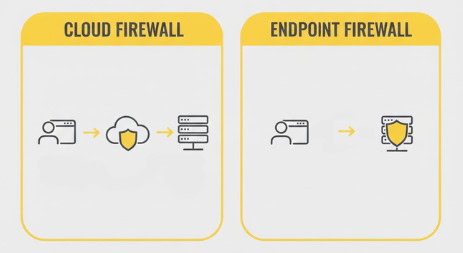
There are two major types of firewalls for WordPress: at the endpoint (inside your website), or in the cloud (via DNS-routing to a remote firewall). They’re both called “WAFs”, both claim to keep you safe, and both block bad traffic.
But here’s the real question: Which one actually does the job of protecting your WordPress site?
To answer that, we need to get very clear on what the goal of a firewall even is. Then, we need to look at which design actually achieves it.
Cloud firewalls can be bypassed, but endpoint firewalls can’t. If you want real WordPress protection, MalCare’s firewall is the best endpoint option.
Why this matters (and why we’re talking about it)
A cloud firewall only works so long as all traffic passes through your domain name. But what if someone finds your server’s real IP address? Then they can bypass the firewall completely, talk to your server directly, and skip all filtering.
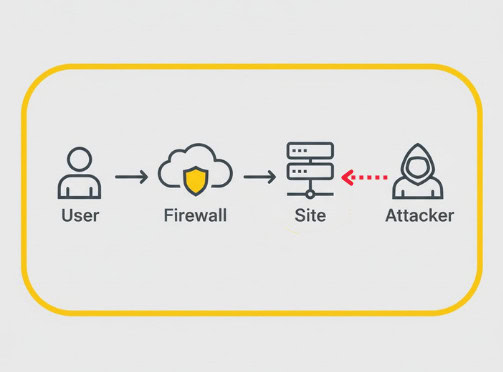
That’s not a hypothetical risk. The research paper CloudPiercer tested 17,877 websites protected by cloud-security services, and found that 71.5% exposed their real IP address through at least one “origin-exposing” vector.
In other words: for most cloud-protected WordPress sites, the firewall is only as strong as the secrecy of the server IP. And, more importantly, that secrecy often doesn’t hold.
What is an endpoint firewall?
An endpoint firewall runs directly inside the application. In this case, WordPress. It loads with your site, inspects every request that reaches it, and evaluates it in real-time with full awareness of how your system works.
Pros
- Real-time protection at the exact point code executes.
- Firewall is integrated with WordPress, so understands core, plugins, user roles, capabilities, authentication status, and permissions.
- Stops WordPress-specific attacks because it can interpret plugin requests, admin-level actions, AJAX calls, and more.
- Cannot be bypassed, because there is no path around the firewall because it lives at the actual target.
Cons
- Not suited for DDoS mitigation, because it’s designed to block attacks at the application level, not absorb traffic floods.
- Endpoint firewalls usually consume server resources. In general this is true, but not in the case of MalCare’s firewall. With MalCare, the heavy lifting is offloaded to our infrastructure rather than your hosting server. So the usual performance downside doesn’t apply.
What is a cloud firewall?
A cloud firewall, like Cloudflare or Sucuri, sits in the middle between a visitor and your site. A visitor types your domain, their request hits the cloud provider, the firewall checks it, and, if approved, forwards the request to your server.
As a result, blocked traffic never touches your site.
Pros
- Works well for general, non-WordPress-specific attacks, and is effective against DDoS attacks.
- Filters traffic before it reaches your server.
Cons
- Cloud WAFs can be bypassed. If attackers find your origin IP, they access it directly. The firewall becomes invisible and useless.
- IPs are easy to discover, using a variety of methods like DNS records, SSL certificates, subdomains, search tools, in addition to several publicly available tools.
- Security decisions lack context because cloud firewalls don’t know who is logged in, their user role, or even if a request is normal or expected.
- Generic rules miss WordPress-specific threats, like plugin exploits, core attack patterns, database write attempts.
- You might see a number of false positives on legitimate WordPress behaviour or users. Sucuri blocks users all the time.
- If the cloud provider goes down, your site looks down even if your server is fine. (Cloudflare’s major November ‘25 outage springs to mind.)
What is the goal of a firewall?
A firewall’s job is simple on paper: stop malicious traffic from reaching your website and keep legitimate users free to interact with it.
For WordPress, that means:
- Detecting hacking attempts that target WordPress
- Blocking plugin vulnerabilities and malicious requests
- Knowing who is logged in, who isn’t, and who has which permissions
- Preventing attackers from simply walking around your defenses
Once you frame the goal correctly, the differences between cloud and endpoint firewalls stop being academic.
One design is structurally suited to protect WP; the other has a built-in blind spot.
Conclusion
So, which firewall achieves the real goal of protecting your WordPress site?
A cloud firewall blocks general bad traffic and is great for DDoS, but its blind spot is massive: if someone gets your origin IP, the firewall ceases to exist.
An endpoint firewall, on the other hand, protects where the attack actually lands. It sees everything the site sees. It cannot be bypassed. It understands WordPress as WordPress, not as generic HTTP.
FAQs
What is an endpoint firewall?
A firewall that runs inside your WordPress site itself, inspecting requests with full knowledge of plugins, roles, and permissions.
What is a cloud firewall?
A firewall that sits between your domain and your site, blocking requests before they reach the server — but only if traffic goes through the domain.
Can a cloud firewall be bypassed?
Yes. If an attacker discovers your server’s IP, they can directly access your site and bypass the firewall entirely.
How do attackers find origin IPs?
Through DNS records, SSL certificates, leaked subdomains, historical IP logs, or scanning tools built specifically for this purpose.
Why is endpoint protection better for WordPress?
Because it understands WordPress context: plugins, user states, permissions, and site-specific behavior.
If I use a cloud firewall, do I still need endpoint security?
Yes. Cloud filtering doesn’t prevent bypass or detect WordPress-specific exploits at the application layer.