If you are reading a LastPass review in 2026, you probably are not asking only, “Does it save passwords?”
You are asking the harder question: can I still trust this company with the keys to my online life?
That is the uncomfortable part of reviewing LastPass now. The product is still good. In day-to-day use, it is one of the smoother password managers around: easy onboarding, reliable autofill, useful dark web monitoring, and a free plan that is still meaningful for some users. But LastPass also carries the weight of the 2022 breach, the delayed encryption of URL fields, and the ongoing fallout for some users who stored highly sensitive data in their vaults.
So the short answer is this: LastPass is still a capable password manager, but it is no longer the easy default recommendation.
Use it if you value ease of use, already get it through work, or want free dark web monitoring without paying for a full plan. Skip it if the breach history is a dealbreaker, if you store cryptocurrency seed phrases, or if you want the strongest trust story available. For most security-conscious new users, 1Password is the safer-feeling premium choice. For readers comparing the best free password managers, Bitwarden is harder to beat.
Quick Verdict
| Decision | Recommendation |
|---|---|
| Best for | Users who want a polished password manager with reliable autofill and free dark web monitoring |
| Not for | Users who cannot move past the 2022 breach, cryptocurrency holders, or anyone who wants the cheapest plan |
| Best free alternative | Bitwarden |
| Best premium alternative | 1Password |
| Biggest strength | LastPass gets the daily workflow right |
| Biggest weakness | Trust, support, and the long shadow of the breach |
The useful way to think about LastPass is not “good password manager or bad password manager.” It is more like buying a very comfortable car from a manufacturer that had a serious safety scandal. The current model may be better engineered. The controls may feel excellent. But the decision is not only about the dashboard.
It is about whether you trust what happened behind it.
How I Evaluated LastPass
This review weighs LastPass on the criteria that actually change the decision: price, daily usability, autofill reliability, vault management, security architecture, breach response, support reputation, and alternatives.
That matters because password managers are easy to over-review by feature count. A product can have passkeys, dark web monitoring, secure notes, shared folders, and a beautiful dashboard, and still be the wrong choice if you cannot trust the vendor or get help when you are locked out.
What Is LastPass?
LastPass is a cloud-based password manager. You create one master password, and LastPass stores your logins, secure notes, addresses, payment cards, and other sensitive records in an encrypted vault.
In normal use, that means the browser extension or mobile app remembers passwords for you, fills them into login forms, generates stronger replacements, and warns you when a saved password is weak, reused, or exposed in a breach.
LastPass has been around since 2008. It was acquired by LogMeIn in 2015, spun out again as an independent company in December 2021, and is used by millions of individuals and many businesses. It is also mostly browser-first. There is no traditional desktop app at the center of the experience; the browser extension and web vault do most of the work.
That design makes LastPass feel lightweight and easy to access from almost anywhere. The catch is that people who prefer a full desktop app, strong offline workflows, or a more local-first feel may find it limiting.
LastPass Pricing and Plans
Pricing is one of the cleaner parts of the LastPass decision. The personal plans are easy to understand, and the Families plan is genuinely good value if several people will use it.

The Free plan is useful, but the device restriction matters. LastPass lets free users choose one device type: computers or mobile devices. If you use a laptop and a phone every day, that limit gets annoying quickly.
Premium is the sensible individual plan if you want LastPass. Families is the best value if you can actually use the six accounts. At $4/month for six Premium licenses, the per-person cost can be very low.
LastPass is not the cheapest password manager. NordPass and other competitors often run lower introductory prices. The reason to choose LastPass is not bargain hunting. It is the combination of polish, autofill reliability, dark web monitoring, and familiar business tooling.
Key Features and How They Work
LastPass does a lot, but the important question is which features make daily password management easier and which ones look better in a table than they feel in practice.
Password Vault and Browser Extension
The LastPass browser extension is the center of the product. It separates saved data into passwords, notes, addresses, payment cards, and bank accounts. The layout is easy to understand, and the web vault is friendly enough that a non-technical user can usually find what they need without a tutorial.
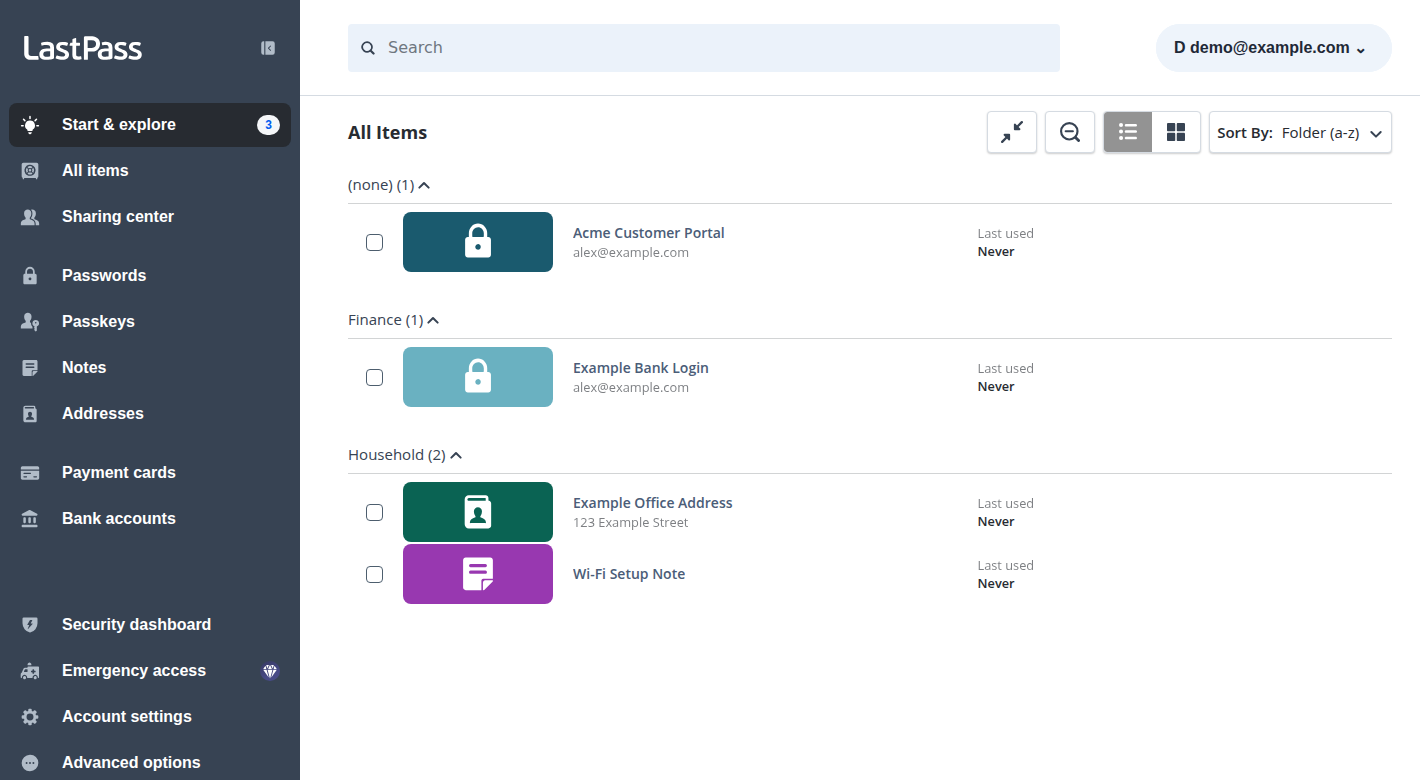
Adding new items to the vault is straightforward, with a clean interface that guides you through the necessary fields.
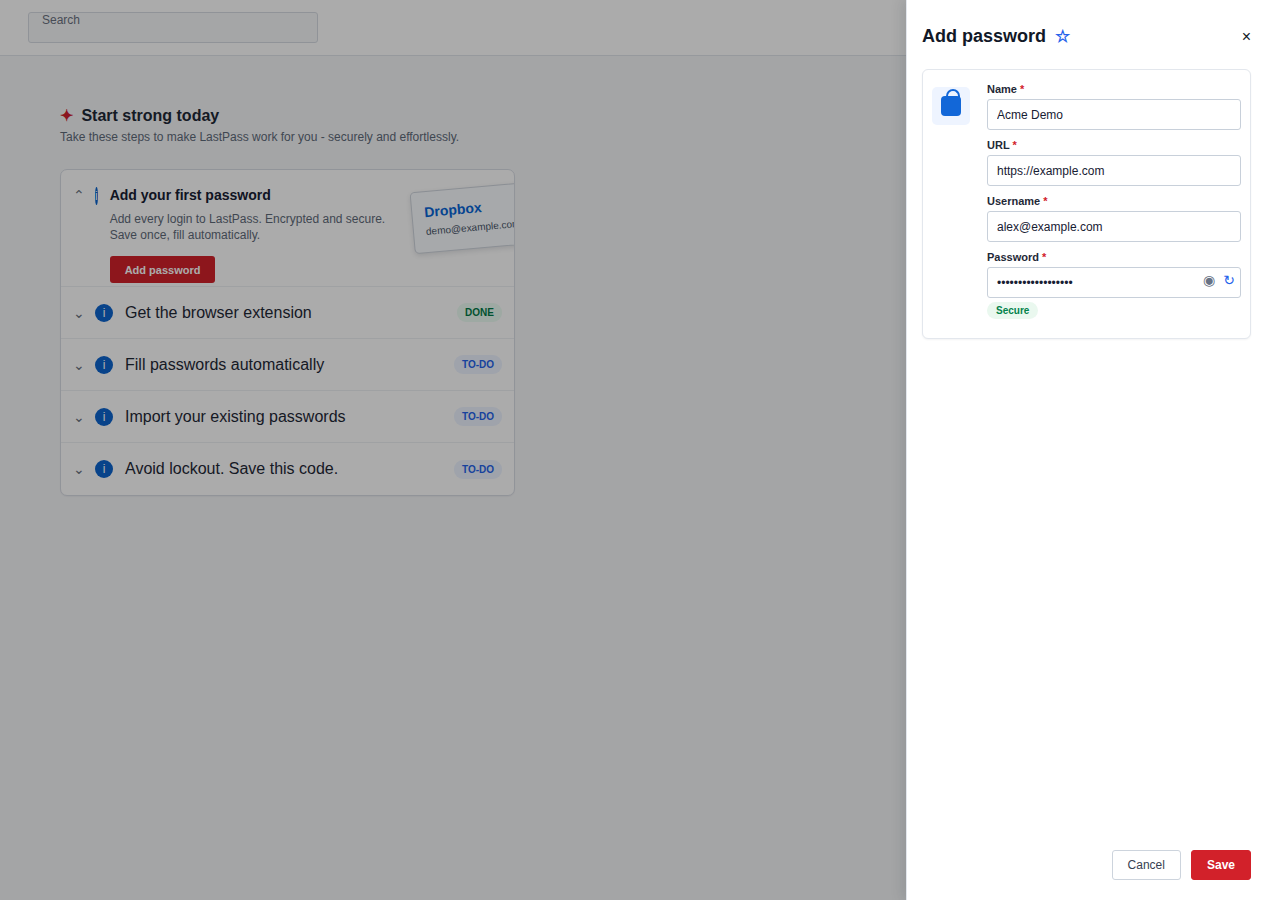
The organization model is weaker than the interface. LastPass does not offer subfolders or tags in the way many power users would expect, and categories can feel blunt once your vault grows. A vault with 80 logins is easy. A vault with 1,500 saved items, old client accounts, shared family streaming logins, admin portals, and half-forgotten test accounts becomes harder to keep tidy.
That is a recurring LastPass theme: the first mile is excellent, but the messy long-term vault can expose limits.
Autofill and Password Capture
Autofill is one of LastPass’s strongest areas. It reliably detects login forms, fills credentials without making you click through too many prompts, and handles many banking portals better than some password managers.
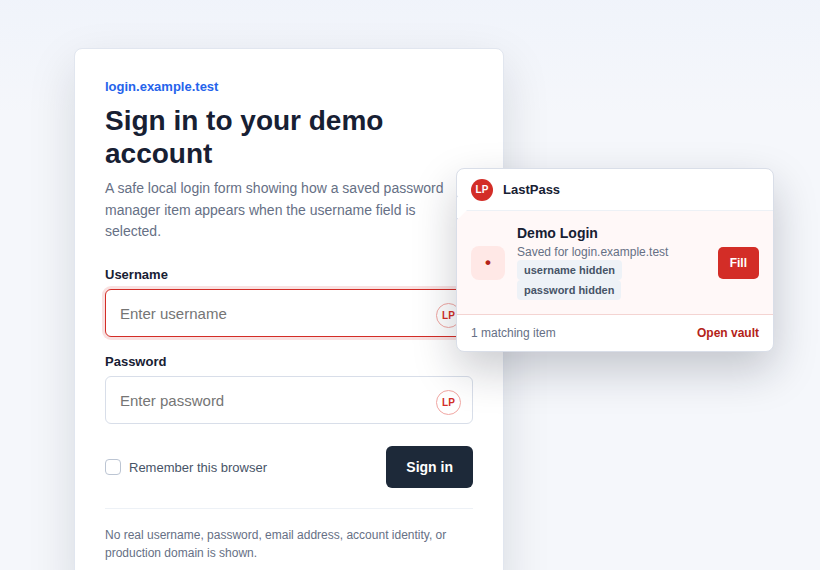
That matters because autofill quality is not a cosmetic feature. A password manager that fails on important logins slowly teaches users to copy and paste passwords, reuse simpler passwords, or keep a “temporary” note somewhere unsafe.
LastPass generally avoids that trap. It gets the repetitive part of password management out of the way.
Password Generator
The password generator supports three basic styles: easy to say, easy to read, and all characters. The default length is commonly 16 characters, but you should push important passwords to 20 characters or more.
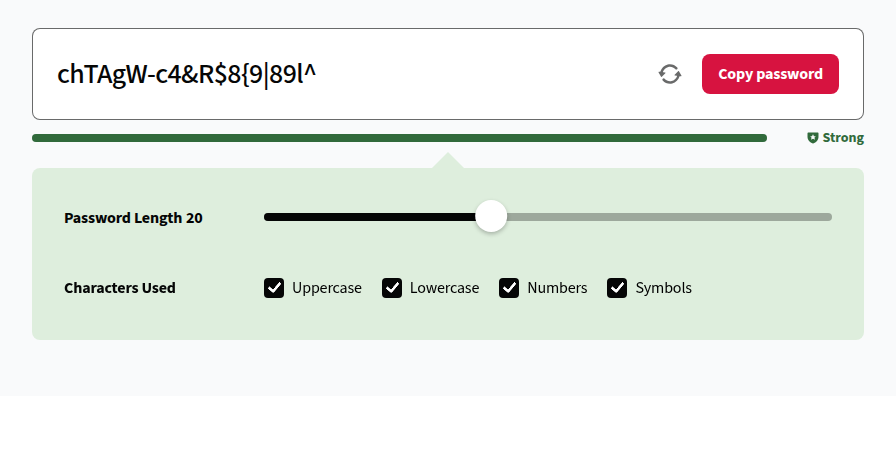
The missing feature is passphrase generation. Some users prefer long, memorable phrases for master passwords or accounts where typing is unavoidable. LastPass can generate strong random strings, but it is not as flexible here as it should be.
For everyday site passwords, the generator is fine. For your master password, use a long phrase you can remember and never reuse.
Security Dashboard and Dark Web Monitoring
The Security Dashboard checks for weak, reused, and compromised passwords. It also includes dark web monitoring, which is one of LastPass’s better differentiators because it is available even on the Free plan.
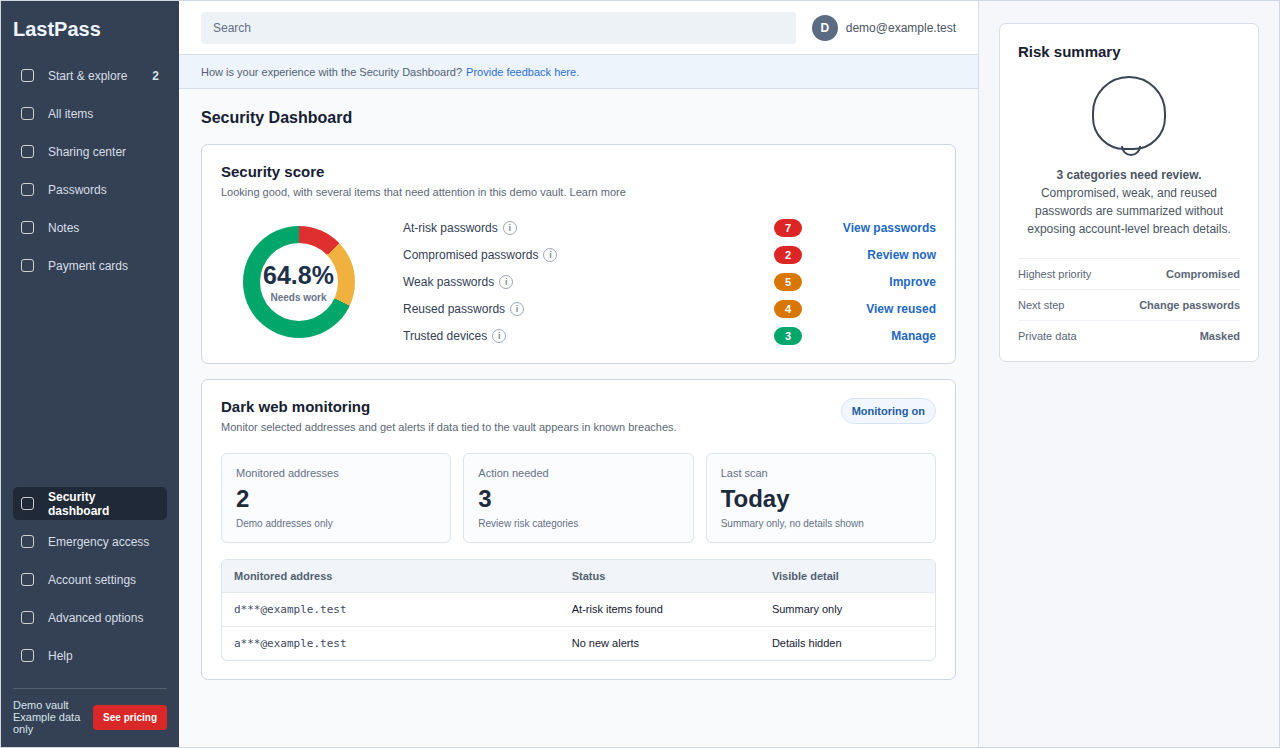
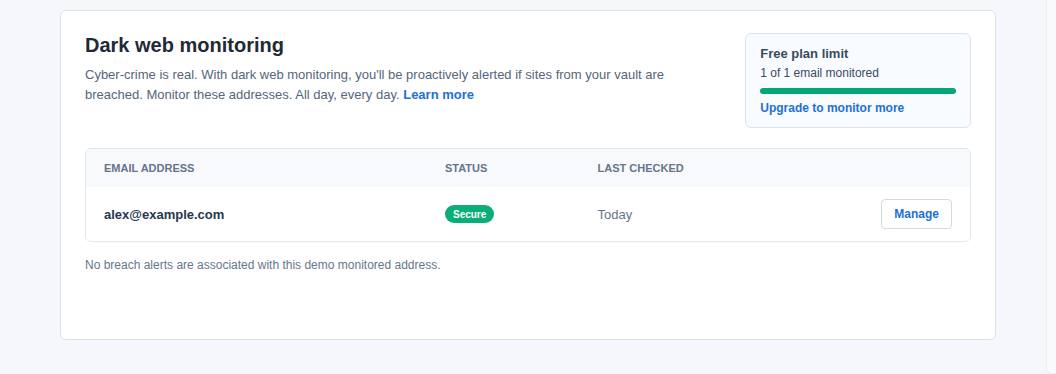
Free users can monitor a limited number of email addresses. Paid users can monitor more. The granular control is useful if you have personal, work, old domain, and throwaway addresses that have accumulated over the years.
The dashboard is not perfect. Testing notes from multiple reviews found that it may not flag every short or easily guessed password. Treat it as a helpful audit tool, not as proof that your vault is clean.
The green checkmark is the visible 10%. The hidden 90% is whether the tool recognizes the kind of bad password humans actually create.
Sharing and Emergency Access
Password sharing works best when the other person also uses LastPass. Families users get shared folders, which is useful for household accounts like streaming services, utilities, school portals, or shared travel logins.
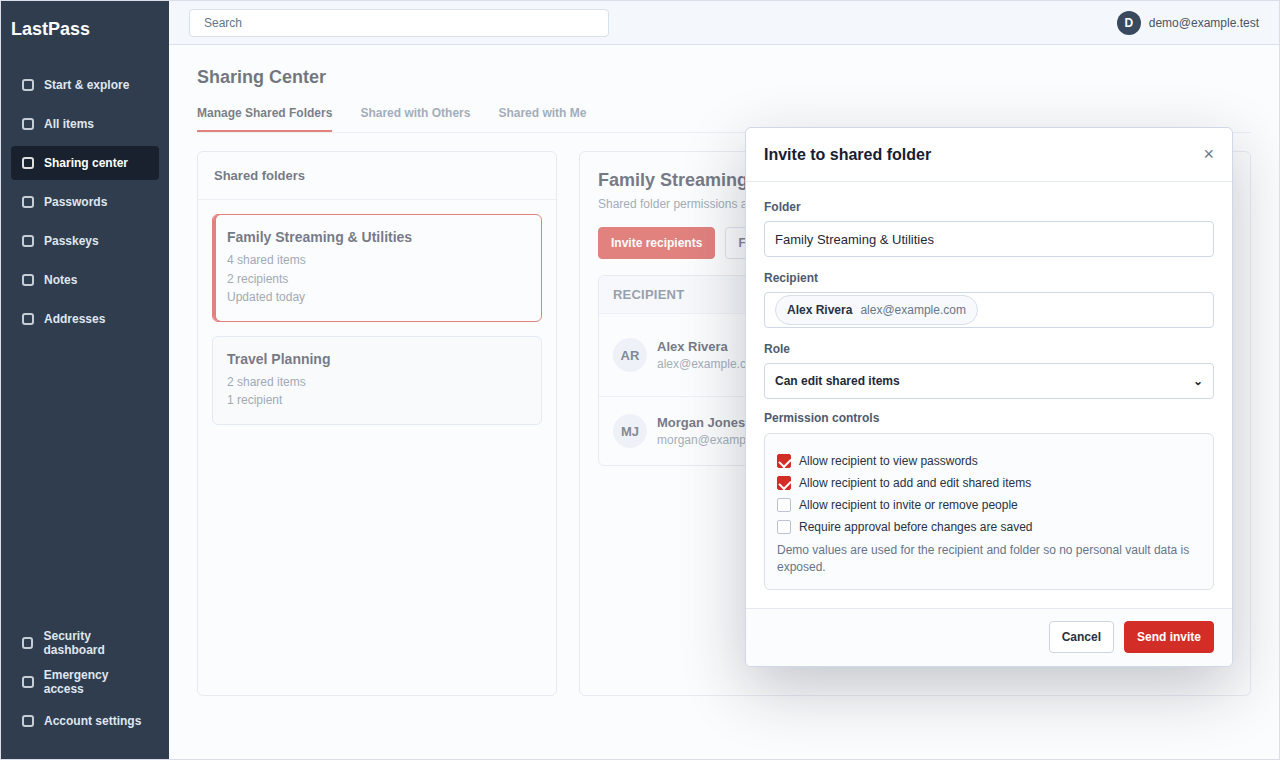
Emergency Access is more important than it sounds. You can name trusted contacts and set waiting periods before they can access your vault. If someone requests access and you are still around, you can deny it. If you are not, they can eventually get in.
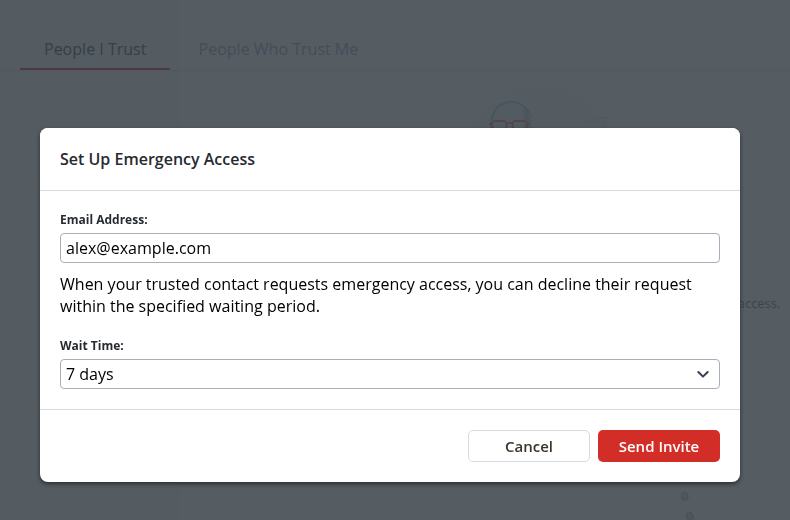
This is the kind of boring feature that becomes valuable only when life gets messy.
Passwordless Login and MFA
LastPass supports passwordless login through push notifications, biometrics, and hardware keys, and it offers multifactor authentication options across plans. There is also smartwatch support through LastPass Authenticator.
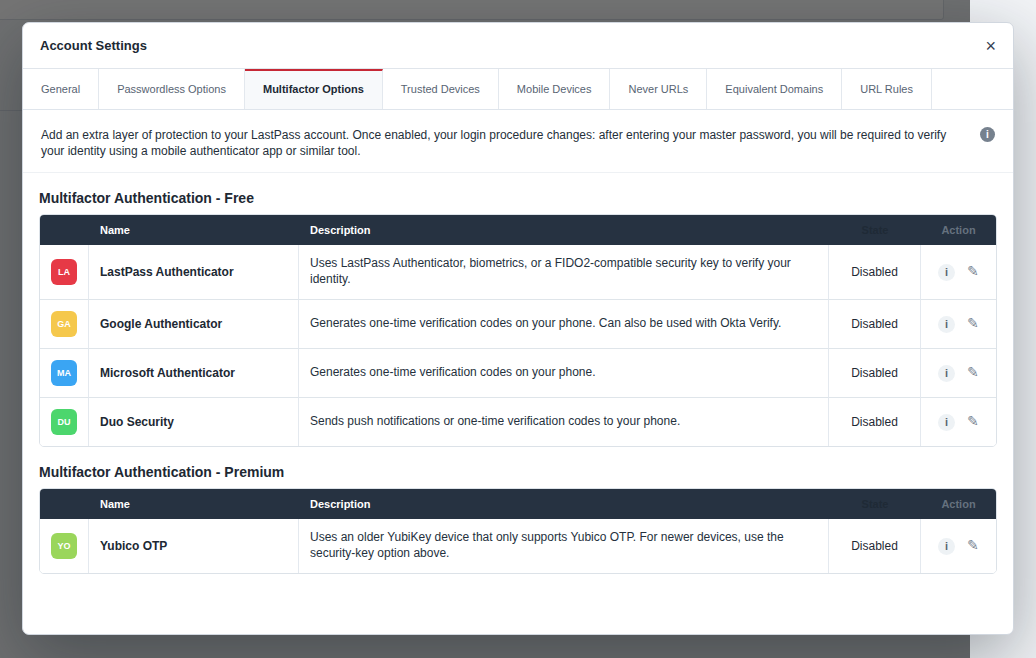
The catch is setup friction. Passwordless login often requires the LastPass Authenticator app, and MFA enrollment can feel more manual than it should. Competitors such as 1Password tend to make this feel cleaner.
Do not skip MFA because setup is annoying. A password manager without MFA is a locked door with the spare key under the mat.
User Experience: The Good and the Frustrating
LastPass is easy to like when you judge it only by the product experience.
The onboarding is polished. The vault tour helps new users understand what to do next. The interface is clearly labeled. The achievement-style prompts can feel a little gimmicky, but they also guide people toward important setup steps. That is useful for a product many people otherwise install and forget.
The browser extension is also unusually capable. LastPass is a password manager first, not a small feature bolted onto an antivirus suite or browser. That focus shows in the daily workflow.
But a few frustrations keep coming up.
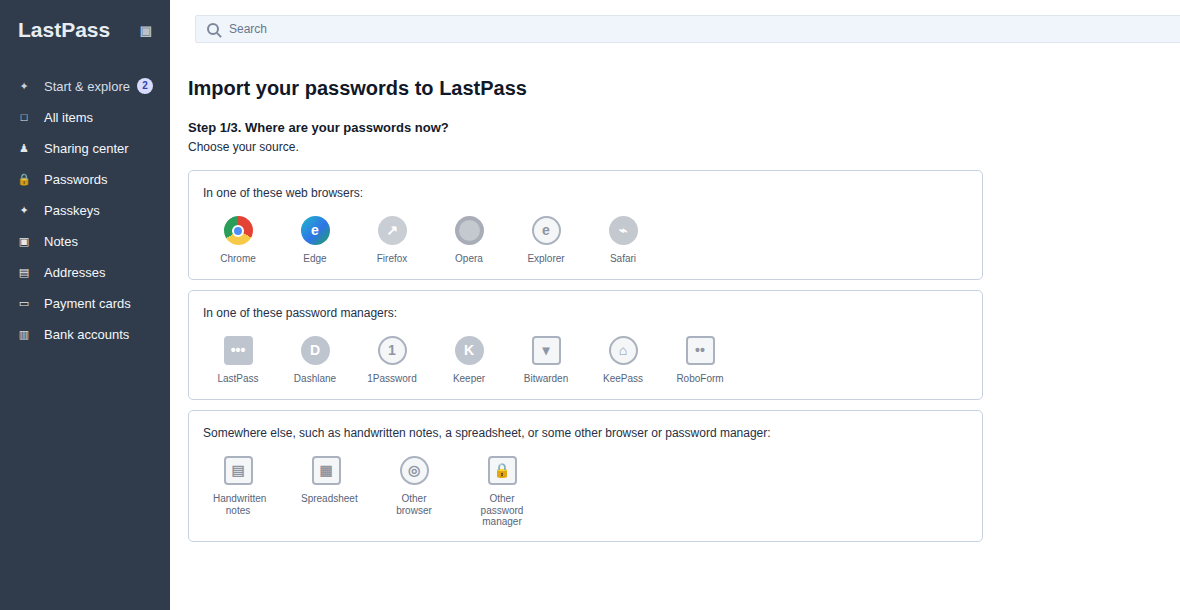
The Free plan device restriction is confusing. Mobile setup requires making LastPass the primary password manager in iOS or Android settings. Auto-logout after browser close or long idle periods can mean frequent re-logins. Importing from some tools can still feel clumsy, especially when the process becomes CSV export, open in a text editor, copy, paste, review, and hope the fields line up.
If you manage a small vault, these are irritations. If you manage years of personal, business, family, and admin credentials, they become workflow costs.
The practical test is simple: if you are setting up a password manager for a relative, LastPass is easy to explain. If you are cleaning up a messy business vault with old shared credentials, stale folders, and people leaving the company, the limitations become more visible.
Pros and Cons
| Pros | Cons |
|---|---|
| Excellent onboarding and easy interface | 2022 breach remains a serious trust issue |
| Reliable autofill, including difficult sites | Free plan limited to one device type |
| Free dark web monitoring | Support reputation is weak |
| Good Families value | No desktop-first app experience |
| Useful emergency access | Vault organization lacks tags and subfolders |
| Mature business controls | Passwordless and MFA setup can be clunky |
The product strengths are real. So are the reasons people hesitate.
The Security Question: What Happened and What Changed
This is the section that matters most. A password manager review that treats the LastPass breach as a footnote is not doing the reader a favor.
What Happened in the 2022 Breach?
In 2022, attackers accessed a LastPass cloud storage environment used for backups. The stolen data included encrypted vault data and some unencrypted metadata. Historically, URL fields in LastPass vaults were not encrypted, which meant an attacker could potentially see which services were stored in a vault even if they could not read the passwords.
That distinction matters.
If an attacker sees that a vault contains bank accounts, crypto services, email accounts, and WordPress admin URLs, they know where to focus. Even if the passwords remain encrypted, the roadmap is useful.
The breach was especially damaging because it was not just a cryptography story. Public reporting and user discussion focused on operational failures too: an unpatched Plex server, access involving a personal device, and legacy account settings that had weaker password-derivation iteration counts than modern recommendations.
The Legacy Iteration Count Problem
Iteration count sounds like security jargon, but the idea is simple. When someone tries to guess a master password, iterations make each guess more expensive.
Think of it as the number of locks an attacker has to work through for every guess. If one vault has 100,000+ locks and another has 500, the second vault gives attackers a much cheaper guessing problem.
That is why legacy LastPass accounts with low iteration counts became such a serious concern. The criticism was not only that old settings existed. It was that users were not clearly forced through a re-encryption path soon enough.
For a password manager, that kind of miss hurts trust.
The Ongoing Fallout
The most alarming post-breach reports involve cryptocurrency thefts linked by investigators and researchers to users who stored wallet seed phrases or private keys in LastPass. One widely cited wave in late 2024 involved about $5 million in stolen crypto. Later reporting has suggested the broader downstream theft figure may be higher.
The important nuance: traditional encrypted passwords have not been publicly confirmed as decrypted at scale. The most damaging linked cases involved crypto seed phrases, which should never be stored in a general-purpose password vault if losing them means losing irreversible assets.
That is not a comfort to victims. It is a practical warning to everyone else.
What LastPass Changed
LastPass has made meaningful security changes since the breach. It says it has modernized cloud infrastructure, strengthened internal controls, created dedicated Trust and Security functions, and added threat intelligence and mitigation teams. LastPass also completed the second phase of URL and URL-related field encryption in September 2025, after beginning the broader URL encryption work in 2024.
Those changes matter. Encrypting URL fields closes a privacy gap that should have been closed earlier. Better internal device controls, monitoring, patching, and access segmentation also address the kind of operational weaknesses that made the breach possible.
But there is a difference between “improved” and “trust restored.”
LastPass may be technically stronger now than it was before the breach. The decision for users is whether that is enough.
Before publication, LastPass’s current compliance and audit documentation should be checked directly in its Trust Center. The company has public security architecture and compliance pages, but a review should not imply a stronger independent-audit conclusion than the available documents support.
Is LastPass Safe Now?
Technically, LastPass uses a zero-knowledge model with AES-256 encryption and PBKDF2 SHA-256. Zero-knowledge means LastPass should not know your master password or hold the keys needed to read your vault contents. Your master password is the thing that protects the vault.
In plain English: if you use LastPass, your safety depends heavily on a long, unique master password and MFA.
I would not store cryptocurrency seed phrases in LastPass. I would not keep old, weak, reused passwords in any password manager and assume the vault makes them safe. And if you are a long-time LastPass user who has not changed your master password or rotated important account passwords since 2022, do that before debating software philosophy.
For WordPress site owners, remember that credential security is only one layer. A stolen admin password can put the site itself at risk, so password management should sit alongside WordPress login security, broader WordPress security, monitoring, vulnerability scanning, and malware defense.
Real User Sentiment: What People Actually Say
Expert reviews often praise LastPass’s usability. User review sites tell a rougher story.
Trustpilot shows an extremely poor rating for LastPass, with recurring complaints about billing, cancellation, support access, sync failures, Chrome extension issues, and users being locked out while unable to reach a human support path.
Review sites skew negative. Happy users do not usually stop their day to write, “Autofill worked again, five stars.” But a very low score across hundreds of reviews is still a signal, especially when the complaints repeat.
The Reddit sentiment is split in a more useful way. Some long-time users argue that LastPass has learned from the breach and that a strong master password still protects the vault. Others treat the breach as a permanent trust breaker and recommend moving to 1Password or Bitwarden.
Both reactions are rational. They just weight trust differently.
One practical point from user discussions is easy to underestimate: migration is painful. Moving 1,000+ saved items from LastPass to another password manager is not always clean. Exports, imports, duplicate entries, broken autofill, missing notes, and old junk entries can turn a principled switch into a weekend project.
If you switch, plan it like a small data migration, not like changing a browser theme.
Customer Support
Support is not a side issue for password managers. If you are locked out of your vault, support quality suddenly becomes the whole product.
LastPass offers self-service resources for free users and personal support for paid users. Business plans add stronger support paths, and higher tiers may include more hands-on customer success.
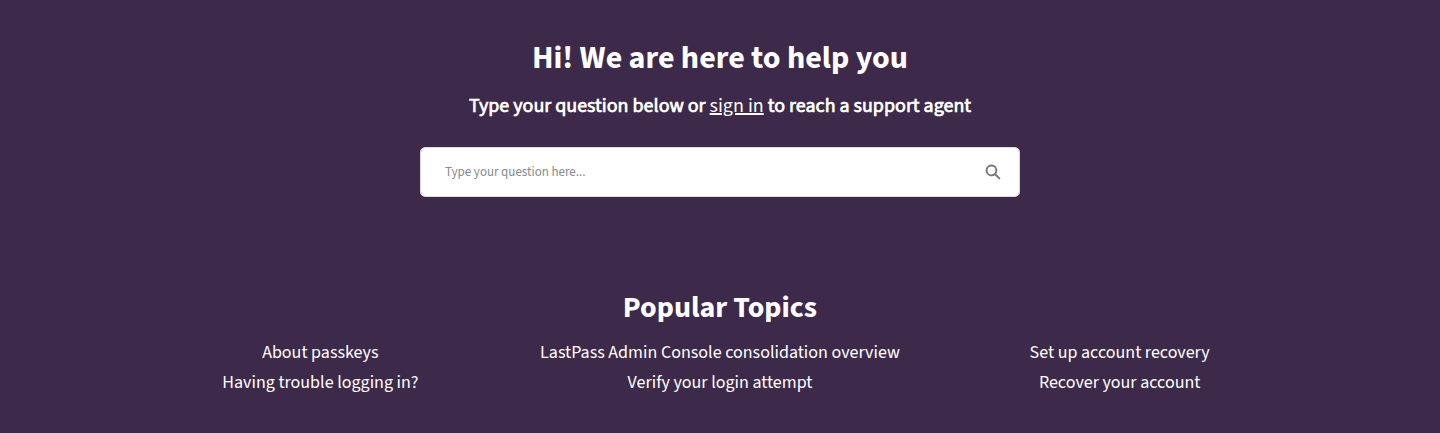
The problem is reputation. User reviews repeatedly complain about bot-heavy chat, hard-to-find email support, delayed responses, and catch-22 situations where users need to be logged in to get the help they need because they cannot log in.
That does not mean every user will have a bad support experience. It does mean support should count against LastPass if you are choosing a password manager for a business, an older relative, or anyone who will need human help when something breaks.
This is one area where the buying decision should be more practical than philosophical. If losing access would stop payroll, client work, site maintenance, or family access to critical accounts, support is not a nice extra. It is part of the security model.
LastPass vs the Competition
LastPass makes the most sense when you compare it by use case instead of trying to crown one universal winner.
| Password manager | Best reason to choose it | Main tradeoff |
|---|---|---|
| LastPass | Polished UX, free dark web monitoring, familiar business features | Breach history and support reputation |
| 1Password | Strong trust story, excellent apps, polished security features | No meaningful free tier |
| Bitwarden | Excellent free plan, open source, strong value | Less polished for some mainstream users |
| NordPass | Low promotional pricing, modern encryption approach | Feature depth and business maturity may vary by need |
| Dashlane | Extra features like VPN and identity tools | Higher price and broader-suite feel |
LastPass vs 1Password
1Password is the cleaner recommendation for most users who want a premium password manager and care deeply about trust. It has a strong reputation, polished apps, and a security model that inspires more confidence after LastPass’s breach history.
LastPass wins on price for individuals and offers a free plan. It also has excellent dark web monitoring availability. But if you are asking, “Which company do I feel better trusting with everything?” 1Password has the easier answer.
LastPass vs Bitwarden
Bitwarden is the better free choice for most people because its free tier does not force the same one-device-type compromise. It is also open source, which matters to users who value transparency.
LastPass is often easier for non-technical users. The onboarding is friendlier, the UI feels more guided, and autofill can feel smoother in everyday use.
Choose Bitwarden if free and transparent matter most. Choose LastPass if you accept the trust tradeoff and want a more guided mainstream experience.
LastPass vs NordPass
NordPass is often cheaper, especially with introductory pricing. It also has a cleaner breach-history story and uses a modern encryption approach.
LastPass has a more mature feel in some business and family workflows, stronger free dark web monitoring, and a long history in password management.
NordPass is attractive if price and a fresher trust story matter most. LastPass is more attractive if you want its exact feature mix and daily workflow.
LastPass vs Dashlane
Dashlane adds extras such as VPN-style security features and identity-focused tools. That can be useful if you want a broader bundle.
LastPass is more focused and often cheaper. If you only want password management, the extra suite features may not justify the cost.
Who Should Use LastPass?
Use LastPass if you want a password manager that feels easy from the first day and you are comfortable with the post-breach improvements.
It is a good fit for:
- people who want reliable autofill and simple onboarding
- families who can use all six Families accounts
- users who value free dark web monitoring
- employees who get LastPass through work
- small teams already aligned with LastPass business tooling
- users with strong master passwords, MFA enabled, and no crypto seed phrases in the vault
LastPass is also reasonable for people who already use it and have cleaned up their vault properly. If you changed your master password, rotated critical passwords, enabled MFA, removed dangerous stored secrets, and still like the product, switching may not be urgent.
Who Should Avoid LastPass?
Skip LastPass if trust is your top criterion.
That includes:
- cryptocurrency holders
- users who stored seed phrases or private keys in any password manager
- people who want an open-source option
- users who need the best free plan
- businesses that require a vendor with a cleaner breach history
- anyone who expects fast, human support when locked out
- users who want a desktop-first password manager
The cleanest rule is this: if the 2022 breach will make you second-guess every future LastPass outage, do not choose LastPass. A password manager should reduce your background anxiety, not become another thing you monitor.
A Word for WordPress Site Owners
For WordPress site owners, LastPass solves only the credential side of the problem.
That matters, but it is not the whole defense. A password manager can help you create and store strong admin passwords. It cannot tell you whether a vulnerable plugin is still active, whether a brute-force attack is underway, which admin account made a risky change, whether session hijacking has bypassed the login step, or whether malware has already landed on the site.
This is where a tool like MalCare fits as a complementary layer. Password managers protect the human login habit. MalCare protects the WordPress site with a WordPress vulnerability scanner, firewalling, login protection, and malware cleanup workflows.
The practical model is layered defense: strong unique passwords, MFA, careful admin access, and site-level protection. No single layer should be asked to carry the whole risk.
How to Get Started with LastPass Safely
If you decide to try LastPass, set it up deliberately. The first hour matters more than most people think.
- Create your account with a long, unique master password.
- Use at least 20 characters for the master password, preferably a memorable passphrase.
- Enable MFA immediately.
- Install the browser extension on your main browser.
- Import existing passwords carefully and review the results.
- Run the Security Dashboard.
- Replace reused, weak, and critical old passwords first.
- Add emergency access only for someone you genuinely trust.
- Disable anonymized performance data if you do not want to share it.
- Do not store crypto seed phrases or private keys in the vault.
If you are a current LastPass user who has not cleaned up after the 2022 breach, start with your email, banking, domain registrar, hosting account, database credentials, WordPress admin, cloud storage, and financial accounts. Those are the accounts attackers care about most, and they are where strong WordPress passwords matter first.
Do the boring accounts later. Secure the blast-radius accounts first.
FAQ
LastPass appears technically stronger than it was before the 2022 breach, and it has completed important security work such as URL-related field encryption. But safety is not only encryption. The company’s breach history and user trust issues remain serious factors.
Yes. LastPass has a free plan with unlimited passwords, but it is limited to one device type. You can use it on computers or mobile devices, not both.
Attackers accessed a cloud storage environment used for backups and obtained encrypted vault data plus some unencrypted metadata. The passwords were encrypted, but URL metadata and legacy account settings created additional risk for some users.
LastPass is better if you want a free plan or lower individual pricing. 1Password is the stronger recommendation if trust, app quality, and breach history matter more than price.
For most premium users, 1Password is the best alternative. For free users, Bitwarden is the strongest alternative.
Switch if the breach changed your trust permanently, if you stored crypto seed phrases, or if you want open-source transparency. Staying can be reasonable if you have cleaned up your vault, use a strong master password, enable MFA, and still prefer LastPass’s workflow.
Final Verdict
LastPass is still a good product. That is what makes the decision difficult.
If it were clumsy, overpriced, and weak on features, the answer would be easy. But LastPass is polished. Autofill works well. The Families plan is good value. Free dark web monitoring is genuinely useful. The product team clearly understands how normal people use password managers.
The problem is trust.
For new users who want the least complicated recommendation, I would look at 1Password first and Bitwarden if free matters most. For existing LastPass users who like the product, the decision is more personal: clean up your vault, strengthen your master password, enable MFA, remove anything that should never have been stored there, and then decide whether the product still earns its place.
LastPass can still be worth using. It just has to earn the answer now.