Password security shouldn’t create constant anxiety, but we know it often does. You’re probably here to answer one core question:
Is Bitwarden actually any good? With the nagging fear of a breach from a reused credential, you need a clear answer, not just hype. We’re here to provide exactly that.
This Bitwarden review cuts through the noise to help you determine if its acclaimed security and simplicity are the right solution for you.
Bitwarden provides elite, transparent security and an amazing free plan, making it the best value on the market. Its only real downside is a basic user interface, which is a small price to pay for its powerful features and trustworthiness.
Bitwarden review at a glance

| Feature | Our Assessment |
|---|---|
| Security & Encryption | Excellent. Open-source code, zero-knowledge architecture, and AES-256 encryption, all verified by independent security audits. |
| Core Features (Free Plan) | Best-in-Class. Unlimited passwords and devices, cross-platform syncing, a robust password generator, and secure sharing. Covers all essential needs. |
| Key Premium Features | High Value. Adds a built-in 2FA code generator (TOTP), vault health reports, support for physical security keys (YubiKeys), and 1GB of encrypted storage. |
| User Experience & Design | Functional. The interface is clean and efficient but feels basic and utilitarian, lacking the visual polish of more expensive competitors. |
| Pricing Model | Unbeatable. The free tier is a complete solution, not a crippled trial. The Premium plan is extremely affordable at around $20 per year. |
| Best For | Budget-conscious individuals, security enthusiasts, and anyone who values open-source transparency over a flashy user interface. |
| Primary Weakness | The user interface, while perfectly usable, can feel less intuitive and more dated compared to sleeker, modern alternatives. |
Security & encryption
Bitwarden’s code is open-source, which means its security blueprints are public. As people who follow security news, this is a huge deal. It means experts worldwide can inspect the code for flaws like cross-site scripting or other issues, rather than us just having to take the company’s word for it.
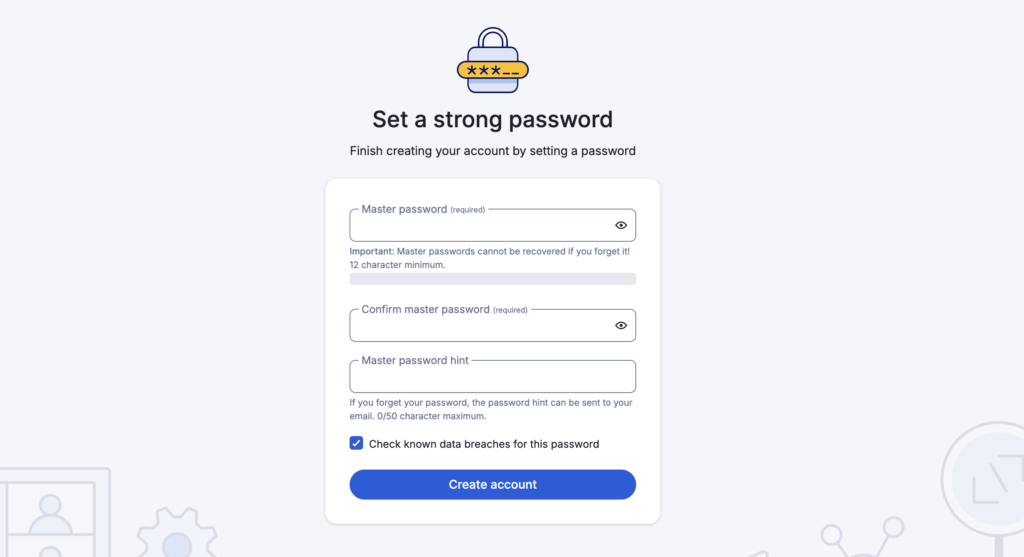
It also uses a zero-knowledge architecture. This simply means only you have the master key (your password) to your secure vault. Bitwarden doesn’t have a copy and cannot open it. This gives us peace of mind knowing that even if their servers were somehow breached, our data would remain a useless, scrambled file, much like how an SSL certificate encrypts your site’s data.
Your information is protected with end-to-end AES-256-bit encryption, the same security standard used by banks. To prove this, Bitwarden undergoes regular independent annual audits from security firms.
We’ve read through these reports, and they confirm the security model is sound. Though they occasionally find and fix minor issues, which is exactly what you want to see.
Core features & functionality
Bitwarden works everywhere, with fast, automatic syncing. Here’s how the key functions performed in our tests:

- Vault management: To test its organizational capabilities, we simulated a few logins for different test sites and accounts. Using folders to separate categories proved essential for keeping everything organized.
- Password generator: During our review, we used this for every new test account created.

👊 Note: Brute force attacks often succeed by guessing weak, easily created passwords for new accounts.
- Auto-fill & capture: This worked flawlessly during our tests.
- Secure sharing: This feature is a far more secure method than sending passwords over Slack or email.
- Emergency access: The emergency access feature is a thoughtful addition to the paid plan. It’s designed to let you grant a trusted person access to your vault in a crisis, a critical safety net for your digital life.
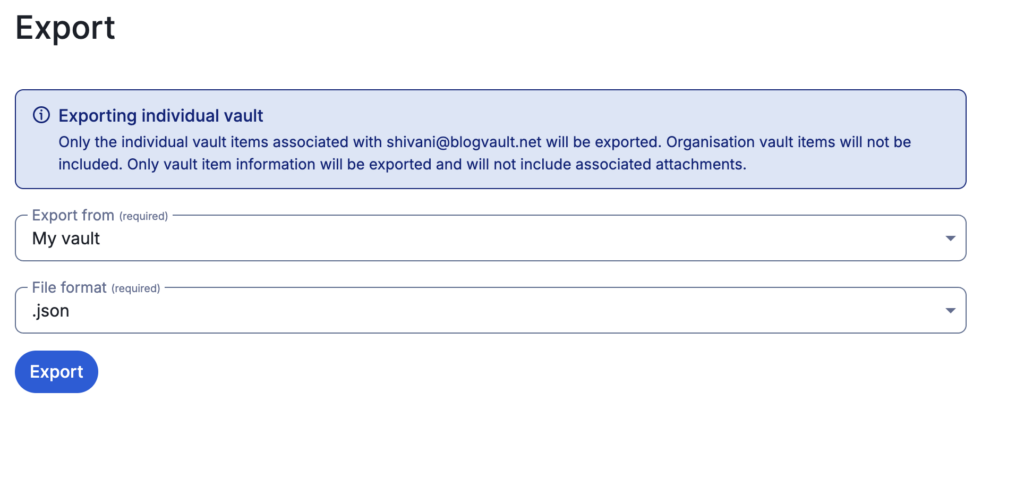
You can also export your data at any time, which is a crucial feature for any tool you’re evaluating, ensuring you are never locked in.
Usability & user experience
Bitwarden’s design is functional, not flashy. If you’re comfortable in practical interfaces like the classic WordPress dashboard, you’ll feel right at home. It’s all business.
The setup is simple. You’ll spend most of your time in the browser extension. Learn the keyboard shortcut Ctrl/Cmd + Shift + L. It instantly fills your login details and will save you countless clicks.
Advanced features & value-adds
The free version is powerful, but the Premium plan (about $19.80 a year) adds some game-changing tools.
The single best reason to upgrade, in our opinion, is the integrated TOTP authenticator. This generates the expiring six-digit codes for two-factor authentication (2FA). When you auto-fill a password, the 2FA code is automatically copied. No more grabbing your phone and switching apps. It’s a small quality-of-life improvement that you can’t go back from.
Premium also includes:
- Vault health reports: This feature scans the vault to flag weak, reused, and compromised passwords, which helps users proactively identify security risks.
- Advanced 2fa options: The premium plan adds support for physical security keys like YubiKeys, providing an additional layer of protection for the account.
👊 Note: You’ll often see the terms 2FA and MFA used interchangeably. 2FA means using exactly two factors (like a password + a code from your phone), while MFA is the broader term for using two or more.
- 1gb of encrypted file storage: The plan includes one gigabyte of secure storage that is ideal for sensitive files like scans of important documents.
- Self-hosting capabilities: This feature is available for users who want absolute control over their data.
Pricing & business model
This is where Bitwarden leaves its competition behind.
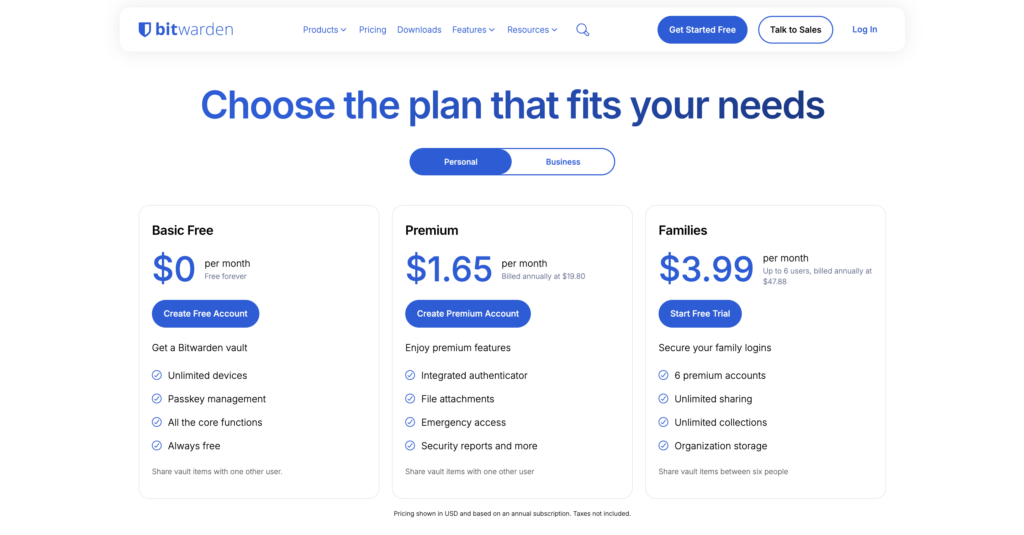
- Free tier: You get unlimited passwords on unlimited devices. This is not a crippled trial; it’s a complete solution.
- Premium plan: At $19.80 a year, you get all the advanced features. For the price of two coffees, the upgrade was a no-brainer for us.
- Family plan: At $47.88 a year, six users get premium accounts and can share passwords.
Pros and cons of bitwarden
No tool is perfect. Here’s our honest breakdown.
| Pros | Cons |
|---|---|
| Unbeatable free plan with all the features most people will ever need. | The user interface is basic; lacks polish of pricier alternatives. |
| Top-tier, transparent security that you can actually verify. | Autofill can be inconsistent on non-standard websites. |
| Works on all devices with reliable syncing that has never failed us. | The sharing workflow feels clunky until you get used to it. |
| Extremely affordable paid plans that offer immense value. | Support for free users is limited to community forums. |
| Two-factor authentication is available to all users, even free ones. |
Who is bitwarden perfect for?
Bitwarden is the ideal choice for:
- Anyone who values transparent security and functionality without a high cost.
- If you want premium features without a pricey subscription, this is it.
- Businesses needing a scalable, auditable, and secure solution.
For transparency, security, and value, Bitwarden is the gold standard.
If you’re wondering whether password managers are safe, the answer is that the tool is only part of the equation. Bitwarden’s security model is solid, but your overall safety depends on using it correctly.
Best practices while using a password manager
A secure tool requires secure habits.
- Create a strong, unique master password. Make it a long passphrase you can remember.
- Enable two-factor authentication. Trust us on this: it’s the most important step to protect your vault.
- Use the password generator for every new account. Stop reusing passwords immediately.
- Securely store your Bitwarden recovery code offline.
- Periodically review the vault health report to find and update weak passwords.
- Consider setting up emergency access for a trusted contact.
- Always log out of your vault on public or shared computers.
Common risks to watch for
A password manager is a tool, not a replacement for vigilance.
- Your master password is irrecoverable. If you forget it and lose the recovery code, your data is gone.
- Phishing attacks can still succeed. Bitwarden will fill your password on a fake site if you go there, so always verify the URL.
- An unlocked vault is an open vault. We have our vaults set to lock automatically after five minutes of inactivity.
- Infected devices compromise your security. If your computer has malware, it could capture your master password as you type it.
Parting thoughts: Is bitwarden safe?
Yes. Bitwarden’s security model is sound, respected, and exceptionally transparent. Our in-depth testing confirms that its reputation for security and reliability is well-deserved.
The choice isn’t about safety but about convenience; the free tier provides all the security you need, while the premium plan adds features that make managing that security even easier. You can absolutely trust Bitwarden with your credentials.
FAQs
Frequently asked questions
The main cons of Bitwarden are its functional but somewhat dated user interface and an autofill feature that can be inconsistent on complex websites. Additionally, its customer support for free users relies on community forums rather than direct email or chat.
What’s “better” depends on your needs; services like 1Password offer a more polished user experience and more intuitive family sharing. However, no competitor matches Bitwarden’s combination of transparent security, robust free features, and exceptional overall value.
No, Bitwarden does not sell your data, as stated in their privacy policy. Their zero-knowledge security model means they cannot access or view your encrypted vault data, making it impossible to sell.
You should never save passwords in unencrypted places like a note app because they are easily stolen if your device is lost or compromised. A password manager like Bitwarden encrypts this data, making it unreadable to anyone without your master password.
Bitwarden has not suffered a publicly disclosed breach where encrypted user vaults were stolen from their servers. Security vulnerabilities have been discovered and patched through regular audits, which is a normal and healthy security practice.
Yes, sophisticated malware on an infected device, like a keylogger, could steal your master password as you type it. This is why enabling two-factor authentication (2FA) on your Bitwarden account is a critical security step.