
You try logging into your own site and are met with an unexpected message: “Access Denied – Sucuri Website Firewall.”
The problem is that Sucuri’s firewall has mistakenly treated a normal request (yours) as an attack.
Worse, if this WordPress firewall can’t reliably recognise you, the site admin, it may also be blocking your visitors in the same way.
Security shouldn’t lock you out of your own site. And if you’re here trying to decode these messages, it may be time to consider a smarter alternative like MalCare’s firewall instead.
What exactly is the “Access Denied – Sucuri Website Firewall” error?
The Access Denied message means your WordPress firewall has incorrectly concluded that a normal action resembles malicious behaviour.

Sometimes it’s a plain “Access Denied.” Other times, it’s “Your IP address is listed in our blacklist and blocked from completing this request.”
We have also run into error codes in the message. The one people see most often is the BLACK02, which means your IP has been blacklisted from accessing your site. Another is the EXPVP range of codes, which means the request was blocked because of a virtual patch added to the firewall in an attempt to prevent exploits of a vulnerability.
While these are the most common codes we have run into, there are plenty of other Sucuri WAF block codes. These codes were not designed for end users at all. But if you encounter them, support teams will ask you to reference the code as part of the troubleshooting process.
Because Sucuri filters traffic through pattern-based rules, requests that look even slightly suspicious can end up flagged. It is much better to have a firewall that integrates deeply with WordPress to prevent these false positives.
That’s also why the error appears inconsistently. A request that passes once may be blocked later if it triggers one of Sucuri’s filters.
How to unblock yourself from your site
Depending on the situation on hand, there are a few ways you can resolve the block.
If you’ve faced a similar blacklist issue with Wordfence before, those steps will not work because the firewall is set up differently.
Option 1: Reach out to Sucuri support
The first step is usually Sucuri support. They will validate that you’re the legitimate owner and remove the Access Denied – Sucuri Website Firewall block.
Before they do, you should run a full malware or virus scan on the device you’re accessing the site from. The rare case where Sucuri is correct is when a local virus, keylogger, or injected script is sending unusual requests. Confirming a clean device is simply smart practice.
Once cleared, Sucuri will reinstate access and strongly recommend whitelisting your IP so the firewall doesn’t trigger again. This can be done from their dashboard, or via API if you have credentials.
Option 2: Change your DNS nameservers back
Sucuri is a cloud firewall, not an endpoint firewall. Therefore, during setup, you had to replace your site’s IPs with Sucuri’s for it to work.
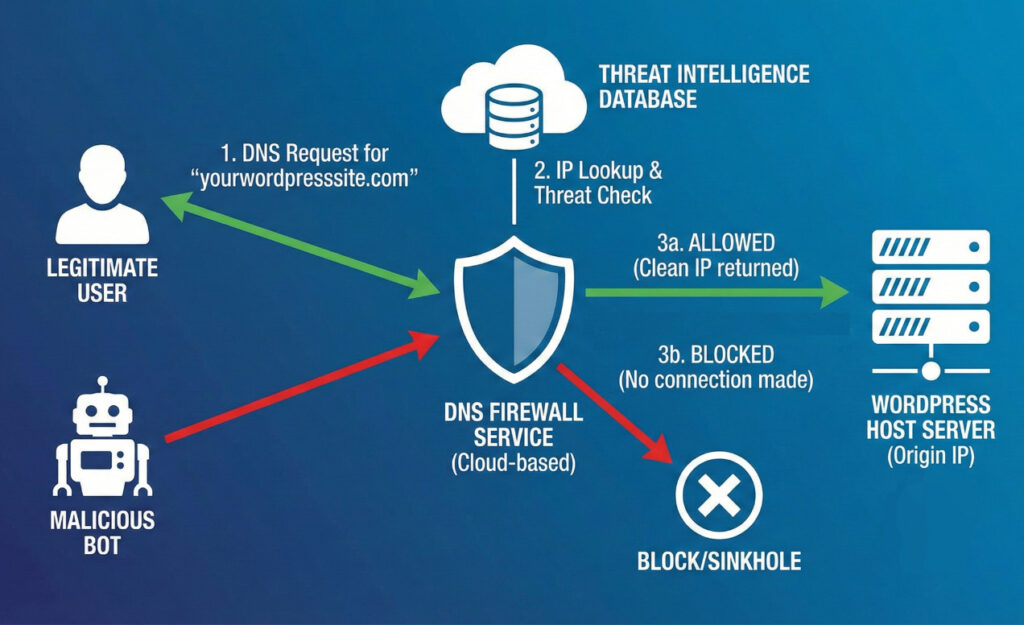
This is a complex DNS setup that developers usually undertake, so we strongly recommend getting one to undo it for you.
Right now, your domain is pointing to Sucuri’s firewall, so all the traffic goes there first. You want to remove this middleman, so your domain points to your site directly.
Log into your domain provider to pull off this switcheroo.
Option 3: Migrate your site to another host
If Sucuri doesn’t remove your IP from block/blacklist status, you may find yourself stuck between your hosting provider and Sucuri. The standard response from Sucuri in this situation is that your host’s IP range is already blacklisted, and you should contact their support.
The host’s support will, naturally, say that there is nothing wrong with their server IPs, and send you right back to Sucuri.
Sucuri will be deeply apologetic about not being able to do anything, and their suggestion will becomes: migrate away from that host.
Once you are tired of this support tennis match, where your site is the ball, you have a decision to make: you can either move infrastructure to accommodate the firewall, or replace the firewall with a solution that doesn’t treat its own users as threats. (We recommend MalCare’s firewall, obviously.)
Option 4: Try a VPN or proxy
Although VPN or proxy use will often trip up the Sucuri firewall, it is still an option to regain access to your site when you hit a blank wall.
😬 Once you gain access, disable and choose an alternative to Sucuri. While this will not prevent the firewall from blocking you, it is a step in the right direction.
How to stay unblocked
On paper, whitelisting your IP looks like a permanent fix. In practice, it’s neither reliable nor secure.
Most users don’t have static IPs. Even residential networks rotate addresses. Mobile networks reshuffle them. Switching connections, resetting routers, or geographic travel can all change your IP.
That means a whitelist today might be invalid tomorrow.
Worse, the recommended workaround becomes whitelisting entire IP ranges. While this increases the chance of staying unblocked, it bypasses core firewall checks. If your device ever becomes compromised, the firewall won’t scrutinise what’s coming from that address.
💡 We strongly recommend you skip the hassle and just install MalCare’s firewall instead.
And lurking beneath all of this is a more fundamental truth: whitelisting should not be necessary for normal usage. A firewall that repeatedly requires it isn’t filtering with precision.
Meanwhile, there are scraper APIs, proxy networks, and automated systems engineered specifically to mimic human traffic patterns. Many of these evolve faster than static rulesets. As a result, real humans get interrupted while non-human traffic finds ways through.
Reasons why Sucuri blocks real users
Sucuri has a history of misidentifying real users as hackers or bots. This is the biggest reason you, as an admin or user of a site, will see the access denied error message.
That being said, there are other (legitimate reasons) why users are blocked for no apparent (to them) reason:
- Local malware: Rare but possible. Malicious extensions or device infections that copy data or send abnormal requests.
- Third-party blacklist records: Your IP may be flagged a blacklist or two somewhere.
- Proxy masking: Any proxy service immediately looks less trustworthy.
- Failed login patterns: Too many incorrect attempts look like a brute force attack.
- Bot-like activity: Automated refreshes, scraping behavior, or failed 2FA triggers blocks.
These scenarios reveal a fundamental problem. If the system can’t reliably differentiate human traffic from hacker bots, legitimate users will continue to be blocked.
Alternatives to Sucuri
When looking for an alternative to Sucuri, you are spoilt for choice.
And so you should be!
If your firewall routinely blocks you from your own site, forces whitelisting, generates “Access Denied” messages, and flags you with BLACK02, EXPVP, and blacklist warnings, you need a tool that evaluates threats more intelligently.
MalCare, a top security plugin for WordPress, approaches attacks differently. Instead of relying solely on static firewall rules or pattern matches, it uses behavior-based analysis to understand what malicious activity actually looks like.
This means:
- Legitimate admins aren’t misidentified
- Real visitors aren’t turned away
- Malware scanning happens offsite, without impacting site load
- The firewall doesn’t require constant tweaks and customisations to function
In short: strong, hands-free protection without obstructing normal usage.
Conclusion
A firewall that repeatedly blocks real users is not offering protection; it’s creating disruption. If you’re encountering warnings blocking your access to your own site, you’re experiencing a known weakness in Sucuri’s detection accuracy.
While temporary fixes like whitelisting do work, they are not permanent. Also, they defeat the purpose of a firewall.
If you want reliable security without unnecessary lockouts, choose a solution engineered to separate actual threats from normal usage. MalCare is designed to do exactly that.
Security should keep attackers out. Not you, your team, and definitely not your customers.
FAQs
Why am I being blocked by Sucuri?
Because Sucuri’s firewall interpreted your request as malicious. This may be due to pattern matching, reputation data, proxies, login attempts, or virtual patches.
How do I prevent Sucuri firewall bypass or repeated Access Denied errors?
Whitelisting may help temporarily, but the most reliable long-term solution is using a firewall that doesn’t misidentify you in the first place.
Why do I see messages like EXPVP, BLACK02, or “Your IP address is listed in our blacklist and blocked from completing this request”?
These codes indicate that Sucuri has flagged your IP through internal threat rules or virtual patches, even if you’re the legitimate site owner.
How can I stop this problem permanently?
Replace the firewall with one that uses more precise threat detection. MalCare is built to protect WordPress sites without locking out real users.
Is the “Access Denied – Sucuri Website Firewall” message permanent?
No. These blocks are usually triggered by Sucuri’s firewall rules. Access can be restored by removing the blacklist trigger, whitelisting the IP, or switching to a more accurate firewall solution.
Does Sucuri block legitimate users by mistake?
Yes. Sucuri frequently issues false positives, especially around login behaviors, proxies, or patterns that resemble known exploits. This is why site owners sometimes see BLACK02, EXPVP, or generic “Access Denied” errors.
Can customers or site visitors also see the Access Denied message?
Yes. If the firewall misclassifies their IP or behavior, real visitors can be blocked just as easily as admins. This can impact sales conversions, memberships, checkout flows, and contact form submissions.
Will whitelisting my IP stop Sucuri from blocking me again?
Not permanently. IPs change, and whitelisting bypasses the firewall’s checks entirely. This makes the site more vulnerable if the device is ever compromised in the future.