Most WordPress security plugins provide a false sense of safety until a real hack occurs. You might only discover your security has failed when Google blacklists your domain or your hosting provider suspends your account. We have tested numerous plugins that claim to protect your site but fail to detect sophisticated malware.
Jetpack is developed by Automattic and integrates seamlessly with the WordPress ecosystem. It is a convenient choice for administrators who want to manage backups and performance from a single dashboard. Many users choose it because it is pre-installed on many hosting environments.
Solid Security, formerly known as iThemes Security, focuses on access control and login protection. Their pricing model is designed for agencies managing multiple websites. It offers a low cost per site for basic hardening features like two-factor authentication.
We installed both Jetpack and Solid Security on sites infected with malware and backdoors. We monitored their impact on server resources and checked their logs for missed threats. Our findings show a significant gap between marketing claims and actual detection rates.
Jetpack and Solid Security remain preventative tools that lack malware removal necessary for WordPress security. Solid Security excels at login hardening and virtual patching, while Jetpack provides decent off-site logs but relies on destructive backup restores that can cause significant data loss. For business-critical sites, neither replaces the need for a topnotch malware removal plugin like MalCare.
Summary of Jetpack vs Solid Security (formerly iThemes)
There is no real comparison between these two plugins: it is like comparing a phone with two cans connected by a string. While both have added significant features in recent years, they still fail to address the core requirement of a security plugin: reliable hack recovery.
| Feature | Solid Security Pro | Jetpack Security |
|---|---|---|
| Malware Scanning | Blacklist & File Change Only | Signature-based (Cloud) |
| Automated Cleaning | No (Paid Service $299) | No (Restore Backup Only) |
| Vulnerability Feed | Patchstack (with Virtual Patching) | WPScan Database |
| Login Security | Passkeys, 2FA, Trusted Devices | WP.com SSO, 2FA |
| Server Performance | Light (except DB Bloat) | High (Sync Spikes) |
| Activity Log | Local (Customizable) | Off-site (30 Days – 1 Year) |
| Starting Price | $99 / year | $239 / year* |
*Jetpack price includes backup and scan bundle. First-year promotional pricing may vary.
Solid Security in a nutshell

We have come to a conclusion that Solid Security is a collection of hardening tools rather than a comprehensive security solution. If you have Solid Security installed right now, you should scan your website with a deep malware scanner immediately. Your website lacks proactive defence against active infections.
Solid Security is chock full of configuration features that give an inexperienced user the illusion of a secure website. While it no longer promotes itself as a malware detection tool, it still features a Site Scan that is deceptively simple. Powered by Patchstack, this scanner only checks if your plugins are outdated or if your domain is on a Google blacklist. It does not look at the actual code in your files. If a hacker has already planted a backdoor in a plugin, Solid Security will give you a clean bill of health.
The plugin’s value lies exclusively in site hardening and login security. It offers native Passkey support and excellent two-factor authentication (2FA), which are valuable for identity management. However, these are basic features. If an attacker bypasses them, or uses a vulnerability in another plugin, Solid Security offers no way out. You would be forced to pay $299 for their manual Solid Fix service.
Jetpack Security in a nutshell
Jetpack’s security suite offers a mid-grade, signature-based malware scanner that identifies common malware patterns but lacks the sophistication of a behavioural scanner. We found that it still misses around 30% of infected files, particularly those using obfuscated code.
While it uses WPScan database for vulnerability detection, even a 1% miss rate is enough to cause total carnage on a live site.
Jetpack’s strengths are its cloud-hosted activity log. It is a decent forensic tool, and because it is stored off-site on WordPress.com, it remains accessible even if your server is wiped. However, the performance cost is high. Despite marketing claims of being cloud-based, the sync overhead causes significant server resource spikes that can slow down e-commerce sites or trigger hosting limits during a scan.
On the flip side, Jetpack’s lack of malware removal is its biggest weakness. It relies on site-wide restores, which means you lose all data (orders, comments, posts) created since your last backup. It’s a blunt tool for a surgical problem. While Jetpack doesn’t promise things it doesn’t do, its inability to provide surgical remediation makes it a poor choice for any business that cannot afford data loss or downtime.
Malware scanning
⚖️ Verdict: Jetpack provides an inconsistent signature-based scanner, while Solid Security only monitors external blacklists.
Malware detection is the most important feature of any security plugin. Jetpack misses a significant portion of malicious code, and Solid Security does not actually scan for malware at all.
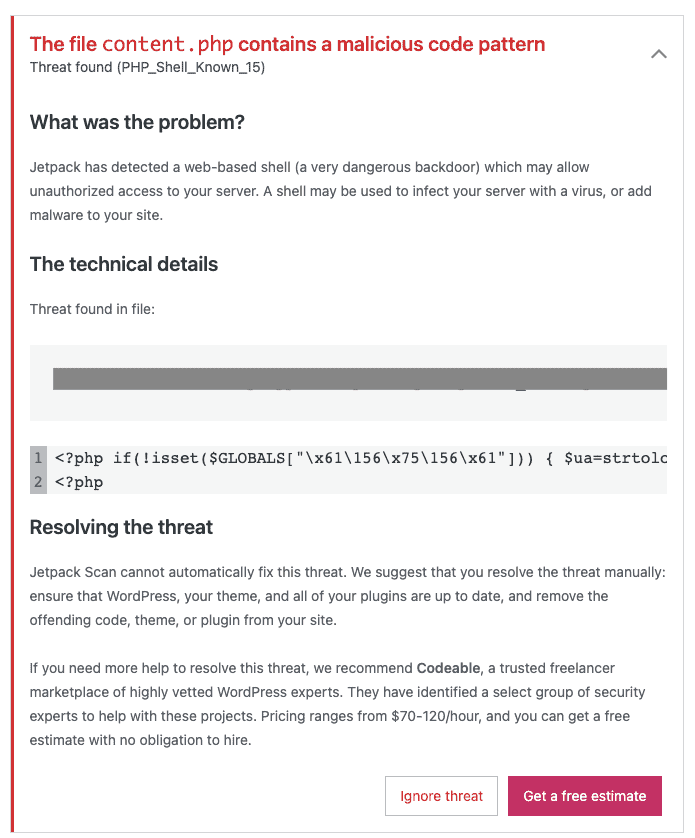
Jetpack Scan uses an automated system to search for suspicious patterns in your files. However, it relies primarily on signature matching, which only identifies known threats. Modern threats use polymorphic code that changes its structure to bypass basic scanners, making a signature-based scan insufficient for real protection.
In our tests, Jetpack missed several obfuscated scripts and custom WordPress backdoors that did not match a documented signature.
While Jetpack flagged some malicious code patterns, it failed to identify a script designed to steal wp-config.php credentials. We also noted that the Jetpack dashboard provides very few details on why a specific file was flagged, which makes manual verification difficult.
The scanning process is also slow. It took over 20 minutes to process a site with minimal data because Jetpack must sync files to its own servers for analysis.
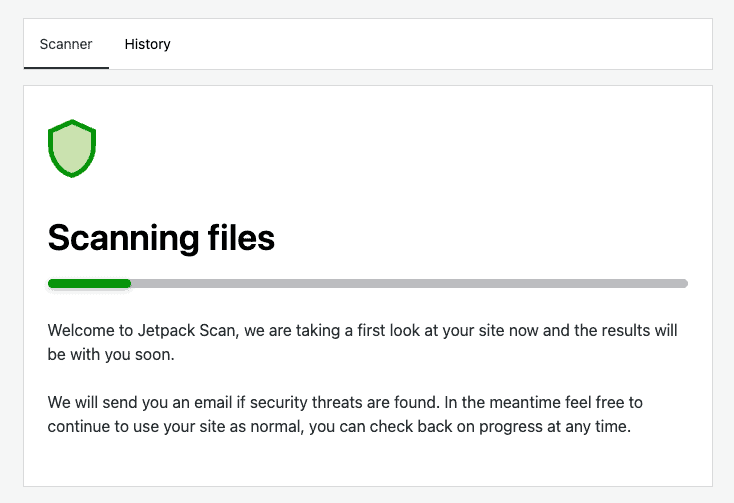
Solid Security, formerly iThemes, has shifted its focus away from malware detection. It no longer promotes its scanner as a tool for finding malicious code within your file system. The current version primarily performs a site check for outdated plugins.
This is a reactive measure rather than a proactive security scan.
Malware removal
⚖️ Verdict: Jetpack uses site-wide restores that risk data loss, while Solid Security offers a manual service but lacks the integrated scanner needed to know when it is needed.
Malware cleaning is the most critical step after a breach, yet it is where these plugins differ most. Neither Jetpack nor Solid Security offers an automated, one-click cleaning feature within the plugin itself.
Jetpack suggests restoring your hacked WordPress site from a backup as the primary recovery method. This is a blunt force (and frankly, terrible) solution. While it can remove malicious files, it also deletes any legitimate content, orders, or comments created since that backup was taken. Furthermore, if the malware was present but dormant when the backup was created, the restoration will simply re-infect your site.
Solid Security has introduced a manual malware removal service called Solid Fix. This is a separate, paid service where human experts manually clean your site. The standard turnaround time for this service is 2 to 4 business days, and it starts at $299 per incident.
While an expert-led service is useful for complex hacks, it presents a practical problem: because Solid Security lacks a deep malware scanner, you may not even know your site is hacked until the damage is extensive. Plus, paying for a manual cleanup every time a site is compromised can become prohibitively expensive for agencies or small businesses.
Without an integrated scanner, the path to using a removal service like Solid Fix is fragmented. You would first need to use an external tool or notice a Google blacklist warning before you even realise you need to pay for a cleanup.
💡 A WordPress security plugin should provide surgical, automated remediation. This means the plugin identifies the exact lines of malicious code and removes them instantly without requiring a site-wide restore or a 48-hour wait for a technician.
Firewall
⚖️ Verdict: Jetpack provides a basic cloud WAF with some connectivity limitations, while Solid Security offers sophisticated virtual patching but lacks a comprehensive behavioural firewall.
A WordPress firewall is the first line of defence against bot attacks and exploit attempts. While the original versions of these plugins lacked this feature, both have now introduced firewall capabilities.
Jetpack has introduced a Web Application Firewall (WAF) that filters traffic at the cloud level. This is designed to block malicious requests before they reach your server. However, technical documentation reveals that the Jetpack WAF requires XML-RPC to remain enabled to function correctly.
Many developers disable XML-RPC to prevent brute-force attacks, therefore rendering Jetpack’s firewall useless. Furthermore, the Jetpack WAF can be difficult to configure behind reverse proxies like Cloudflare, as it lacks a native way to handle trusted proxy headers.
Solid Security has taken a different route by partnering with Patchstack to provide virtual patching.
Virtual patching identifies specific vulnerabilities in your installed plugins and themes and deploys targeted firewall rules to block those exact exploit paths. This allows you to stay protected even if a developer has not yet released a security update.
However, Solid Security’s firewall is limited because it is primarily reactive to the Patchstack database. It lacks a comprehensive, behavioural rules engine to block general malicious patterns or zero-day attacks that have not yet been documented. While virtual patching is great in a pinch, it does not offer the same broad-spectrum protection as a dedicated WordPress firewall.
Vulnerability detection
⚖️ Verdict: Both plugins offer excellent preventative vulnerability scanning via industry-leading databases.
Vulnerability detection is often confused with malware scanning. While malware scanning looks for active malicious code, vulnerability scanning looks for outdated software that could be exploited. Both Jetpack and Solid Security have integrated third-party databases to improve this feature.
Having said that, vulnerability detection is still a proactive measure that identifies security flaws in your plugins and themes before they can be exploited. Both Jetpack and Solid Security provide robust tools for this purpose.
Jetpack Scan integrates the WPScan vulnerability database. WPScan is a manually curated repository containing over 21,000 known security vulnerabilities. Jetpack automatically cross-references your installed plugin and theme versions against this list.
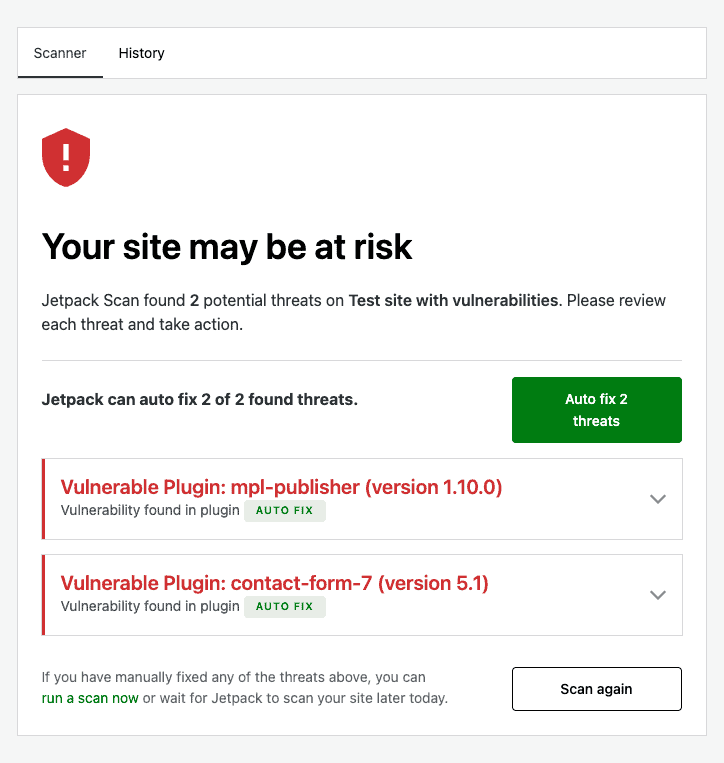
If you are running an outdated version of a popular plugin like Elementor or WooCommerce with a vulnerability, Jetpack will alert you immediately. This allow you to update your software before an automated bot can find and exploit the weakness.
Solid Security uses a Site Scan powered by Patchstack intelligence. This is an advanced vulnerability feed and often identifies flaws up to 48 hours before they are publicly disclosed.
Solid Security also includes a Patchstack Priority Score. This score helps you prioritise updates by distinguishing between a theoretical risk and a vulnerability that is being actively exploited in the wild.
If a hacker has already compromised your site and injected malware into an otherwise up-to-date plugin, these scanners will mark the plugin as safe because the version number has not changed. To be fully protected, you must pair this vulnerability intelligence with a scanner that can identify malicious code within healthy-looking files.
Login security
⚖️ Verdict: Both have decent 2FA and password management features. But they failed at brute force protection.
Login security has evolved beyond simple password management.
The standard for WordPress login security involves a combination of brute force protection and smart password management to ensure that stolen credentials cannot be used to gain access.
Jetpack provides a high-level, cloud-based approach to login security. Its Brute Force Attack Protection works by monitoring millions of sites across the WordPress.com network. When a bot is identified on one site, it is blocked across all sites running Jetpack.
For identity verification, Jetpack utilises Secure Sign-On (SSO), which allows you to use your WordPress.com credentials. This effectively offloads the 2FA process to Automattic’s servers, where you can use authenticator apps or SMS codes.
Solid Security also supports multiple 2FA methods, including TOTP apps (like Google Authenticator), email codes, and backup recovery codes.
The most significant advancement in this section is the support for Passkeys. Passkeys allow you to log in using biometric data (such as a fingerprint or face scan) or a hardware security key (like a YubiKey). Unlike traditional passwords, passkeys are resistant to phishing attacks because they rely on a unique cryptographic pair that never leaves your device.
Solid Security Pro has fully integrated passkeys, allowing users to register their devices directly through the WordPress profile page.
We tested the Passkey registration in Solid Security Pro and found it to be a seamless process. Once configured, we were able to bypass the password field entirely, reducing our login time from fifteen seconds to less than two.
The brute force protection didn’t work as it should have. We expected our IP to get blocked after trying 50+ incorrect logins in less than a minute. The expectation was largely fuelled by the option to whitelist admin IPs to prevent lockouts. Lockouts are the bane of poorly coded security plugins, so that’s probably why this option exists at all. At any rate, we tried to force an IP block, but couldn’t.
Activity log
⚖️ Verdict: Both plugins have activity logs, but neither is reliable as a forensic or troubleshooting tool, as they are inconsistent.
An activity log is the cockpit black box of your WordPress site. It records every change, from plugin updates to content edits, providing a timeline that is essential for troubleshooting and forensic recovery after a hack.
Jetpack’s activity log is automatically enabled and hosted on WordPress.com servers. This off-site storage is a major advantage; if an attacker deletes your site or your server crashes, the records remain accessible.
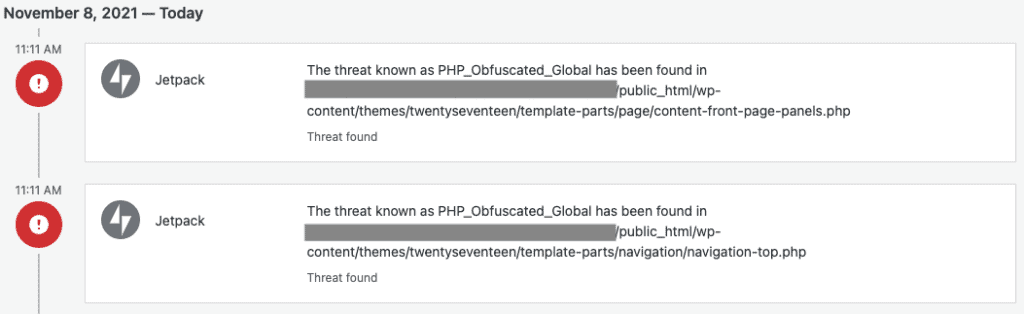
However, the free version is extremely limited, showing only the 20 most recent events. For a real audit trail, you need a paid plan, which provides a 30-day archive or up to one year of history on the Complete plan.
One drawback we noticed is that Jetpack primarily tracks core WordPress and Jetpack-related events, often ignoring changes made within third-party plugins.
Solid Security provides a more detailed on-site logging system. It tracks a wide range of actions, including theme switches, plugin activations, and user profile changes. Because the logs are stored in your own database, you have complete control over the data. However, this can lead to database bloat on high-traffic sites if not managed properly.
Solid Security includes a log rotation feature that allows you to specify how many days of data to keep (e.g., 14 or 30 days) before the oldest entries are purged.
Solid Security logs are inconsistent at best. We saw a number of missed actions, so the feature is not reliable.
We found Jetpack’s activity log useful for identifying exactly when a site went down. Because the log is hosted off-site, we could log into our WordPress.com dashboard and see that a specific plugin update occurred minutes before the 500 Internal Server Error appeared.
In contrast, when we tested Solid Security on a site that suffered a database corruption, we lost access to the local logs entirely, highlighting the risk of keeping your audit trail on the same server as your website.
Performance impact
⚖️ Verdict:
In 2026, site speed is a direct ranking factor for search engines, and a security plugin should never be the reason your site feels sluggish. The performance impact of Jetpack and Solid Security depends entirely on whether they process data on your server or in the cloud.
Jetpack Scan claims to offload its work to Automattic’s servers, but this ignores the synchronisation overhead. For Jetpack to scan your site, it must first read your files to identify changes and sync that data with its cloud. During our tests, even on a lightweight site with a tiny 60 MB database, we saw noticeable spikes in server resource usage during this phase.
This is a significant cause for concern for e-commerce or high-traffic sites. If a 60 MB site causes a visible blip, a site with gigabytes of data and thousands of product images could see severe performance degradation or even errors during a scan.
Solid Security is a lightweight plugin that has a minimal impact on initial page load times. It does not run a continuous background scanner that eats up CPU cycles.
Instead, its performance cost is found in the WordPress database. Because Solid Security tracks activity logs and site changes locally, your wp_options and custom security tables can grow quite large over time. If not regularly optimised, this can lead to slower database queries, particularly on shared hosting environments.
The key performance takeaway is the compute location. A security plugin that scans your files using your own server’s resources will always be slower than one that mirrors your site to a dedicated security cloud for analysis.
🔥 To monitor the real-world impact of a security plugin, check your Interaction to Next Paint (INP) metric. A security plugin that adds heavy JavaScript to your login or checkout pages can delay user interactions, even if the loading spinner finishes quickly.
What’s missing from Solid Security and Jetpack
A great security plugin saves you a ton of money in real terms by protecting your revenue, ad accounts, and SEO rankings. However, during our tests of Jetpack and Solid Security, we identified a critical missing link: malware removal
Our non-negotiable criteria for a professional security plugin is that it must not only protect your site from bots but also provide a path to instant recovery if an infection occurs. Here is where the two contenders fall short:
- No malware removal: If Jetpack detects malware, its only solution is to restore a backup. This is destructive recovery, as you lose all data created between the last backup and the hack. Plus, there is no guarantee that the backup didn’t have malware to begin with. Solid Security offers a manual cleanup service (Solid Fix), but this involves a 24-48 hour wait and a high per-incident fee.
- Malware fallout is faster than ever: In 2026, Google’s AI crawlers are faster than ever at flagging SEO spam. If your site is redirected to a malicious ad even for a few hours, your search rankings can plummet. Waiting for a manual technician or performing a full-site restore costs you precious time that your SEO cannot afford.
- False sense of security: Both plugins are decent at hardening and vulnerability scanning. They can tell you a plugin is vulnerable, but they cannot surgically remove malware that has already been planted.
🔥 MalCare Security is designed with the understanding that only the best firewalls are proof against zero-day exploits. Plus, with one-click automated cleaning, it removes malicious code from your files and database while leaving your legitimate content and recent orders untouched. This eliminates the recovery window and keeps your site pristine without the data loss of a full backup restore.
Jetpack vs Solid Security: Pricing
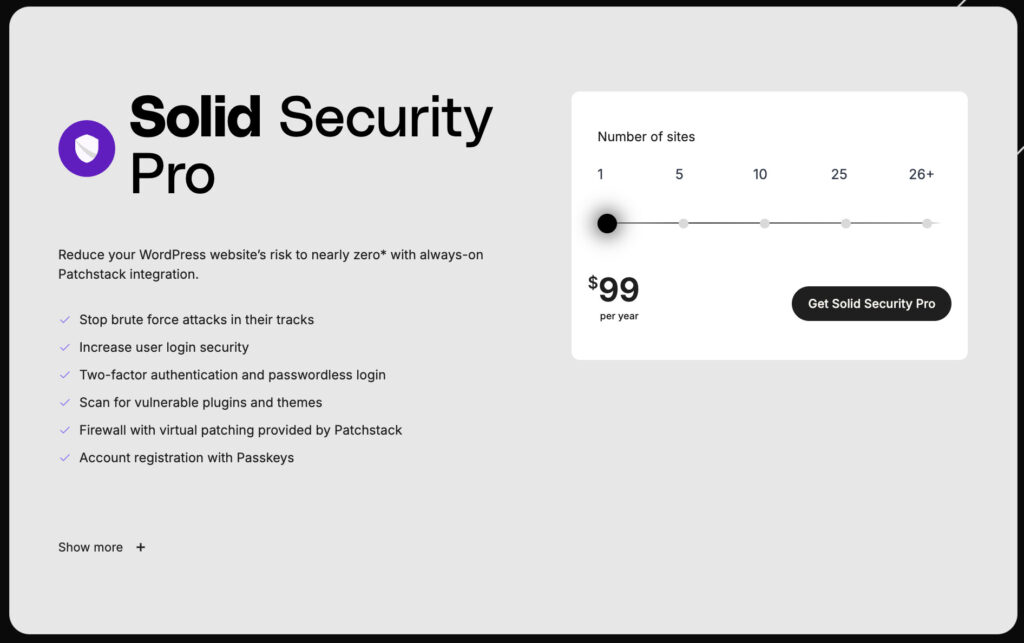
Solid Security (formerly iThemes) has moved away from its unlimited site model. Their entry-level plan starts at $99 per year for a single site. For agencies, the Plus plan covers 5 sites for $199 per year, and the Agency plan covers 10 sites for $299 per year. While this is affordable for login hardening, it does not include malware removal. If a site is hacked, you must pay an additional $299 per incident for their manual cleaning service.
Jetpack Security is now sold as a bundle or as individual components. The Security bundle typically starts around $239 per year (often discounted to $119 for the first year). This includes real-time backups and a WAF. However, Jetpack’s cleanup is limited to restoring a backup, which can lead to significant data loss for active e-commerce or membership sites.
🧮 When calculating the Return on Investment (ROI) of a security plugin, factor in the Mean Time to Recovery (MTTR). A plugin with automated cleaning reduces MTTR from 48 hours to 60 seconds, preventing the SEO decay that occurs when Google identifies a hacked site.
Conclusion
Solid Security and Jetpack offer fragments of a security stack. They are useful for prevention but fail during the remediation phase. Real security requires a tool that identifies vulnerabilities and provides instant recovery. MalCare remains the superior choice for professional WordPress security.
Jetpack and Solid Security provide different approaches to security. Solid Security is a collection of hardening tools. It includes passkey support and virtual patching through Patchstack. It is effective for reducing your attack surface. However it does not include an automated malware cleaner. If your site is infected you must pay for a manual fix or find another solution.