Nothing hits the panic button faster than waking up to a WooCommerce security breach.
Did you get notified of a large number of charges from your payment processor? Far more than usual?
Upon further investigation, are you seeing an unusual number of small transactions? We’re not talking 1 or 2; we’re talking about thousands of transactions of tiny amounts.
If you’re wondering what is happening, the answer is that you’re under a card testing attack. The quick fix is toinstall some bot protection and reCAPTCHA to immediately to stop it.
This article will talk about what card testing is, how it works, and how to prevent it. Whether you’re battling the attack now or are just being cautious, we’ve got you.
The most effective way to prevent WooCommerce card testing attacks is to use bot protection like reCAPTCHA. It will stop the attack that is happening now and block them from even reaching your payment processor. Finally, once you’ve stopped the attacks, reach out to your payment processor support and contest the charges.
As security experts in the WordPress and WooCommerce sphere, we have seen thehavoc that bots can wreak. Card testing attacks use bots for fraudulent reasons and impact your expenses, server resources, and merchant accounts.
The bleaker news is that there is very little you can do to reverse the damage. But all is not lost. What you can do is put in place preventive measures to stop it from happening again. This is wherereliable bot protection comes in.
You may have gotten a gist of what’s happening but let’s dive into the nitty gritty.
What is card testing fraud?
WooCommerce card testing fraud is a type of fraudulent activity where hackers test the validity of stolen or randomly generated credit card numbers. They often get this information hacking ecommerce sites with a skimming attack. They exploit the payment systems of online stores by making thousands of small transactions. If a transaction is successful, they can determine that the card is still active.
A hacker typically acquires a list of stolen credit card details, but their main challenge is determining which of these cards are still valid and can be misused. This is because some cards might have expired, been blocked, or have other restrictions. To identify the active ones, they attempt to run transactions on a legitimate online store—potentially yours—to see which card numbers successfully process payment.
Typically, the process involves using bots to make these transactions in a very short time. Some WooCommerce merchants have seen transactions being made at 1 per second. So, within minutes, they can tell which cards are valid and which are not. This is why we recommend that you implement tools like a firewall with bot protection or reCAPTCHA to stop it.
Are you under a WooCommerce card testing attack?
Identifying the signs of a card testing fraud attack is crucial for online merchants using WooCommerce. Being aware of common indicators of such attacks can help you take quick action.
If you can prove that they’re fraudulent charges, you may be able to reach out to your payment gateway for support. You may also be able to avoid losing inventory if you can stop them from being shipped out.
With that in mind, here are the different signs of card testing fraud:
- One of the most common signs of card testing fraud is an unusual increase in small transactions, often amounting to just a few cents or dollars. Fraudsters typically use small amounts to avoid triggering detection systems while they verify credit card details.
- If you notice multiple transactions originating from geographic locations where you don’t typically have customers, this could be a red flag. Fraudsters often operate from different parts of the world and might target stores unfamiliar with high levels of international traffic.
- Another telltale sign is seeing numerous attempts to make purchases using variations on one user login, email address, or coming from the same IP address within a short timeframe. This behavior suggests automated scripts designed to test multiple cards quickly.
- A sudden rise in failed payment attempts can indicate that someone is experimenting with various stolen credit card numbers on your site.
- If there’s an abrupt surge in sales activity during periods when you’d not anticipate high traffic—such as late at night or outside promotional seasons—it could signal fraudulent behavior aimed at flying under your radar.
- A noticeable decrease in your average order value can imply that large numbers of tiny transactions are being processed instead of regular orders from actual customers.
- A significant increase in chargebacks because customers have realized that they’ve been hacked and reported it.
How to stop the card testing attack now?
You’re seeing the small transactions come in. You’re seeing the payment gateway charges go up. Your panic button is itching to be pressed. But, breathe. This is fixable. You need less than 5 minutes to make it stop. Here are the first 4 things you need to do immediately:
- Temporarily disable payments: One of the quickest ways to halt ongoing fraudulent transactions is by temporarily disabling all payment gateways on your site. This stops further unauthorized attempts and gives you time to address the issue. To do this, click WooCommerce in the sidebar and click Settings. Then, navigate to the Payments tab and toggle all the payment gateways off.

- Disable guest checkout: Enforce customers to be logged in or create an account to make a transaction. Click WooCommerce in the sidebar. Then, click Settings. Navigate to the Accounts and Privacy tab. In the Guest checkout section, uncheck Allow customers to place orders without an account.

- Install bot protection: You need a firewall that can block bot protection and is intelligent enough to differentiate good bots from bad bots and effectively block them.
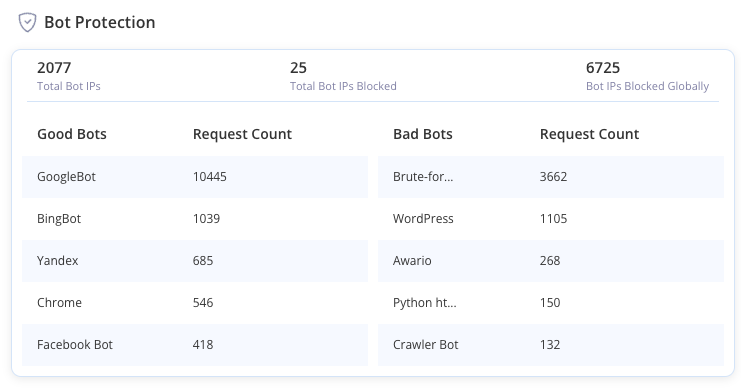
- Implement CAPTCHAor reCAPTCHA: You can use plugins like reCaptcha by BestWebSoft to do this. You will need to create a reCAPTCHA account and generate a Site Key and Secret Key. Then, sync the reCAPTCHA account to the plugin. You can follow their documentation for more details. Add reCAPTCHA to your checkout page so a bot can’t go through.

Once you’re done, record everything that happened and get in touch with your payment gateway’s support. We can’t guarantee that they will be helpful or empathetic. In fact, companies like Stripe and PayPal consider you liable for fraudulent transactions. This is because they expect the security of your site to be your responsibility. And, unfortunately, this type of attack results from lax front-end security. So be mentally prepared to pay their fees. But we wish you luck with their customer support.
How to prevent card testing fraud?
Preventing card testing fraud requires a proactive approach, targeting the issue at multiple levels to block fraudulent transactions before they occur. Here’s how you can fortify your WooCommerce store against such attacks:
- Block bot transactions from the front end: To stop fraud before it affects your store, incorporate advanced security measures directly into your checkout process. Employ techniques like reCAPTCHA to identify and deflect bot activities during transaction attempts. You can use form plugins like Fluent forms to do so.
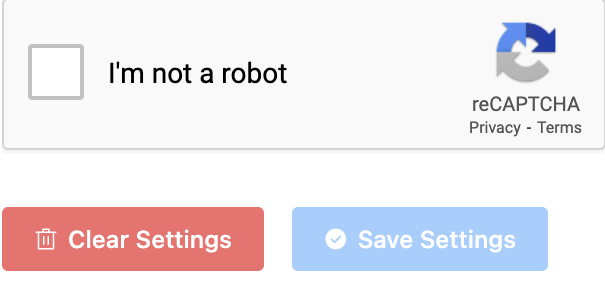
- Use a good web host: Choosing a reputable web host can significantly enhance your website’s security. Superior hosting providers offer robust defense mechanisms including advanced firewalls, intrusion detection systems (IDS), and automated backups that shield your site from potential threats.
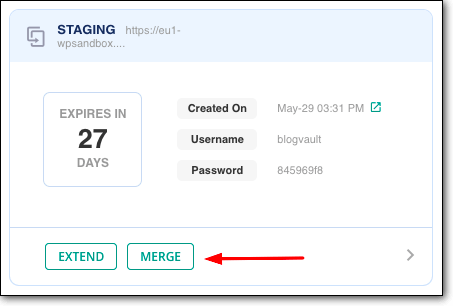
- Keep everything safely updated: It’s important to keep all your plugins, themes and WordPress core updated. They come with bug fixes, security patches and new features. But there is a risk to updating willy-nilly. That’s why MalCare has features that solve this problem. For starters, they have a staging sitethat you can test updates on. It also takes a backup before an update.
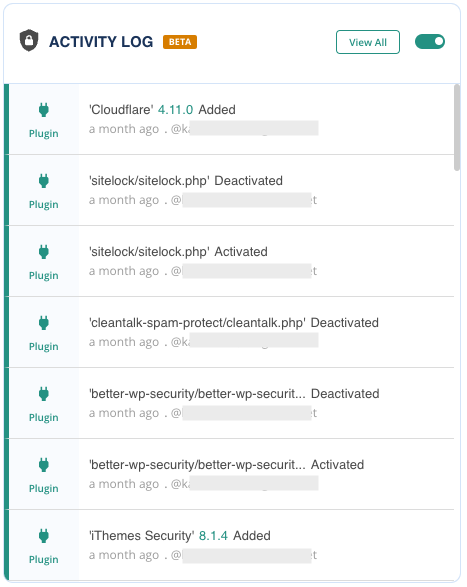
- Monitor activity: We recommend that youuse a security plugin like MalCare to monitor an activity log that logs user activity and changes to the site. Also, monitor your Google Analytics. Look for anomalies in customer behaviour.
- Implement Address Verification Services (AVS): AVS is a security feature used by credit card processors to verify addresses. It checks that the billing address provided by a customer matches the billing address associated with their credit card. This helps in preventing fraudulent transactions. You can enable this within the settings for your payment gateway.
Why is it important to stop WooCommerce card testing attacks?
Card testing fraud poses significant challenges and risks for WooCommerce store owners. More importantly, it’s a type of attack that needs to be blocked immediately. Here are some of the primary issues associated with card testing fraud:
- Huge load on resources: Card testing often involves automated scripts that generate a high volume of small transactions in a short period. This sudden spike in activity can overwhelm your server, leading to slower site performance or even downtime. A sluggish or inaccessible website can frustrate legitimate customers.
- Increased operational costs: Handling a large number of fraudulent transactions consumes valuable resources, including time and manpower. Your team will need to spend considerable effort identifying and reversing these transactions, which diverts attention from other critical business operations.
- Processor account suspension: Payment processors closely monitor transaction patterns for signs of fraud. A high incidence of suspicious activity, such as numerous small transactions or a spike in chargebacks, can trigger red flags. If your account is flagged for excessive fraudulent activity, your payment processor may suspend or terminate your account, severely disrupting your ability to conduct business.
- Higher processing fees: You probably already know this, but fraudulent transactions can lead to higher processing fees.
- Lost product: In some cases, fraudsters may complete transactions using stolen card details, leading to the shipment of products that you will never be paid for. This results in a direct loss of inventory, which can be particularly damaging for small businesses with limited stock. Beyond the cost of the lost product, you may also incur shipping expenses for orders that are later identified as fraudulent.
Final thoughts
Dealing with card testing fraud can be both scary and frustrating for any WooCommerce store owner. The sudden surge in fraudulent transactions, the strain on your resources, and the potential damage to your reputation can feel overwhelming. While you can’t go back and undo the harm caused by past attacks, you can take decisive steps to protect your store from future threats.
One of the most effective ways to safeguard your WooCommerce site is by using a comprehensive security solution like MalCare. MalCare offers robust protection features, including real-time malware scanning, firewall defenses, and login protection, to help you block malicious activities before they can cause harm. Additionally, MalCare enables you to block suspicious customers , further improving your fraud prevention efforts. By integrating MalCare into your security strategy, you can ensure that your store remains a safe and trusted place for your customers to shop.
FAQs
How do I test Payments in WooCommerce?
Testing payments in WooCommerce is essential to ensure that your checkout process works smoothly. You can do this by enabling test mode or the sandbox on your payment gateway. You can also use test credentials to do so. We’ve previously tested out how to set up PayPal and Stripe with WooCommerce. In the articles, we talk about enabling testing and getting the test credentials.
How do I stop card testing on my website?
Stopping card testing attacks on your website requires a combination of proactive measures and continuous monitoring. Here’s how you can effectively stop card testing:
- Install a security plugin like MalCare to provide real-time protection and monitoring against suspicious activities. You want a security plugin with excellent bot protection and a reliable activity monitor.
- Add Google reCAPTCHA to your checkout, login, and registration pages to block automated bots.
- Ensure that only logged-in users can make purchases, adding an extra layer of verification.
- Use Address Verification System (AVS) and Card Verification Value (CVV) checks to ensure that the billing address and CVV code match the cardholder’s information.
- Regularly review transaction logs for unusual activity, such as numerous small transactions or attempts from unfamiliar locations.
What are bot attacks?
Bot attacks are malicious activities carried out by automated software programs, known as bots, designed to perform repetitive tasks at a much faster rate than a human can. These bots can be used for various nefarious purposes, including card testing fraud or user enumeration.