Web security for business can be overwhelming. You’re juggling customer orders, managing staff, and growing revenue. Website security is often the last thing a small business owner is thinking about. It’s also likely that you think your site is immune or unlikely to be hacked.
Here’s the brutal truth: small business websites are easy targets for hackers. They’re able to steal customer data and financial information without you noticing. You can lose traffic, sales, and a community, if you’re not careful.
But, what does it mean to have web security? What’s good advice and what’s not helpful? This article cuts through all the noise. We’ll give you a roadmap of security measures to take. We’ll also suggest some tools that you can rely on.
Install a security plugin like MalCare that handles malware scanning, firewall protection, and automatic cleanups. This single step blocks 99% of common attacks without any technical setup on your part.
One-Click Security Solution: Why MalCare Is All You Need
Installing a security plugin can prevent website security issues without you lifting a finger. While you’re running meetings or serving customers, your plugin is scanning every file, monitoring every login attempt, and blocking attacks in real-time.
However, not all security plugins are built the same. Some plugins slow down your site and others overwhelm you with false alarms. We’ve tested security plugins and have put them through the wringer. From all our testing, MalCare came out at the top.
Here’s what makes MalCare different:
- Deep malware scanning that finds threats other plugins miss, including sophisticated attacks hidden in legitimate files
- One-click cleanup that removes malware without breaking your site or losing data
- Intelligent firewall that blocks attacks before they reach your website, not after damage is done
- Real-time monitoring that catches suspicious activity 24/7, even when you’re offline
- Automated daily backups stored securely off-site, so you can restore everything instantly if needed
- Instant alerts that tell you exactly what happened and what was done about it
Essential Web Security Practices For Businesses
We’re not talking about complex technical configurations here. These are simple, one-time setups that work alongside your security tools to create an almost impenetrable defense.
1. Install a Firewall
Installing a firewall means putting a digital security guard between your website and the internet. Every visitor, bot, and potential hacker has to pass through this checkpoint before they can access your site. The firewall examines each request, blocks suspicious activity, and only lets legitimate traffic through. It’s a proactive way to protect your site and avoid any damage.
A good firewall doesn’t need constant updates but should protect your store even if it has vulnerabilities already. The best firewalls work proactively—they don’t wait for you to patch every security hole before they can defend against attacks.
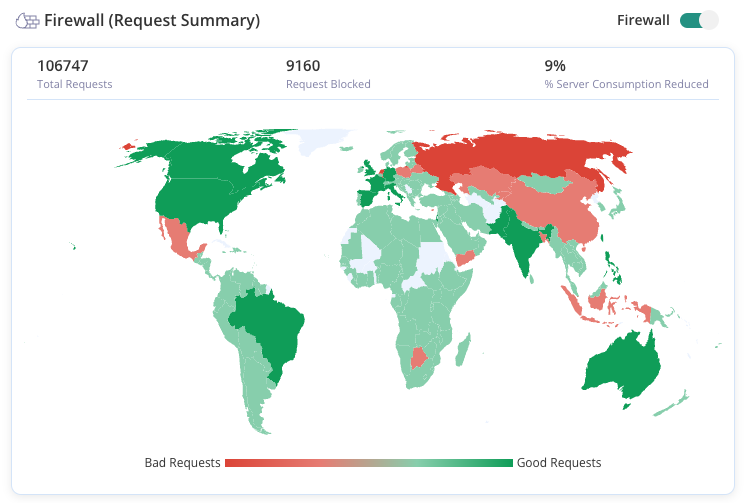
Best solution: MalCare’s Atomic Security is a firewall that protects stores from the first moment of installation.
2. Scan Your Site for Malware Regularly
Malware scanning tools will examine every file and database entry on your site, in the background. It will look for code that doesn’t belong or malicious behaviour and flag it. For businesses, this allows you to catch the malware before it can destroy years of reputation building.
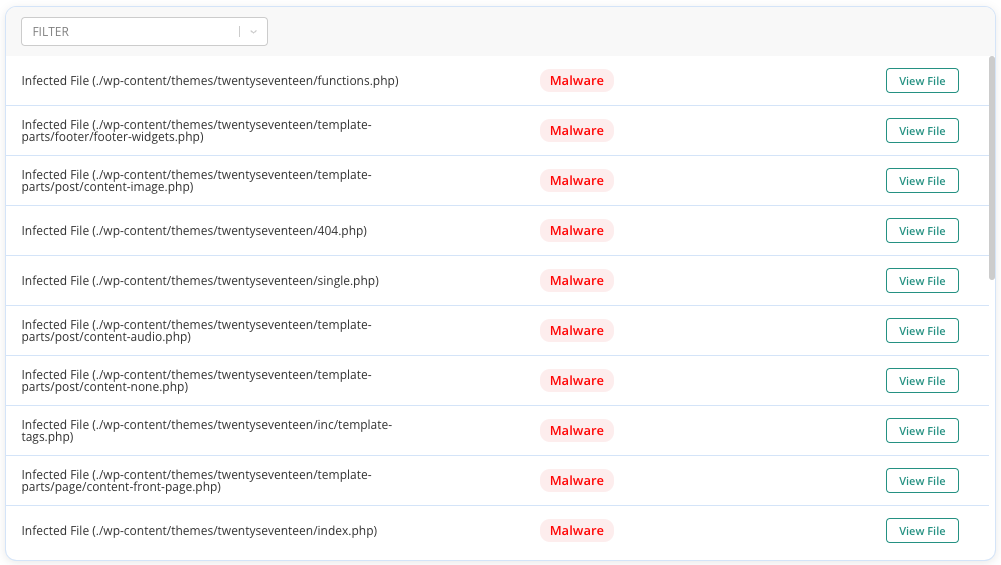
Best solution: MalCare scans daily and automatically. It doesn’t take up any server load. It scans your entire site (files and database tables) and can intelligently identify even zero day malware.
3. Use a Malware Cleaning Plugin
Malware cleaning tools jump into action when a hack is identified. When malware hits your site, every minute counts. Having a cleanup plan ready means the difference between a quick fix and weeks of downtime while you scramble to find help. Immediate cleaning removes malicious code without breaking your site’s functionality or losing legitimate data.

Best solution: MalCare will analyze each piece of malicious code, remove only the harmful parts, and preserve your legitimate content. The best part? It takes one click only.
4. Check for Vulnerabilities
Vulnerability scanners identify weak spots in your website before hackers exploit them. These scans examine your CMS, plugins, themes, and server configuration. They look for known security holes that attackers commonly target. Think of it as a security audit that runs automatically.
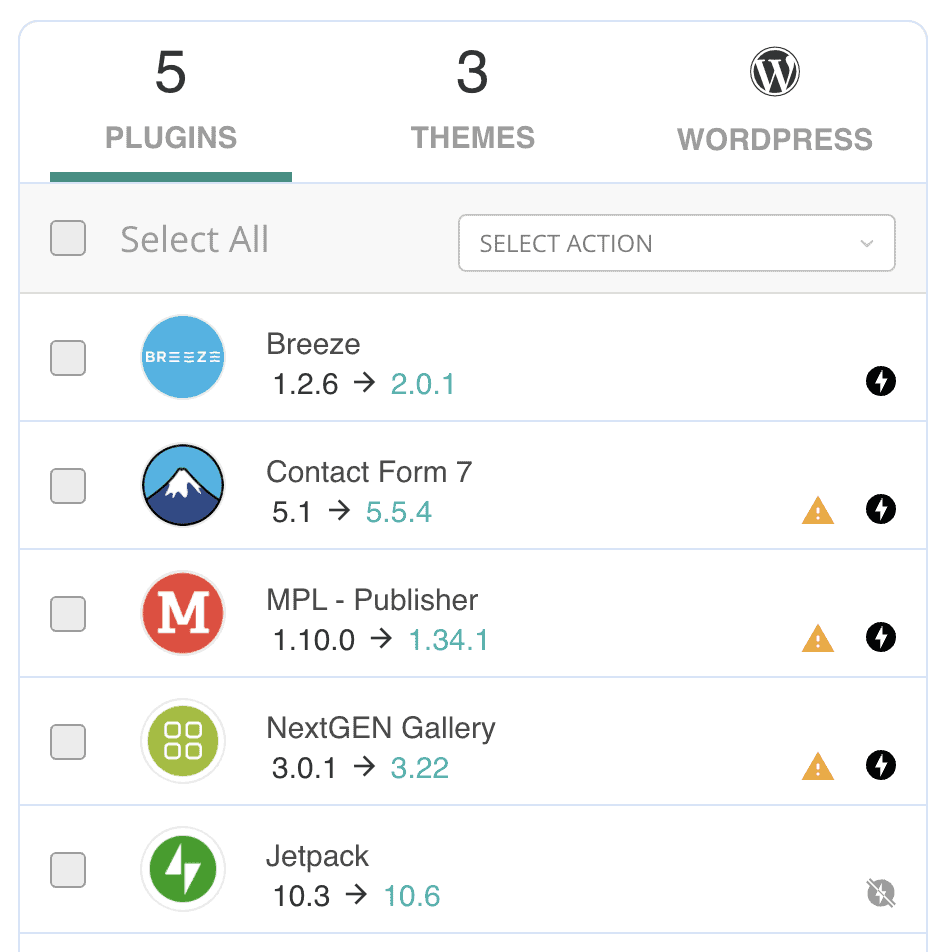
Best solution: MalCare has a vulnerability scanner that reviews your site daily and identifies what is outdated. It then scans for vulnerabilities within those outdated software and recommends which ones you should update immediately.
5. Avoid Nulled Plugins/Themes
Nulled plugins and themes are premium WordPress themes that have been cracked and distributed for free, with their licensing protection removed. These themes often contain hidden malware, backdoors, or malicious code that gives hackers direct access to your site. Using them is like inviting a burglar to move into your house.
Nulled themes create massive liability. The “free” theme becomes expensive fast when it compromises customer data, gets your site blacklisted, or requires professional cleanup. Beyond security risks, nulled themes don’t receive updates, leaving known vulnerabilities permanently exposed.
Best solution: Stick to reputable theme sources—the official WordPress repository, established marketplaces like ThemeForest, or direct purchases from theme developers.
6. Keep Everything Updated
Outdated websites are sitting ducks. Hackers specifically target sites running old versions of popular plugins because they know exactly which weaknesses to exploit. A good update system handles this regularly, applying critical security patches as soon as they’re available.
Best solution: Combine automatic minor updates with careful testing of major changes on a staging site. We also recommend that you create backups before making changes. This way, you can roll back updates if something breaks.
7. Install SSL Certificates
SSL certificates encrypt data traveling between your website and visitors’ browsers, turning readable information into scrambled code that hackers can’t intercept. When active, your site shows “https://” and a lock icon in the address bar. This encryption protects sensitive information like login credentials, payment details, and personal data.

Best solution: Most hosting providers offer free SSL certificates through Let’s Encrypt or Real Simple SSL, making this protection accessible to every business.
8. Enforce Strong Passwords
Strong password requirements force users to create complex passwords that resist brute force attacks and dictionary-based guessing. This means requiring a minimum length, mixing uppercase and lowercase letters, numbers, and special characters. Weak passwords are the easiest way for hackers to break into accounts.
Best solution: Enforce strong passwords across the board.
9. Enable Bot Protection
Bot protection blocks automated scripts and malicious crawlers that attempt to exploit your website. These bots try thousands of login combinations, scrape your content, or overwhelm your server with fake traffic. Good bot protection distinguishes between helpful bots (like Google’s search crawler) and malicious ones.

Bot attacks waste server resources and can bring down your website during peak traffic periods. They also mask real threats by flooding your security logs with automated noise, making it harder to spot genuine attacks from human hackers.
Best solution: Security plugins like MalCare offer bot protection within their suite of features.
10. Limit Admin Access
Limiting admin access means giving users only the permissions they need to do their jobs. Most team members don’t need full administrative privileges—they need specific roles like Editor, Author, or Contributor. This principle of least privilege reduces the damage potential if any single account gets compromised.
Best solution: Review user roles regularly and downgrade unnecessary admin accounts.
11. Disable File Editing
WordPress has a built-in editor that lets users change theme and plugin code from the dashboard. The downside is that it also gives hackers a direct way to inject malicious code if they compromise an admin account. Disabling file editing can reduce the level of damage a hacker can create.
Best solution: Security plugins like MalCare will disable file editing automatically. Once disabled, code changes must happen through proper file transfer methods which are more secure and leave better audit trails.
12. Use Security Headers
Security headers are instructions your website sends to browsers, telling them how to handle your content safely. These headers prevent common attacks like clickjacking, cross-site scripting, and data injection. They set strict rules about what scripts can run and where content can be loaded from. This ensures that your customer data is handled more securely while they’re browsing your site.
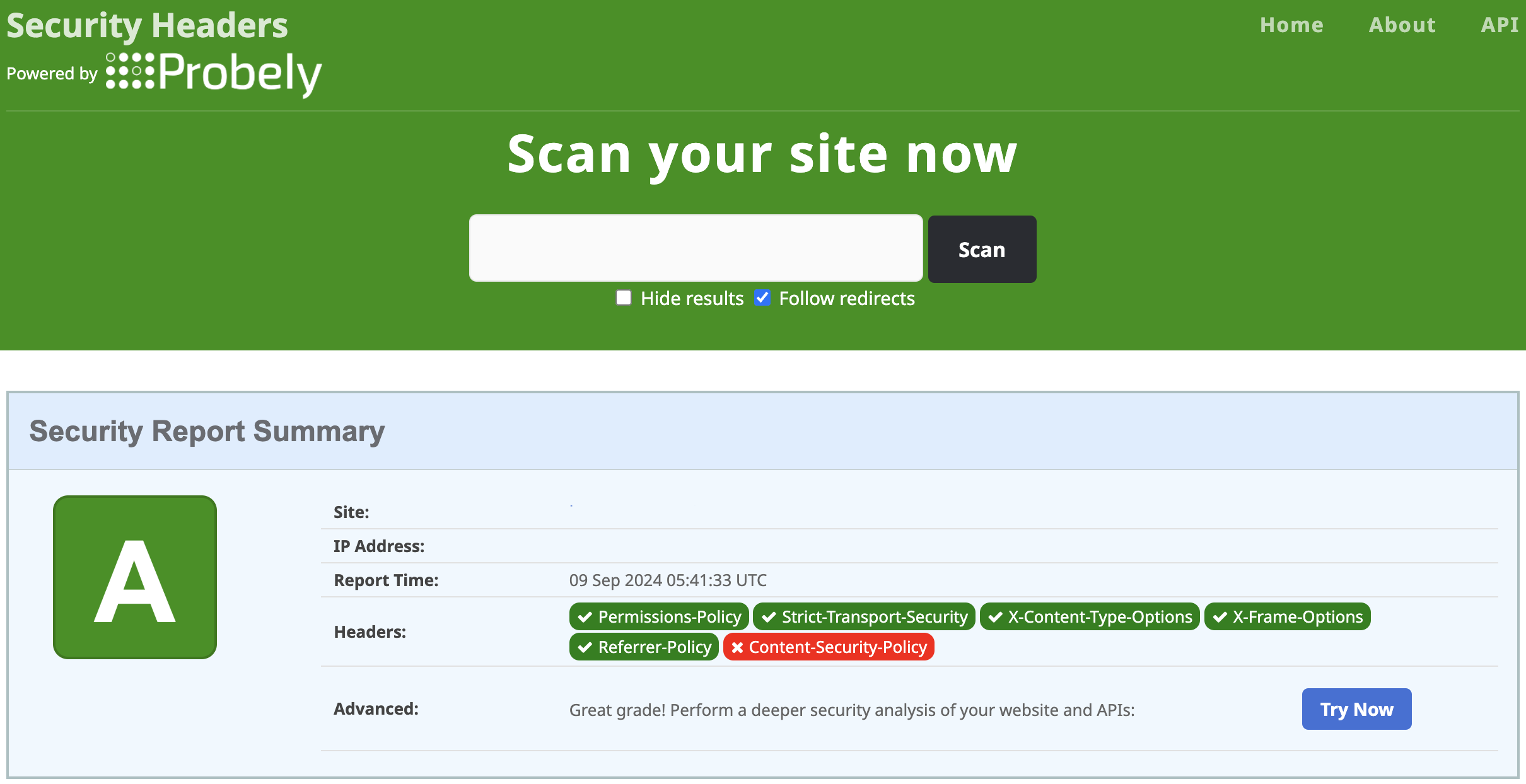
Best solution: Use a plugin like HTTP Headers by Dimitar Ivanov to configure your security headers. You’re able to configure all security headers from one dashboard by just toggling some options.
13. Logout Inactive Users
Automatic logout inactive user sessions after a period of inactivity. This is to prevent unauthorized access to accounts left open on shared computers or unattended devices. This feature works silently in the background, logging out users who walk away from their desk or forget to close their browser.
This can be especially useful in offices with shared computers or employees who work from public spaces. A forgotten login session gives anyone physical access to your admin panel, customer data, and business operations.
Best solution: An easy way to do this is to use a plugin like Inactive Logout plugin. You can customize the time limit and the alert message that is displayed. It’s an easy plugin to navigate,
14. Disable Directory Browsing
By default, anyone can view your site’s file structure from the browser. This potentially exposes sensitive documents, configuration files, or backup archives that should remain hidden. It also reveals information that helps hackers understand your site’s setup and find potential attack vectors.
Best solution: While there are pieces of code you can add to site files to disable directory browsing, security plugins like Solid Security can help you do this from the dashboard.
15. Schedule Automated Backups
Good backup plugins like BlogVault will automatically backup your website files and database, storing them safely off-site. These backups run automatically at scheduled intervals, ensuring you always have recent versions of your site available to restore.

Look for backup solutions that store copies off-site, encrypt sensitive data, and can restore your site quickly. The best systems run incremental backups to save storage space and bandwidth while maintaining complete recovery capability.
Best solution: Use Blogvault. It takes incremental backups that it encrypts on stores their servers.
16. Disable Plugin and Theme Installations
Plugin and theme installations should be restricted to trusted administrators only. Even users with editor or author roles might have installation privileges they don’t need, creating unnecessary risk. If attackers compromise any account with these permissions, they can install malicious plugins or themes that steal data, create backdoors, or completely take over your website.
Best solution: MalCare makes disabling plugin and theme installations effortless through their website hardening section. Just toggle the setting in your dashboard, and you’re done—no code editing or configuration files needed.
17. Allow Only SFTP
SFTP (Secure File Transfer Protocol) encrypts file transfers between your computer and web server, preventing hackers from intercepting login credentials or sensitive data during upload. Regular FTP sends everything in plain text, making it easy for attackers to steal your server access information.
Best solution: Configure your hosting account to disable regular FTP and require SFTP for all file transfers. Most modern web hosts support this change, and all professional FTP clients can handle SFTP connections with the same ease as regular FTP.
18. Use a CDN (like Cloudflare) for DDoS Protection
Content Delivery Networks distribute your website across multiple servers worldwide while filtering malicious traffic before it reaches your main server. CDNs like Cloudflare analyze incoming requests and block distributed denial-of-service (DDoS) attacks that try to overwhelm your site with fake traffic.
DDoS protection prevents attackers from taking your website offline during critical periods like sales events or product launches. These attacks can cost thousands in lost revenue and damage customer trust in your reliability.
Best solution: Cloudflare offers free DDoS protection that works automatically once configured. It sits between your website and the internet, blocking attacks while speeding up legitimate traffic through global caching. This protection scales automatically to handle attacks of any size without requiring technical intervention.
19. Educate Your Team
Team education teaches employees to recognize and avoid common security threats like phishing emails, social engineering attacks, and suspicious downloads. Regular training keeps security awareness current as attack methods evolve and new threats emerge.
For businesses, human error causes most security breaches—not technical failures. One employee clicking a malicious link or downloading infected software can compromise your entire network, making team education your most important security investment.
Best solution: Provide regular training sessions covering password security, email safety, and safe browsing practices.
20. Audit Your Site Regularly
Regular site audits help you spot security risks hiding in plain sight. Inactive plugins still contain vulnerabilities even when deactivated. Unused user accounts create unnecessary attack vectors. Outdated themes might have known security flaws. During each audit, delete or remove whatever you’re not using. Lastly, review file permissions for anything unusual. These digital housekeeping tasks eliminate potential entry points that attackers love to exploit.
Best solution: Schedule these audits monthly for busy sites or quarterly for simpler websites—just set a calendar reminder so you don’t forget.
Web security myths that won’t help your business
The internet is full of outdated security advice that sounds smart but provides zero real protection. These “security through obscurity” tactics might make you feel safer, but hackers aren’t fooled.
- Change your database prefix: Changing WordPress’s default “wp_” database prefix from “wp_posts” to something like “mybiz_posts” doesn’t stop SQL injection attacks. Real SQL injection exploits don’t rely on guessing table names—they extract the actual database structure directly from your site.
- Hide your login URL: Moving your login page from “/wp-admin” to “/secret-login” only stops the most amateur attackers. Professional hackers use automated tools that scan for common WordPress files and can discover your real login URL within minutes. Plus, hiding your login URL breaks legitimate functionality like password reset emails and can cause problems with some plugins.
- Password protect core files: Adding password protection to files like wp-config.php sounds secure but creates more problems than it solves. Properly configured servers already protect these files from direct web access, and adding extra password layers can break legitimate WordPress functions.
- Remove WordPress version number: Hiding your WordPress version from page source code doesn’t prevent version detection. Attackers use dozens of other methods to fingerprint your WordPress installation—plugin versions, theme signatures, file modification dates, and API responses all reveal your software versions
Final Thoughts
Web security isn’t optional—it’s your business’s immune system. Just like you wouldn’t skip vaccinations during flu season, you can’t afford to leave your website unprotected in today’s threat landscape. The difference is that while the flu might knock you out for a week, a cyberattack can destroy years of hard work in minutes.
Use a security plugin like MalCare. MalCare handles automated scanning, instant malware cleanup, daily backups, and intelligent firewall protection. It works while you sleep, only alerting you if something has gone very wrong. You get enterprise-level security without needing an IT department, so you can focus on growth, not hackers.
FAQs
Frequently asked questions
MalCare consistently ranks as the top WordPress security plugin because it combines comprehensive protection with zero technical complexity. It handles malware scanning, automatic cleanup, firewall protection, and daily backups in one solution. However, the “best” tool depends on your specific needs—Wordfence offers more granular control for technical users, while Sucuri provides excellent website monitoring services. For most businesses, MalCare provides the strongest protection with the least effort required.
The four main types of security are: Physical security (protecting hardware and facilities), Network security (securing data transmission and network infrastructure), Application security (protecting software and web applications from vulnerabilities), and Data security (safeguarding sensitive information through encryption and access controls). For web-based businesses, application and data security are your primary concerns, though network security becomes important as you grow.
The best business security uses multiple layers working together: a quality security plugin for automated threat detection, strong password policies with two-factor authentication, regular backups stored off-site, SSL encryption for data transmission, and employee training to prevent social engineering attacks. No single solution provides complete protection—you need overlapping defenses that cover different attack vectors and failure points.
Web security is the practice of protecting websites, web applications, and online services from cyber threats like malware, hacking attempts, data breaches, and service disruptions. It includes technical measures (firewalls, encryption, malware scanning) and operational practices (strong passwords, regular updates, employee training) that work together to keep your online business safe from attackers.
The seven main cybersecurity domains are: Network Security (protecting network infrastructure), Application Security (securing software and web apps), Information Security (protecting data confidentiality and integrity), Operational Security (managing user access and procedures), Disaster Recovery (planning for security incidents), End-User Education (training people to recognize threats), and Physical Security (protecting hardware and facilities). For online businesses, focus first on application security, information security, and end-user education.