We recognise that a PCI DSS compliance checklist is necessary when you have an ecommerce store. It’s a good way to make sure your WooCommerce security is solid and your customers’ payment information is protected.
But, navigating the technical requirements feels overwhelming when you’re trying to run a store. So we’ve broken it down into simple, actionable steps. We’ll walk you through the 12 core requirements without the confusing jargon.
PCI DSS compliance are 12 core requirements that cater to network security, data protection, and vulnerability management. WooCommerce security plugins like MalCare help by automating daily malware scanning, vulnerability detection, and firewall protection.
What is PCI DSS Compliance?
WooCommerce security issues are so damaging and your ecommerce site isn’t immune to it. You need to understand PCI DSS compliance and the steps you need to take.
At its core, PCI DSS stands for the Payment Card Industry Data Security Standard. It is a mandatory set of security rules for any business that accepts, processes, stores, or transmits credit card information.

It was created and is enforced by the major card brands themselves—think Visa, MasterCard, and American Express. It’s designed to combat the rampant credit card fraud that costs everyone money.
4 Levels of PCI Compliance
Security issues like skimming attacks are increasingly common with websites that handle credit card information. The more data and transactions you handle, the more important it is for you to securie your website.
When talking about PCI DSS Compliance, your level is determined by the number of card transactions you process annually. The card brands set these levels, and while they are mostly aligned, you should always confirm with your payment processor.
Here is the most common breakdown:
- Level 4: This is for merchants processing fewer than 20,000 e-commerce transactions per year. Most small to medium-sized WooCommerce stores fall into this category.
- Level 3: This level is for merchants processing between 20,000 and 1 million e-commerce transactions per year.
- Level 2: This applies to merchants processing between 1 and 6 million transactions per year across all channels.
- Level 1: This is the highest and most stringent level. It applies to merchants processing over 6 million transactions annually. Crucially, any merchant who has suffered a data breach that resulted in compromised card data is automatically moved to Level 1, regardless of their transaction volume.
So, what does this actually mean for your PCI DSS compliance checklist?
While everyone has to work towards protecting cardholder data, your level determines the paperwork and validation required.
If you’re a Level 2, 3, or 4 merchant, you can typically validate your compliance with a Self-Assessment Questionnaire (SAQ). This is essentially an official report card where you attest to your own compliance.
But if you’re a Level 1 merchant, you must hire an independent Qualified Security Assessor (QSA) to perform a formal audit. They will generate a Report on Compliance (ROC) to validate that you meet every single requirement. It’s a far more rigorous, time-consuming, and expensive process, and it’s why avoiding a data breach is so incredibly important.
Ultimate PCI DSS Compliance Checklist (The 12 Requirements)
Alright, this is the core of it all. We’re about to walk through the 12 requirements that make up the complete PCI DSS compliance checklist. It looks intimidating, but I’ve found it’s much easier to digest when you group them into their six core goals.
Goal 1: Build and Maintain a Secure Network and Systems
This first goal is all about building the fortress walls. Before you even think about handling sensitive data, you must create a secure environment for it to live in.
Requirement 1: Install and Maintain Network Security Controls
This requirement is all about controlling what traffic gets into and out of your network. The primary tool for this is a firewall.
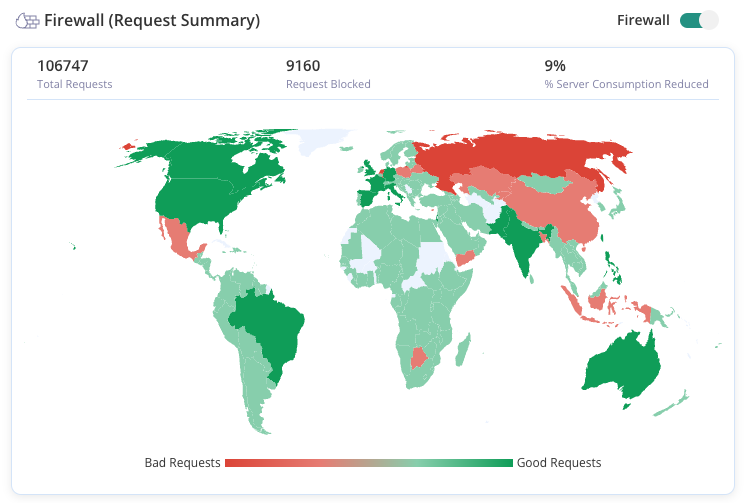
- Install and Configure Firewalls: Your first step is to set up firewallsto create a barrier between your internal network where cardholder data is handled. Security plugins like MalCare include a web application firewall (WAF) that does this specifically for your website.
- Document Your Rules: This creates a clear record of what’s allowed and what’s blocked. This is essential for security reviews and troubleshooting.
- Review Rules Regularly: Hackers are always finding new ways to attack. You must review your firewall and router rules every six months to ensure they are still effective.
Requirement 2: Apply Secure Configurations to All System Components
Hackers love easy targets. This requirement is about hardening your systems so they aren’t low-hanging fruit for attackers.
- Change All Vendor Defaults: Before you deploy any new device or software—be it a router, server, or even a WordPress plugin—your first action must be to change all WordPress credentials like “admin/password.”
Expert Advice: Don’t forget to change phpMyAdmin password and other WordPress credentials as well.
- Develop Configuration Standards: Create a documented standard for how to securely configure every type of system you use. This ensures consistency and makes sure no critical security setting is overlooked when new components are added.
- Maintain an Inventory: You can’t protect what you don’t know you have. Keep a detailed inventory of every piece of hardware and software that is within the scope of PCI DSS. This is critical for managing updates, patches, and security configurations.
Goal 2: Protect Cardholder Data
Once your network is secure, the next logical step is protecting cardholder data itself. This goal is split into two critical parts: securing data when it’s stored on your systems (data at rest) and protecting it as it travels across the internet (data in transit).
Requirement 3: Protect Stored Cardholder Data
WooCommerce CNP fraud is a huge reason why cardholder data needs to be protected. The golden rule here is simple: don’t store what you don’t need. And for the data you absolutely must keep, lock it down so it’s unreadable and useless to thieves. I’ve seen too many businesses get into trouble for holding onto sensitive data for no good reason.
- Implement Data Retention Policies: You must have a formal policy that dictates what data you keep, where you keep it, and for how long. Once you no longer have a legal or business need for it, you must have a process to securely destroy it.
- Never Store Sensitive Authentication Data: This is a strict one. After a transaction is authorized, you are prohibited from storing the full credit card number, the CVV code (the three or four-digit number on the back), or PIN data. Storing this is a major compliance failure.
- Encrypt Stored Cardholder Numbers: Any cardholder numbers you do store must be rendered unreadable through strong encryption. This means using industry-tested algorithms and processes to scramble the data, making it worthless without the proper decryption key.
- Implement Secure Key Management: Encryption is only as strong as the key used to lock and unlock the data. You need documented policies for managing your cryptographic keys, including how they are generated, stored, distributed, and retired.
Requirement 4: Encrypt Transmission of Cardholder Data Across Open, Public Networks
When a customer enters their credit card details on your site and clicks “buy,” that data travels across the public internet to your payment processor. This requirement ensures that data is sealed in a virtual armored car during its journey.
- Use Strong Cryptography and Protocols: You must use strong encryption protocols like TLS (Transport Layer Security) to protect data in transit. This is what puts the “s” in “https://” and the padlock icon in a browser’s address bar.
Expert Advice: Install an SSL/TLS certificate on your website. This is the fundamental step to enabling HTTPS, which encrypts all data transmitted between your customers and your server. Without it, you are automatically non-compliant with this critical requirement.

- Secure Wireless Networks: If you use wireless networks to transmit cardholder data, they must be configured with robust security, including strong encryption for authentication and transmission.
- Never Send Unprotected PANs: It should go without saying, but never send unprotected Primary Account Numbers (PANs) via insecure methods like email, instant messaging, or chat. These channels are not encrypted and are easily intercepted.
Goal 3: Maintain a Vulnerability Management Program
A secure system today can be a vulnerable one tomorrow. Hackers and security researchers are constantly finding new flaws in software. This goal is about having a program to continuously find and fix these weaknesses before they can be exploited.
Requirement 5: Protect All Systems and Networks from Malicious Software
Malware, viruses, and trojans are some of the most common tools attackers use to steal data. This requirement is about having an active defense system to detect and eliminate these threats.
- Deploy Malware scanning Software: You must have malware scanners installed that can identify malicious software. This is where a tool like MalCare is essential, as it automates daily scanning and removal for your website
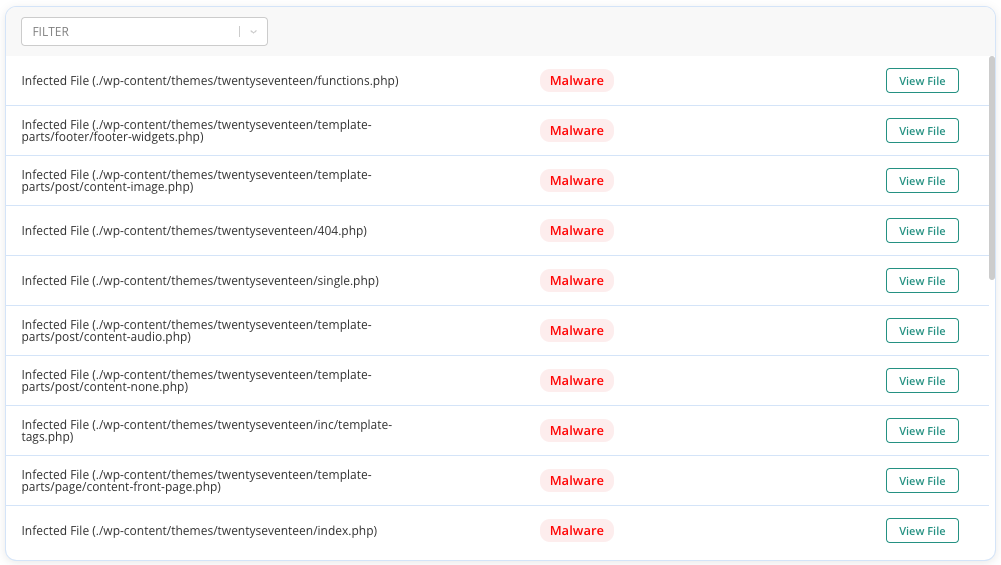
- Keep It Current and Active: Your firewall and malware scanner should be regularly updated to identify the latest malware..
Requirement 6: Develop and Maintain Secure Systems and Software
This is all about proactive maintenance. Using outdated software with known vulnerabilities is like leaving your front door wide open for criminals.
- Install Security Patches Promptly: When a developer releases a security patch for software you use (like WordPress, WooCommerce, or your plugins), you must update your WordPress sitewithin a month of its release.
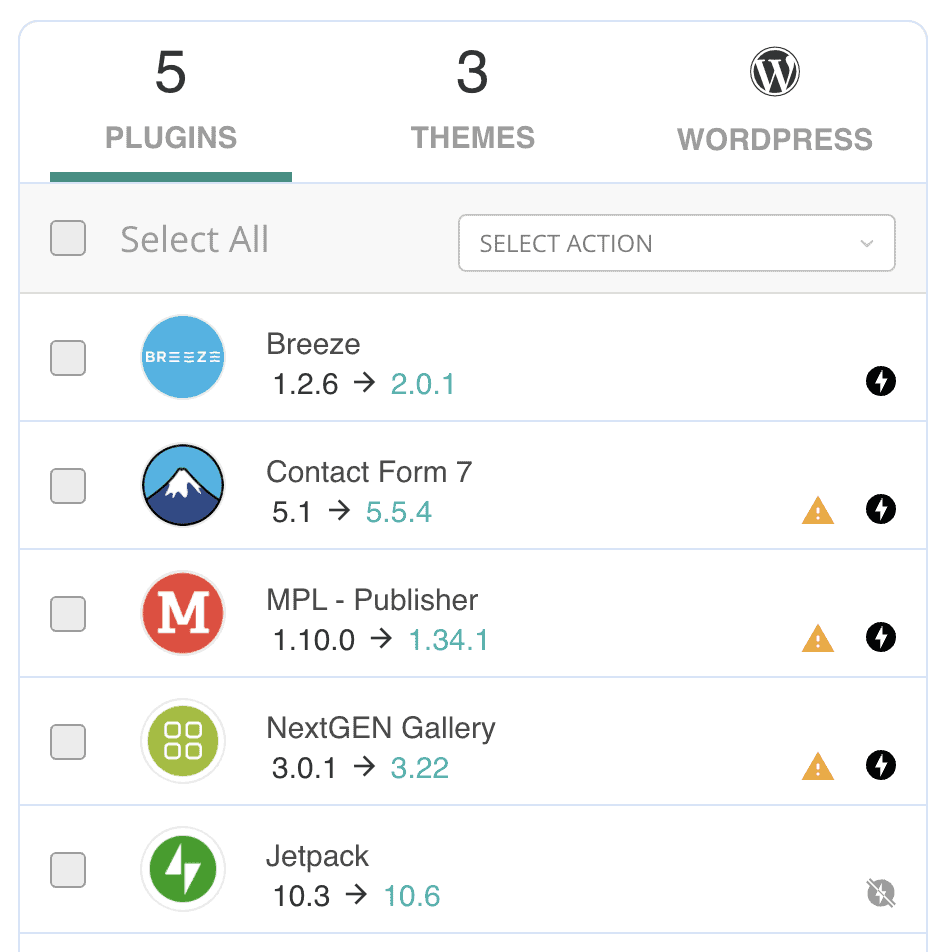
Expert advice: Vulnerability scanners in plugins like MalCare can alert you to these needed updates.
- Develop Securely: If you develop your own applications or custom plugins, they must be built according to secure coding guidelines (like the OWASP Top 10) to prevent common vulnerabilities.
- Implement Change Management: You need a formal process for all changes to your systems. This ensures that any update or modification is tested and approved, preventing accidental security holes from being introduced.
Goal 4: Implement Strong Access Control Measures
Not everyone in your company needs access to sensitive customer data. This goal is built on the “principle of least privilege,” which means only giving people access to the specific data and systems they absolutely need to do their jobs, and nothing more.
Requirement 7: Restrict Access by Business Need-to-Know
This is the foundation of access control. Access should be a privilege, not a default setting.
- Implement Role-Based Access Control (RBAC): Your default access rule should be “deny all.” You then grant access to specific roles and users based on their exact job responsibilities.
- Restrict Access: An employee in marketing, for example, should never have access to stored credit card information. Access must be restricted to the minimum necessary for a role.
Requirement 8: Identify Users and Authenticate Access
Every person who accesses your systems must have a unique identity, and they must be able to prove they are who they say they are. This prevents unauthorized users from getting in and creates accountability.
- Assign Unique IDs: Every user must have their own username. Shared accounts like “admin” or “webmaster” are not compliant because you can’t trace actions back to a specific individual.
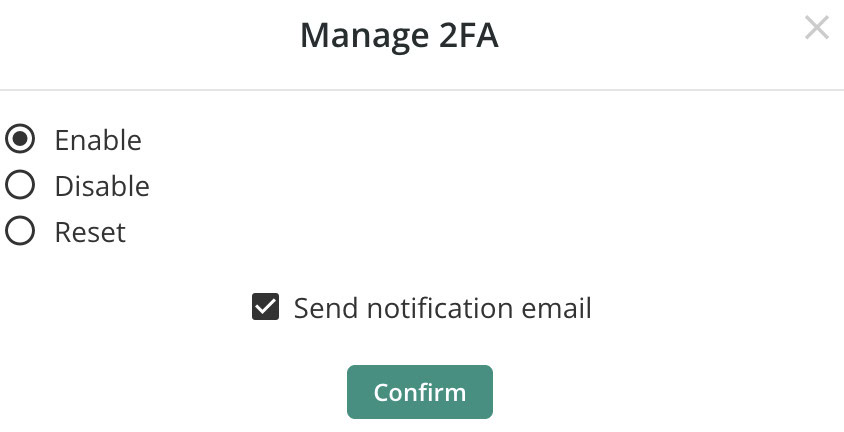
- Implement Multi-Factor Authentication (MFA): All users accessing the CDE must use 2FA or MFA on their login page. This requires them to provide more than just a password, such as a one-time code from their phone, to gain access.
Expert Advice: Good bot protection like this can also help with card testing attacks/
- Use Strong Password Policies: You must enforce strong password rules, including minimum length, complexity (using letters, numbers, symbols), and history (preventing reuse of old passwords).
Requirement 9: Restrict Physical Access to Cardholder Data
Cybersecurity isn’t just about digital threats. This requirement covers the physical security of the computers and servers that store or process customer data.
- Use Facility Entry Controls: Any sensitive area, like a server room, must be protected with physical controls like badge readers or keypads. You should use video cameras to monitor these areas.
- Maintain Visitor Logs: Anyone who is not an employee must be authorized before entering, sign a visitor log, and be escorted at all times within sensitive areas.
- Securely Destroy Media: When you dispose of old hard drives, paper printouts, or any other media containing cardholder data, it must be physically destroyed (shredded, incinerated, or degaussed) to make the data unrecoverable.
Goal 5: Regularly Monitor and Test Networks
You can’t assume your defenses are working. This goal is about being constantly vigilant. You must regularly monitor your systems for suspicious activity and proactively test them for weaknesses. Completing a PCI audit checklist often hinges on having good logs and test results.
Requirement 10: Track and Monitor All Access
This is about creating a detailed digital paper trail. If a breach occurs, these logs are often the only way to figure out what happened.
- Implement Audit Trails: You must have logging enabled on all system components. These logs must be detailed enough to link any action to a specific user, including what they accessed and when.

Expert advice: Use an activity log to help you track everything.
- Review Logs Daily: Logs are useless if no one looks at them. You need a process to review security logs every day for signs of anomalies or malicious activity.
- Retain Logs: You must keep your audit logs for at least one year, with the most recent three months kept online and easily accessible for analysis.
Requirement 11: Regularly Test Security Systems and Processes
This is where you actively try to find holes in your own security.
- Conduct Vulnerability Scans: You must run vulnerability scans at least once per quarter, and after any significant change to your network.
- Perform Penetration Testing: At least once a year, you need to conduct a penetration test, where you hire an ethical hacker to simulate a real-world attack on your systems to find exploitable weaknesses.
- Use Intrusion Detection/Prevention Systems: These tools monitor your network traffic for suspicious patterns and can either alert you to a potential attack (detection) or automatically block it (prevention).
Goal 6: Maintain an Information Security Policy
Finally, technology and controls are only part of the solution. Your security is only as strong as the people who use the systems. This final goal is about creating a formal information security policy and making sure everyone in the organization understands their role in protecting data.
Requirement 12: Maintain a Policy that Addresses Information Security
The next step is to create a consistent plan on how to prevent WooCommerce fraud.. This policy is the master document for your entire security program and how to prevent it from happening. It sets the rules and expectations for everyone.
- Establish a Comprehensive Security Policy: You must have a formal, documented information security policy that sets the tone for your company’s security posture. It must be published and accessible to all relevant personnel.
- Review the Policy Annually: Your security policy must be reviewed at least once a year and updated to reflect any changes in business objectives or the threat landscape.
- Implement a Security Awareness Program: You must provide security awareness training to your staff upon hiring and at least annually. They need to understand the sensitivity of cardholder data and their responsibilities in protecting it.
- Establish an Incident Response Plan: You must have a formal plan for what to do in the event of a data breach. This plan should be tested annually to ensure everyone knows their role when a crisis hits.
How to Get Started: 4 Steps for PCI DSS Compliance
Now that you’ve seen all 12 requirements, the big question is: where do you actually begin? The path for how to become PCI compliant can feel overwhelming, but I’ve always found that breaking it down into a manageable project is the key. You don’t have to boil the ocean. Just follow these four fundamental PCI compliance steps in order.
1. Determine Your Scope
Before you can protect anything, you need to know exactly what you’re responsible for protecting. This is the most critical first step. Your “scope” includes every system, process, and person that interacts with or could affect the security of cardholder data. This defined area is called your Cardholder Data Environment (CDE).
Think of it like this: if cardholder data is a river, your scope includes the river itself and both of its banks. Any system the data flows through is in scope. Any system that can connect to those systems is also in scope. The goal is to make this environment as small and isolated as possible to simplify your compliance efforts.
2. Perform a Self-Assessment
Once you know what’s in scope, it’s time for an honest evaluation of your current security. You do this using a Self-Assessment Questionnaire (SAQ), which is the official checklist provided by the PCI Security Standards Council. There are different types of SAQs depending on how you process payments, so check with your payment processor to ensure you’re using the right one. The SAQ consists of a series of “yes” or “no” questions that map directly to the 12 PCI DSS requirements.
3. Remediate and Fix Gaps
This is where you do the actual work. Go through your completed SAQ, and for every question you answered “no” to, create a to-do list. Each “no” represents a gap between your current security and the PCI standard. Fixing these gaps could involve a range of tasks, such as:
- Implementing new technology: This could mean installing a website security tool like MalCare for its firewall and malware scanning capabilities.
- Updating policies: You might need to write or update your information security policy or create a formal incident response plan.
- Training your staff: Your team needs to be aware of their security responsibilities.
You must address every single gap. Your goal is to be able to honestly answer “yes” to every applicable question on the SAQ.
4. Report and Validate
After you’ve fixed all the gaps and can attest that you meet all the requirements, it’s time to make it official. You’ll complete an Attestation of Compliance (AOC), which is a document you sign to formally declare your compliance to the payment card brands and your acquiring bank. For most small and medium-sized businesses (Levels 2, 3, and 4), the SAQ and AOC are all that’s required.
However, if you’re a Level 1 merchant, this step is much more involved. You must hire an independent Qualified Security Assessor (QSA) to perform a formal, on-site audit and submit a detailed Report on Compliance (ROC).
Why PCI DSS Compliance is Crucial for Your Business
WooCommerce fraud prevention is an important part of your website’s maintenance. PCI DSS compliance is an excellent framework to follow. Here are some reasons why I think it’s important:
- Avoid Crippling Financial Penalties: If you’re not compliant during a data breach, the fines from payment card issuers are severe.
- Prevent Damaging Data Breaches: The requirements in a PCI audit checklist aren’t arbitrary. They are proven security controls that work to protect your customers’ financial data.
- Build and Maintain Customer Trust: Shoppers are smarter than ever about online security. They will abandon a cart in a heartbeat if a site feels insecure or untrustworthy. Achieving PCI compliance is a clear signal that you take their security seriously.
- Protect Your Hard-Earned Reputation A WordPress hack can destroy your brand’s reputation overnight. The financial cost is often less damaging than the long-term loss of trust and the negative press that follows.
Final Thoughts
Working through a PCI DSS compliance checklist is a huge step, but it’s critical to understand that this isn’t a one-and-done project. Achieving compliance is the starting line, not the finish line. The digital landscape is constantly shifting, with new threats emerging every day. True security comes from treating compliance as an ongoing process of assessment, remediation, and constant monitoring.
This is where having the right tools becomes a game-changer. A reliable security plugin like MalCare works tirelessly in the background, handling the repetitive, critical tasks that form the backbone of your security posture. By automating daily malware scanning, vulnerability detection, and firewall protection, MalCare provides the consistent, reliable security you need to stay compliant and protected long after you’ve checked the last box on your list.
FAQs
What are the 12 requirements for PCI DSS compliance?
The 12 requirements are the core technical and operational rules for securing cardholder data. They are organized into six main goals:
- Build and Maintain a Secure Network and Systems (Requirements 1-2)
- Protect Cardholder Data (Requirements 3-4)
- Maintain a Vulnerability Management Program (Requirements 5-6)
- Implement Strong Access Control Measures (Requirements 7-9)
- Regularly Monitor and Test Networks (Requirements 10-11)
- Maintain an Information Security Policy (Requirement 12)
What is PCI DSS compliance?
PCI DSS (Payment Card Industry Data Security Standard) is a mandatory set of security standards for any business that accepts, processes, stores, or transmits credit card information. It was created by major card brands like Visa and MasterCard to reduce credit card fraud and ensure a secure payment environment.
What are the steps for PCI DSS compliance?
The process for achieving PCI DSS compliance can be broken down into four key steps:
- Determine Your Scope: Identify all the systems and processes that make up your Cardholder Data Environment (CDE).
- Perform a Self-Assessment: Use the official Self-Assessment Questionnaire (SAQ) to evaluate your security against the 12 requirements.
- Remediate and Fix Gaps: Address any areas where your security falls short of the PCI DSS standard.
- Report and Validate: Complete the necessary documentation, like an Attestation of Compliance (AOC), to formally report your compliance.
What are the 4 levels of PCI compliance?
The four levels of PCI compliance are based on the volume of card transactions a business processes annually. They determine the validation requirements for compliance.
- Level 4: Fewer than 20,000 e-commerce transactions per year.
- Level 3: 20,000 to 1 million e-commerce transactions per year.
- Level 2: 1 to 6 million transactions per year.
- Level 1: Over 6 million transactions per year, or any merchant that has suffered a data breach.