Solid Security, formerly known as iThemes Security, is a security plugin for WordPress designed to harden site defenses. The plugin has recently undergone a significant rebranding and architectural update to focus on vulnerability management.
I will provide an in-depth review of Solid Security, assessing its effectiveness, ease of use, compatibility with other WordPress plugins, and whether it’s worth the cost. By the end of this article, you should have a better understanding of whether it is the right choice for your website’s security needs.
Solid Security functions as a collection of login security tools and vulnerability alerts rather than a full security suite. It does not contain a malware scanner or a malware removal tool. It cannot protect a site from an active infection or clean a site that has already been hacked. I found it alright for some preventative hardening, but it failed to protect my test site during an active attack.
The plugin has rebranded its scanner as a site check. This feature verifies if the site is listed on the Google Safe Browsing list and checks for outdated software. It does not perform a deep scan of the server files or the database to identify malicious code.
Vulnerability detection has improved because the plugin now cross-references your installed themes and plugins with the Patchstack database. This provides more accurate alerts for known security flaws in the WordPress repository.
Many site owners find that a plugin focused on login security is not a substitute for a comprehensive security plugin. A complete security strategy usually requires a tool that can actively block malicious traffic and remove existing malware. There are certain features that you can’t do without: malware scanner, malware cleaner and firewall. These should be top of your list when deciding if the plugin is a good fit.
🚨 It is notable that the official website for Solid Security uses a different security service to protect its own infrastructure. This suggests that even the developers recognise that their plugin is not sufficient for high-stakes environments.
Solid Security review verdict
If you are looking for a lightweight tool to secure your WordPress login and track vulnerabilities, Solid Security is a contender. However, our 2026 testing reveals it is not a complete security solution. While the Patchstack integration adds value for virtual patching, the plugin still lacks an active malware scanner and will fail under a real attack.
- Poor firewall logic ❌
- No malware scanner ❌
- No malware removal ❌
- Vulnerability scans ✅
- Robust login security ✅
- Brute force defense ⚠️
- No server overhead ✅
- Patchstack virtual patching ✅
- Passwordless login support ✅
Not recommended as a standalone defence for WordPress sites already infected with malware or those requiring real-time, high-performance traffic filtering.
Core security protection
Malware scanner
Solid Security includes a feature called Site Check. This is NOT a malware scanner; it merely scans your site for security issues. The problem with “security issues” as a term is that it is very vague; or it refers to vulnerabilities.
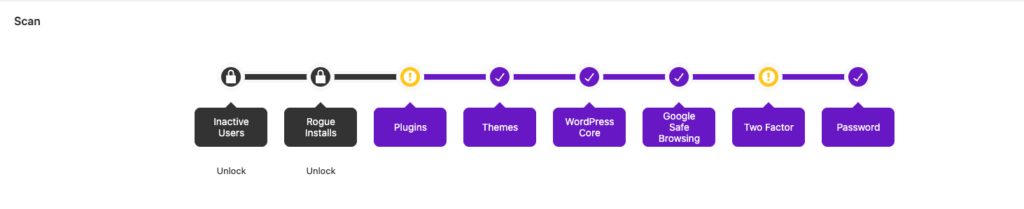
What the Site Check does
The Site Check in Solid Security is an external scan. It checks your domain against the Google Safe Browsing database to see if you have been blacklisted.
Therefore, while Google is conducting a malware scan on your site, Solid Security isn’t. It is helping you figure out if your site has landed on the Google Transparency Report, colloquially called the Google blacklist. You absolutely do not need Solid Security to run this scan for you. You can go to Google’s site and get the info yourself in literal seconds.
It also looks for vulnerable plugins and themes.
What a malware scanner does
A malware scanner inspects the code within your WordPress files and database for malicious strings or backdoors. A good malware scanner will also function as a scanner for vulnerabilities and blacklist status, but it must be able to identify malware hidden inside your server files.
✋ What’s missing: A true scanner (like MalCare Security or Wordfence) looks for malicious backdoors in your server files. Solid Security simply cannot see them.
Malware removal
Since Solid Security does not detect malware within files, it does not provide any malware removal tools. There is no automated or manual cleanup feature to repair a hacked site. Users must rely on external services or manual file replacement if an infection occurs. The plugin is designed for some login security rather than post-hack solutions.
They do offer a manual malware removal service. We were not able to test this service, and cannot speak to its effectiveness.
✋ What’s missing: A malware removal tool that helps you address the critical problem at hand, when your site is hacked.
Firewall
The WordPress firewall in Solid Security has transitioned to a vulnerability-focused model through a partnership with Patchstack.
The pro version uses this data to apply virtual patching.
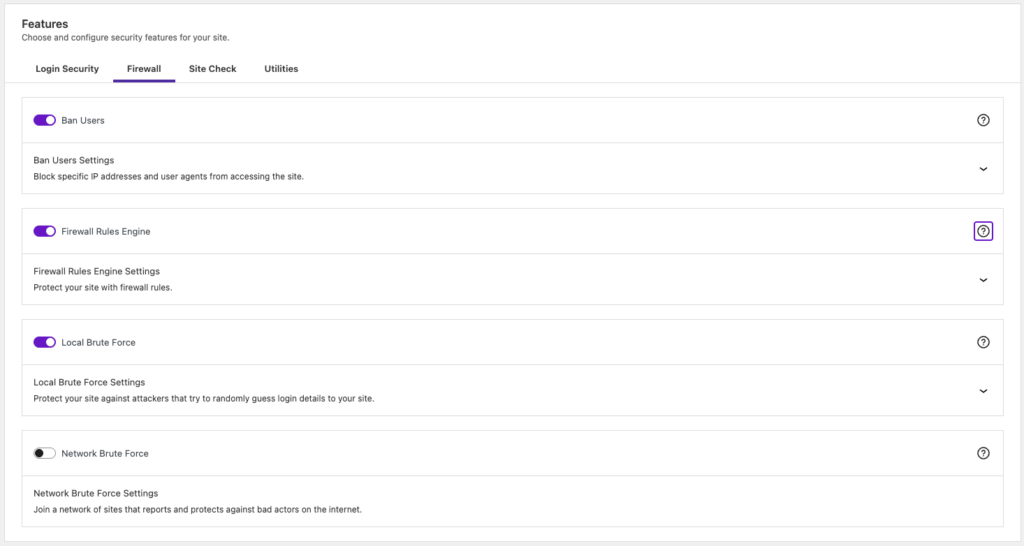
Virtual patching attempts to block traffic that targets a specific security flaw in a plugin or theme. This is meant to protect the site before a developer can release a patch or before a user can update the software.
However, virtual patching is often a temporary measure because it only blocks known exploit paths. Many vulnerabilities remain hidden or unpatched for long periods. Hackers can often find ways to bypass these rules by slightly changing the attack pattern.
The core firewall mechanism still relies on writing security directives to your server files. It writes rules to the .htaccess file for Apache servers or the nginx.conf file for Nginx servers.
This method is primarily used to manage a local blacklist for login security. Testing showed that even when an IP address was manually added to the blacklist, the local ban did not always trigger as configured.
These testing results show that the firewall’s protection is inconsistent when dealing with active infections.
The plugin also shares data with a network brute force feature to ban IPs reported by other users.
Relying on server configuration files for security rules can lead to significant server overhead.
If the list of blocked IPs grows too large, the server must check every request against a massive file. Managing long lists of blocked IPs in these files can lead to server performance issues and is less efficient than a cloud-based firewall that filters traffic before it reaches the server. It can block legitimate traffic if the file becomes corrupted or if the rules are too broad.
Login protection
Solid Security uses local brute force protection to limit the number of failed login attempts. This feature tracks the login attempts made from a specific IP address. If the threshold is exceeded, the plugin locks out that IP for a set duration.
To test this feature, I set up the plugin to lock us out of my account after 10 attempts with the wrong password or username. I ran this test on two different types of sites. On a normal site, I was locked out after 10 attempts, yet on the hacked test site, I got up to 100 attempts and wasn’t blocked. The blocked attempts were logged as network brute force attacks, while the allowed ones were local brute force attacks.
I even tried manually brute forcing the normal site, but despite the IP being removed from the no-ban list, I still wasn’t blocked. It should have locked me out for 15 minutes, according to the configurations. But no luck there.
It’s interesting to note that any mistaken login is categorised as a brute force. The feature is temperamental and unpredictable.
The plugin also offers a network-wide brute force protection feature. This shares data across all sites using the plugin to ban known malicious IPs before they reach your site.
While these features help prevent automated guessing attacks, they do not stop more sophisticated distributed attacks.
These settings are enforced by writing directives to the .htaccess or nginx.conf files. Relying on local server files to manage these bans can lead to performance issues if the list of blocked IPs becomes too large.
Vulnerability detection
The vulnerability detection feature in Solid Security, when it was iThemes, was unreliable. It often produced inaccurate reports or failed to identify active vulnerabilities in popular plugins.
The detection was largely based on a limited internal database that was slow to update. This led to a high rate of false negatives where users were not alerted to critical security flaws on their sites.
The recent integration with Patchstack has significantly improved the quality of these reports.
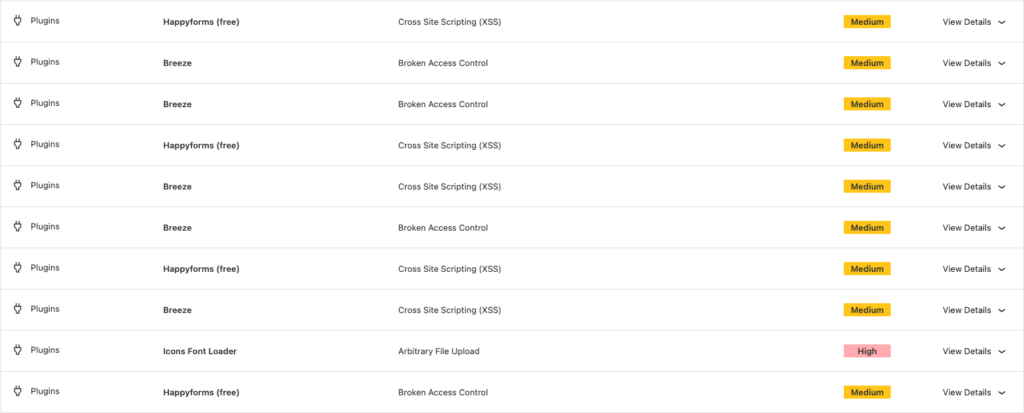
The plugin now scans the installed versions of your WordPress core, plugins, and themes against one of the most comprehensive vulnerability databases in the industry.
It provides an alert when a specific exploit is discovered during the Site Check scan. This reporting is now considerably more accurate.
However, the problem with vulnerability scanners is that the detection is always limited to known vulnerabilities and cannot identify zero-day exploits or custom code flaws.
Additional security features
Two-factor authentication
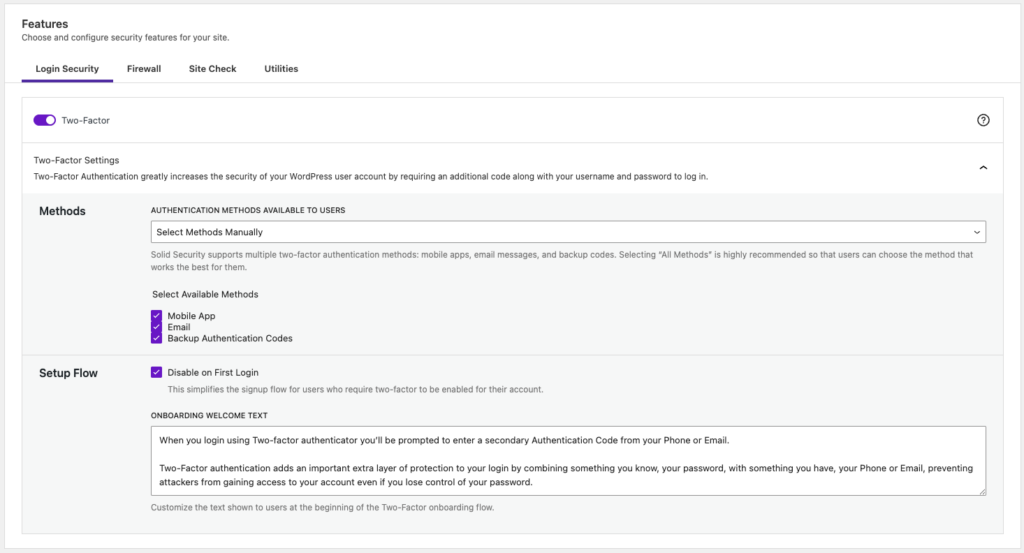
The two-factor authentication feature is one of the more functional tools in the plugin. It supports multiple methods including mobile apps like Google Authenticator, email codes, and backup codes.
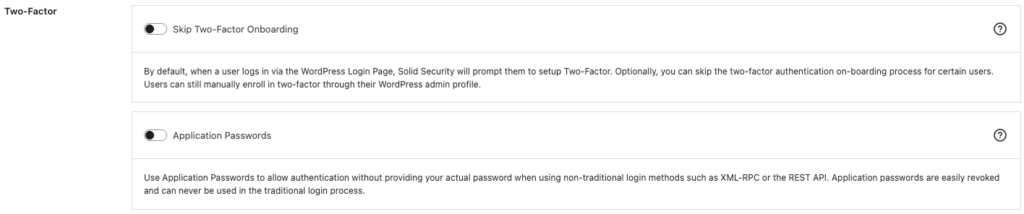
It also allows administrators to force specific user roles to use two-factor authentication. This adds a necessary layer of security to the login process by requiring a secondary device.
However, it only protects the login page. It does not prevent attacks that bypass the login screen entirely by exploiting plugin or theme vulnerabilities.
Additionally, it is possible to set 2FA based on user roles, as well as separate application passwords for REST API and XML-RPC which cannot be used for traditional logins. This setting can be found in the user profile, and can be set from there.
However, due to security concerns, XML-RPC is usually disabled, limiting the utility of these separate passwords.
Database backups
Solid Security includes a feature to create and schedule database backups. These backups can be sent to an email address or saved locally on the server.
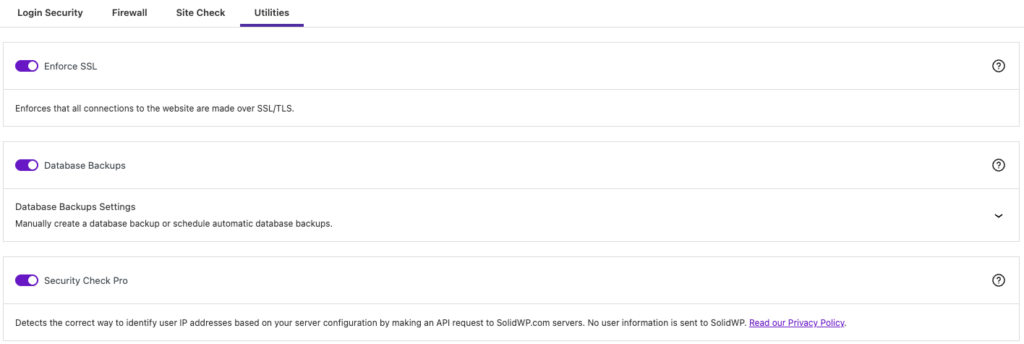
This feature does not include file system backups. A database backup alone is insufficient to restore a site after a hack on a WordPress site, or even server failure.
Restoring a database backup after a hack is generally a last-resort solution.
Malware often targets database tables, specifically for infections like malicious redirects or unauthorised admin users. If the database was already compromised when the backup was taken, restoring it will simply reintroduce the original malware to the site.
Use a dedicated backup plugin for more comprehensive data protection.
Storing backups on the same server as the website also creates a significant security risk.
Hardening features
Solid Security does have a few more features up its sleeves, but they are of limited security value.
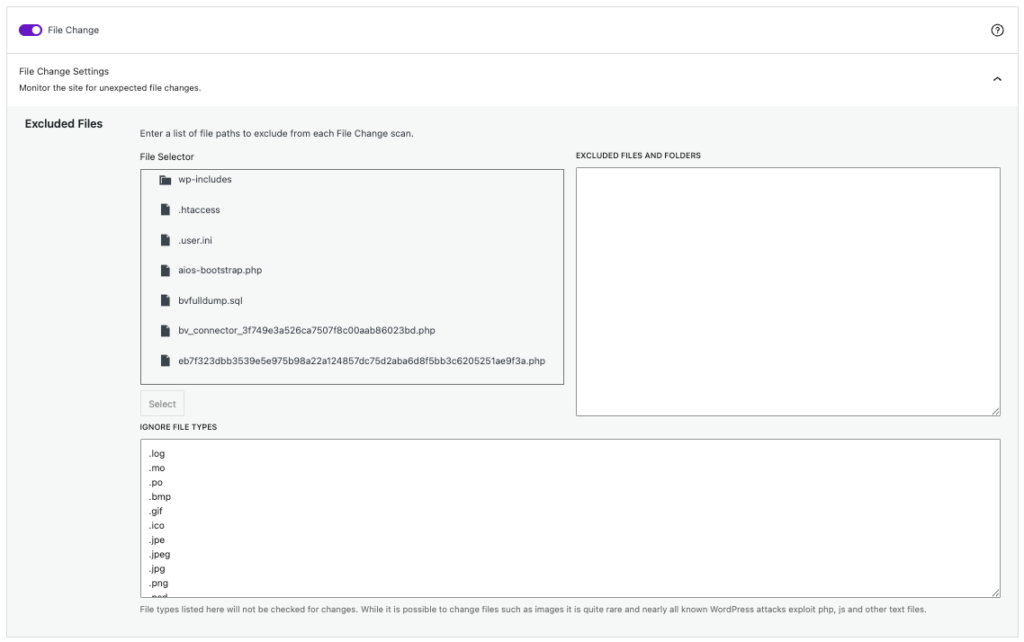
1. File monitoring: As it stands, this isn’t a feature you can rely on for security. You can monitor files and folders for unexpected changes, but there are a few problems with this. You need to know which files to monitor and be able to tell good changes from bad changes. Plus, hackers can alter the modification dates of files, so I’m not sure how this feature will handle that.
The file extension exclusion list also includes JPEG and ICO files, which have been known to carry malware. It also doesn’t detect plugin or theme installations, plugin updates, or changes to posts and pages.
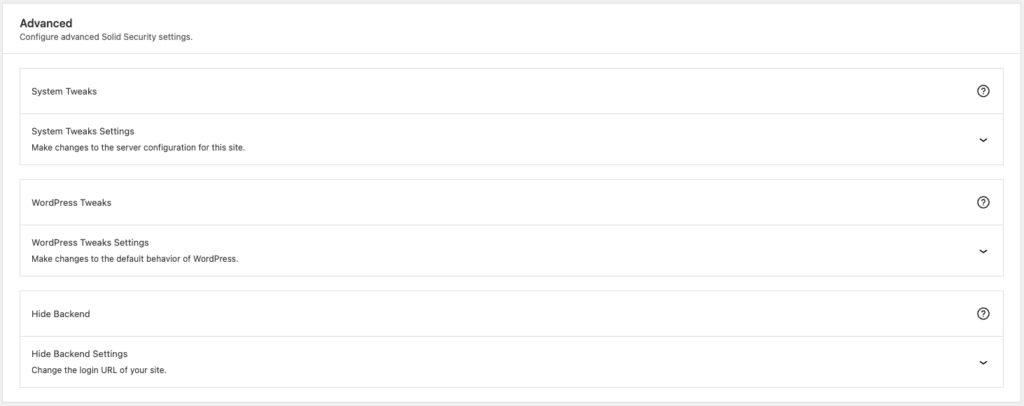
2. Hide backend settings: This is a setting to change the login URL of your WordPress site. This is a common security-through-obscurity tactic, and rarely has any real value.
We have often encountered people who have forgotten or lost the changed URL, and then been forced to take drastic measures to log into their sites. On top of this very real issue, changing the login URL doesn’t prevent other login attacks.
3. Password management: Force users to set strong passwords, or ones that were not discovered in a breach. Both of these practices are critical for good password security, however we could not test their effectiveness to review them adequately.

4. User management: Sure, you can set security settings based on user roles, but many of them are redundant. Strong passwords, for example, should be a given for all users. There are a plethora of options, which look impressive at first glance, but realistically, you don’t need to go into granular detail. Because, if one user-level account is hacked, the hackers can potentially escalate their privileges to admin level. Bottom line is that this feature isn’t as helpful as it seems.
Setup and usability
Installation and configuration
So far, I haven’t had much luck with the security features. But what about usability; is it easy to install and configure?
Installation
Installing the free version is very easy, although there is a lengthy and ultimately unnecessary setup process. For the pro version you need to sign up for a license and download the plugin from their site.
Ease of use
Solid Security is really easy to use. However, the technical jargon threw me off. It will be tough for everyday users to understand.
Notifications and alerts
No alerts at all. I am all for avoiding excessive alerts, but with Solid Security no matter what settings you try and change, you won’t get any. Even if you want notifications, you won’t get them.
Other factors to consider
Solid Security is not much of a security plugin. But, beyond security, there are a few other factors to consider. Here, I will talk about the plugin’s impact on the server and if the support is good.
Impact on server resources
When it comes to server resources, Solid Security gets a perfect score. There’s no impact at all: it’s so light that it’s almost like the plugin isn’t even there or doing anything.
Help and support
As for help and support, I didn’t test it out for myself. However, looking through the reviews on the WordPress repository indicates that it’s not great.
Alternatives and choosing a security plugin
Alternatives to Solid Security
Since I’ve talked about the inadequacy of Solid Security in this review, you need options. Which are the best plugins for WordPress security? Here are the top picks:
- MalCare: MalCare is the best security plugin out there; the malware scanner is super accurate, the firewall is reliable, and an automated malware cleaner is very effective. Each plan includes unlimited malware removal by a team of security experts. Apart from two-factor authentication, you’ll find every major and minor WordPress security feature in MalCare. You can’t go wrong with it.
- Wordfence: Wordfence’s free version offers pretty good protection, including a scanner and firewall. The firewall is regularly updated, but the free version lags behind the premium. If malicious content is found, it will require upgrading to a more expensive plan to remove it safely.
- Sucuri: All of Sucuri’s paid plans come with unlimited malware removal. The downside is that the scanner isn’t always accurate, so you’ll need to be aware of any potential malware issues before you can get the removal feature to work. You can also go through our comparison between Solid Security and Sucuri.
How to choose a WordPress security plugin
Picking the perfect security plugin for your website can be a challenge. With so many solutions out there, it can be difficult to know which one is the right fit for your needs. In this section, I’ll go over the key features you should consider when deciding on a security plugin, including scanning tools, malware protection tools, firewalls, and more.
Crucial security features
- Malware scanning: Trying to stay ahead of the bad guys can feel like a never-ending game of cat and mouse. Thankfully, there are effective ways to automatically detect malware on sites. However, not all methods that security plugins use to identify malware are equally effective. For example, the signature matching mechanism used by Wordfence compares the code of any suspected malware against a database of known malware signatures. The database has to be regularly updated so that threats are detected. As you can imagine, new malware and zero-day threats aren’t caught. MalCare uses a far more reliable signal matching mechanism, which reviews code to check whether it has malicious intent. This way, even the newest threats are caught by the scanner.
- Malware removal: If your site’s been hit with malware, it can be tricky to get rid of. In some cases, you can delete the malicious files and repair the affected site files. For more complicated cases, though, you may need to enlist the help of an experienced security pro. Many security plugins offer malware removal as a premium feature for their expertise. MalCare is the only one with a reliable automatic malware removal feature, and unlimited cleanup by experts in every plan.
- Firewall: No security setup is complete without a good, reliable firewall. Firewalls act as filters for incoming traffic and help keep malicious code from infiltrating your website. Firewalls should be frequently updated, maintain a comprehensive list of logs, and load before WordPress to be really effective.
Other security features
- Vulnerability detection: Nobody wants to find out their website has been hacked because of a security hole they didn’t know existed. A vulnerability scanner can help you spot any vulnerabilities in your WordPress core, plugins, and themes, so you can patch them up quickly.
- Two-factor authentication: To help keep your user accounts secure, it’s worth considering two-factor authentication (2FA). This adds an extra layer of security by requiring two different methods of authentication before allowing a user to log in. With 2FA, users need both something they know (like a username and password) and something they have (like a phone or security token).
- Login protection: It’s essential to protect your WordPress admin area from brute force attacks. These are automated attempts to break into your account by randomly guessing your username and password. To protect yourself, you should install a plugin with login protection features.
- Activity log: If you want to keep an eye on what’s happening on your website, an activity log is a great tool to have. It’ll help you monitor all the changes happening on your site and identify any security events quickly. This can help you respond to threats quickly and keep your website safe and secure.
Potential problems with security plugins
- Server impact: Security plugins can put a strain on your server resources, making your site slower and less responsive. This is because they conduct malware scans on your site, or use your site’s server resources to power the firewall. Wordfence is the worst offender on this front. On the other hand, MalCare is designed to carry out its scans on its own server, so it won’t use any of your own resources. Try to look for plugins that don’t slow down your website.
Solid Security review conclusion
Solid Security has evolved from its origins as iThemes Security by shifting toward a vulnerability-centric approach.
The integration with Patchstack has significantly improved its ability to report on known risks and provide virtual patching.
However, the plugin still lacks essential features for a comprehensive security strategy, such as a malware scanner and a removal tool.
All in all, look elsewhere for WordPress security.
FAQs
Solid Security is a WordPress security plugin, formerly called iThemes Security, that focuses on login security, user authentication, vulnerability management, and security logging. It also uses Patchstack data to identify and virtually patch known plugin and theme vulnerabilities.
Yes. A free version of Solid Security is available in the WordPress plugin repository.
Solid Security Basic provides manual hardening, brute force protection, basic site scans, and limited two-factor authentication. Pro adds more automation and features such as real-time vulnerability patching, geographic blocking, and scheduled scans.
Solid Security emphasizes login protection, user policies, hardening, and virtual patching. Wordfence emphasizes an endpoint firewall, live traffic monitoring, and signature-based malware scanning.