

Website security and SEO work together to improve traffic and user experience. SEO security is important to reduce the chances of website hacks and drops in traffic. It also protects the data of your readers and shoppers.
Bad SEO security cause Google blacklist warnings that can damage your domain entirely. Even minor security lapses like outdated plugins or weak passwords can kill your SEO slowly. This is you need a comprehensive security plan.
This guard shows you what you need to do to boost your SEO security. We’ll talk about what plugins and tools you need to help you out. We’ll walk you through everything you need to know.
A security plugin like MalCare can shoulder the weight of SEO security. It offers an automatic malware scanner, reliable firewall protection and easy malware cleaning.
SEO Security Measures
Strong WordPress security is what separates thriving websites from those that vanish from search results overnight. Here are some measures we recommend you put into place.
1. Implementing Malware Scanning
Malware scanning is your first line of defense against SEO-destroying threats. You have to systematically examine your website’s files, database, and code to identify malicious content. You need to compare your site’s current state against known malware signatures to spot suspicious patterns.
In our experience, there are three different ways to scan for malware:
-
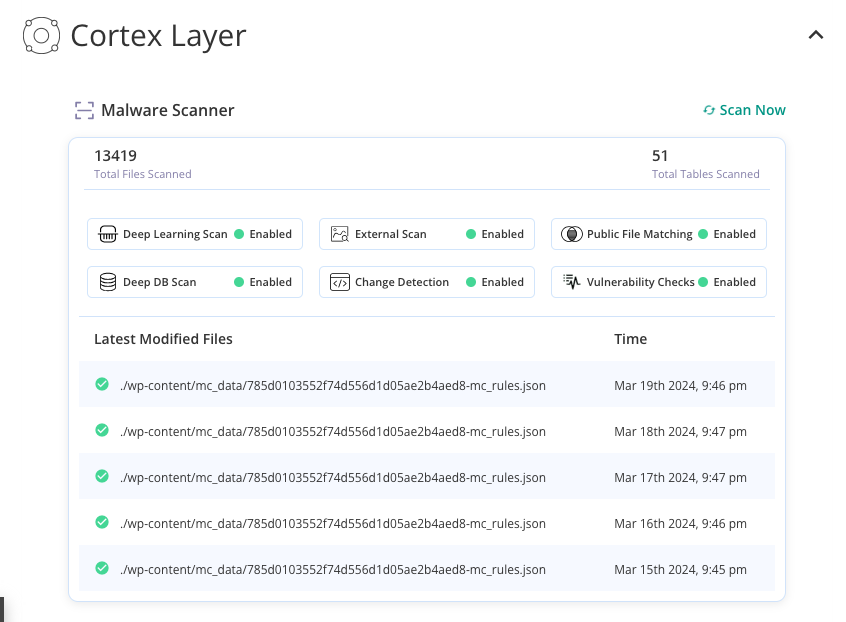
Malware Scanner Plugin: Installing a malware scanning plugin like MalCare is the most comprehensive to do so. This method provides continuous, real-time protection with automated threat removal and seamless integration with your existing workflow.
-
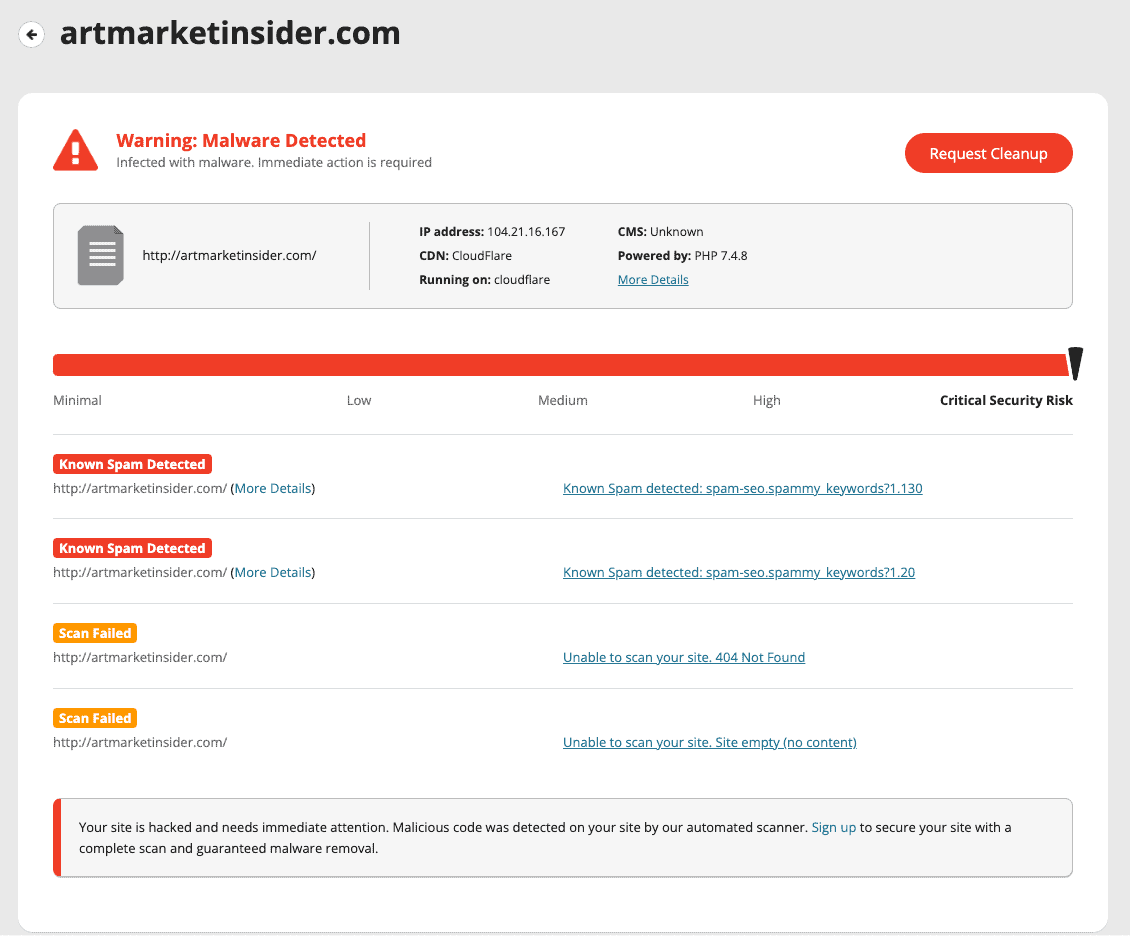
Online Scanning Tools: Sucuri SiteCheck and other online scanners can detect some surface-level threats, but they only scan publicly visible pages. They miss server-side malware, database injections, and admin-only infections that are invisible to external tools.
-
Manual Scanning: Some website owners attempt to scan files manually using FTP clients or command-line tools. However, this approach is fundamentally flawed. It requires extensive technical knowledge, consumes hours of time and risks missing sophisticated infections.
2. Deploying Firewall Protection
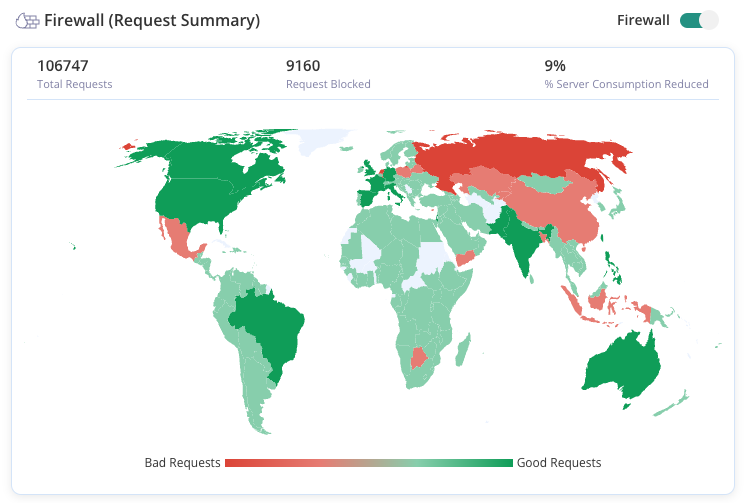
A WordPress firewall stands between your site and the internet to block WordPress attacks before it reaches your server. It examines every visitor, bot, and request trying to access your site. Legitimate users are allowed through while it stops hackers, spam bots, and automated attacks.
WordPress firewall plugins like MalCare automate this entire protection process without requiring technical expertise. They continuously update the threat databases, automatically block suspicious IP addresses, and filter malicious requests in real-time. They also use behavioral analysis to identify new attack patterns, ensuring your site stays protected against zero-day threats that traditional firewalls miss
3. Regular vulnerability patching
A website vulnerability scanner will regularly review what plugins and themes need to be updated. It is important to keep your site updated for security. Every piece of software on your site occasionally develops vulnerabilities, and developers regularly release patches (updates) to seal these gaps. When you delay or skip updates, you’re essentially leaving your front door unlocked.
⚠️ Warning ⚠️
A failed update can cause a plugin conflict and for your site to crash. This is especially true with critical plugins like a page-builder. But, updates are necessary for security. So, take extra precaution when updating your site.
Use tools like UpdateLens on MalCare’s dashboard, to assess an update before you push it through.
4. Securing User Access Points
Your WordPress admin login is often the first thing hackers target. This is because once attackers gain admin access, they can do a lot of damage to your content. Bad login security is also an overlooked security measure. Most of us use the same passwords for everything.
Here is a list of measures we would recommend:
- Strong, unique passwords with 12+ characters mixing letters, numbers, and symbols.
- Enable two-factor authentication (2FA) requiring a phone or app code beyond just passwords
- Change default usernames from “admin” to something less predictable
- User role restrictions giving team members only the access they actually need
- Session timeouts automatically logging out inactive users
- Limit login attempts to block brute-force attacks after failed tries
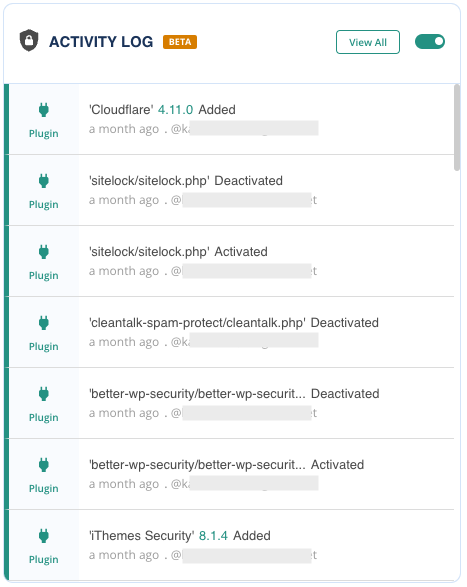
WordPress security plugins like MalCare automate most of these protections without technical complexity. You can enable 2FA options, and automatically block suspicious login patterns before they become successful breaches. They also offer an activity log that monitors suspicious login attempts.
5. Conducting Continuous Security Audits
Security audits act as your website’s regular health checkups. This includes scanning for vulnerabilities, malware or suspicious behaviour. You’re able to identify breaches in security before they become a big problem. You can quickly plug the breach and prevent it altogether.
We recommend you install a plugin like MalCare that can audit your site on a daily basis. It will flag suspicious behaviour and send you a notification. You can quickly log in to the dashboard and remove the malware if needed.
Impact of Bad SEO Security
There are different types of website security that needs to be implemented on your website. This is because security actively sabotages everything you’ve built. The harsh reality is that a single successful cyberattack can instantly destroy years of SEO progress.
- Google Blacklisting: “This site may be hacked” and other warnings can completely remove your pages from search results with Google blacklisting. Recovery involves cleaning the infection and submitting reconsideration requests which can take time.
- SEO Poisoning: SEO poisoning attacks involve hackers creating thousands of spammy backlinks from gambling sites, adult content, or pharmaceutical networks. They are deliberately trying to trigger Google’s unnatural link penalties against your domain.
- Stolen Credentials & Content Hijacking: Weak login security gives hackers direct access to your WordPress admin panel. They can steal your highest-performing content and republish it on scam or phishing sites that outrank your original pages.
- Site Speed Sabotage: Hackers often inject resource-intensive code like the Coinhive malware, a cryptocurrency miner. This will dramatically slow your page load times without obvious visual symptoms. When users experience slow load times, bounce rates skyrocket and dwell time plummets.
- Data Breaches & Trust Erosion: Some WordPress attacks allow hackers to access user databases, payment information and personal data. The trust damage extends beyond immediate visitors, as word-of-mouth about security breaches spreads through social media and industry networks.
Final Thoughts
SEO security is about protecting your site from hackers that can destroy your rankings. Every vulnerability you leave unpatched or every weak password you ignore is another opportunity for cybercriminals to destroy years of SEO investment. Thankfully, there are tools like MalCare that can save you all that heartache.
MalCare can help you quickly recover from malware infections and prevent Google penalties, and blacklist warnings. Combine that with safe updates and regular scanning and you’re good to go. Just install MalCare and let it run in the background.
FAQs
SEO security refers to the protective measures and practices that safeguard your website from cyber threats that can damage your search engine rankings and organic traffic. It encompasses malware protection, firewall deployment, vulnerability patching, secure user access controls, and continuous monitoring to prevent hackers from injecting spam links, stealing content, or triggering Google penalties. Essentially, SEO security ensures your website remains trusted by both search engines and users while protecting the SEO investments you’ve made in content, optimization, and link building.
The four main types of SEO are: (1) Technical SEO – optimizing website infrastructure, speed, crawlability, and security for search engines; (2) On-Page SEO – optimizing individual pages with targeted keywords, meta tags, headers, and content structure; (3) Off-Page SEO – building domain authority through backlinks, social signals, and external reputation management; and (4) Local SEO – optimizing for location-based searches through Google My Business, local citations, and geo-targeted content. Each type works together to improve your overall search visibility and rankings.
The four fundamental types of cybersecurity are: (1) Network Security – protecting data transmission and network infrastructure through firewalls and intrusion detection; (2) Application Security – securing software applications and plugins from vulnerabilities and exploits; (3) Information Security – protecting sensitive data through encryption, access controls, and backup systems; and (4) Operational Security – managing user access, security procedures, and ongoing threat monitoring. For websites, these translate to firewall protection, regular updates, secure data handling, and continuous security auditing.
SEO stands for Search Engine Optimization – the practice of improving your website’s visibility and ranking in search engine results pages (SERPs) like Google, Bing, and Yahoo. It involves optimizing various elements of your website including content quality, technical performance, user experience, and authority signals to help search engines understand, crawl, and rank your pages higher for relevant keywords. The ultimate goal of SEO is to increase organic (non-paid) traffic from users actively searching for information, products, or services related to your business.
SEO security is critical because cyberattacks can instantly destroy years of SEO progress and organic traffic growth. When hackers compromise your site, they often inject malware, spam links, or malicious redirects that trigger immediate Google penalties, blacklist warnings, and complete removal from search results. Beyond the direct ranking damage, security breaches erode user trust, increase bounce rates, slow site speed, and create the kind of poor user experience signals that search engines penalize. With MalCare’s comprehensive protection, you’re not just preventing attacks—you’re building the kind of secure, trustworthy website infrastructure that search engines reward with higher rankings and sustained organic growth.


