At MalCare, we have built one of the most advanced WordPress virtual patching systems in the world.
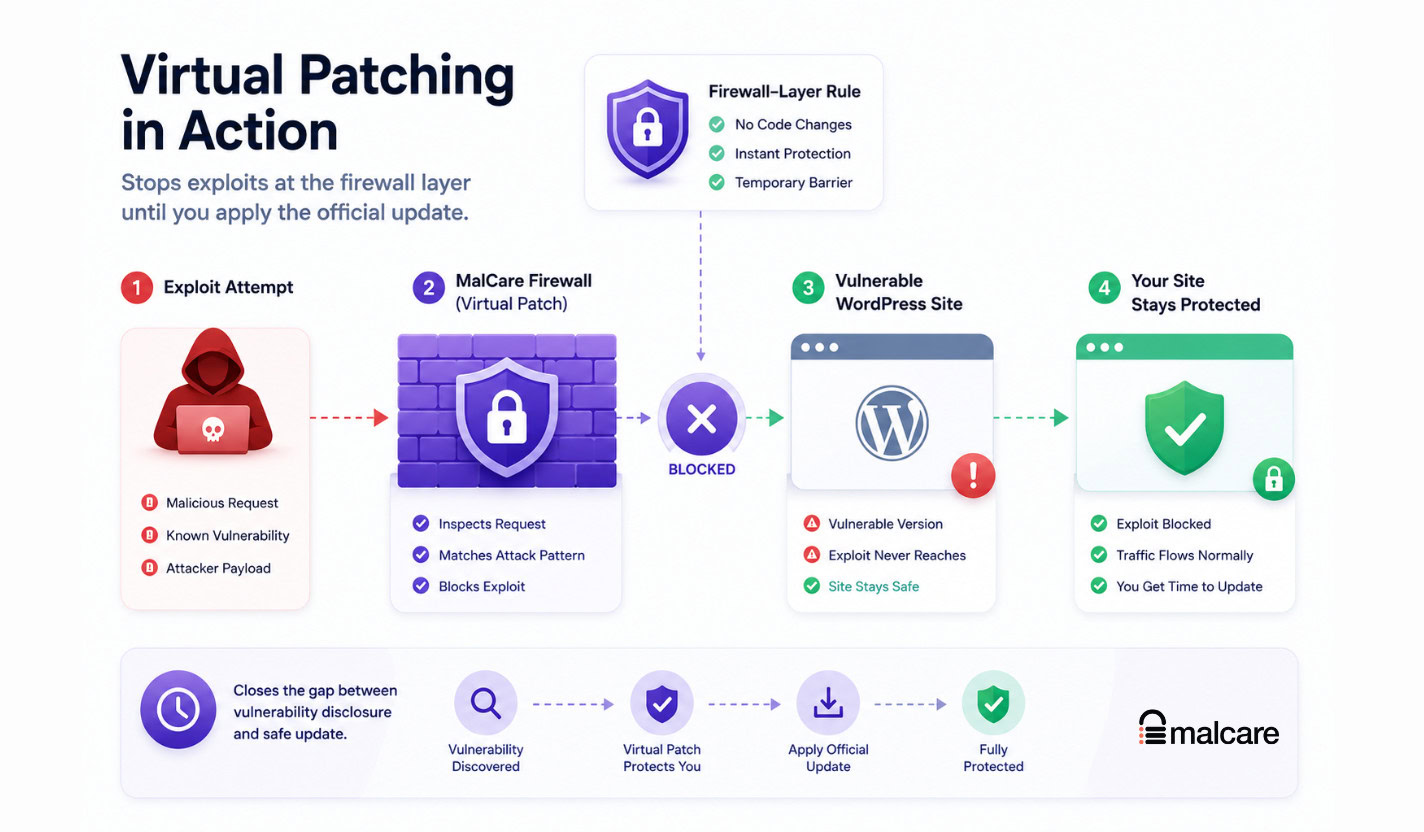
It protects sites in the risky gap between discovering a vulnerability and safely applying the official update. Every virtual patch is a carefully engineered firewall-layer rule that blocks exploit attempts before they reach the vulnerable plugin, theme, or WordPress core code.
The hard part is precision. A rule must stop the exploit, avoid false positives, preserve normal WordPress behavior, and be hardened against bypass attempts.
This is how we build each rule.
The Short Version
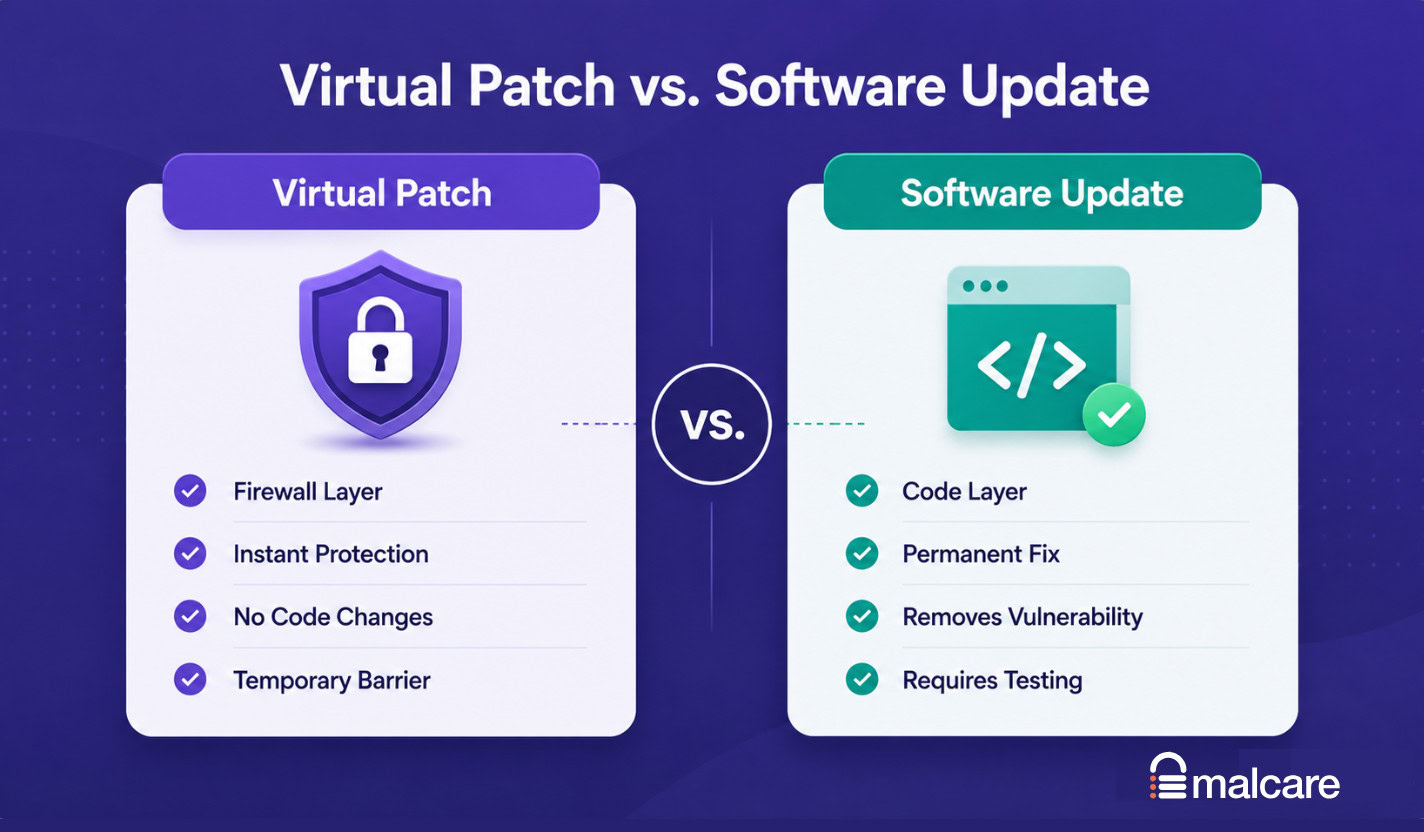
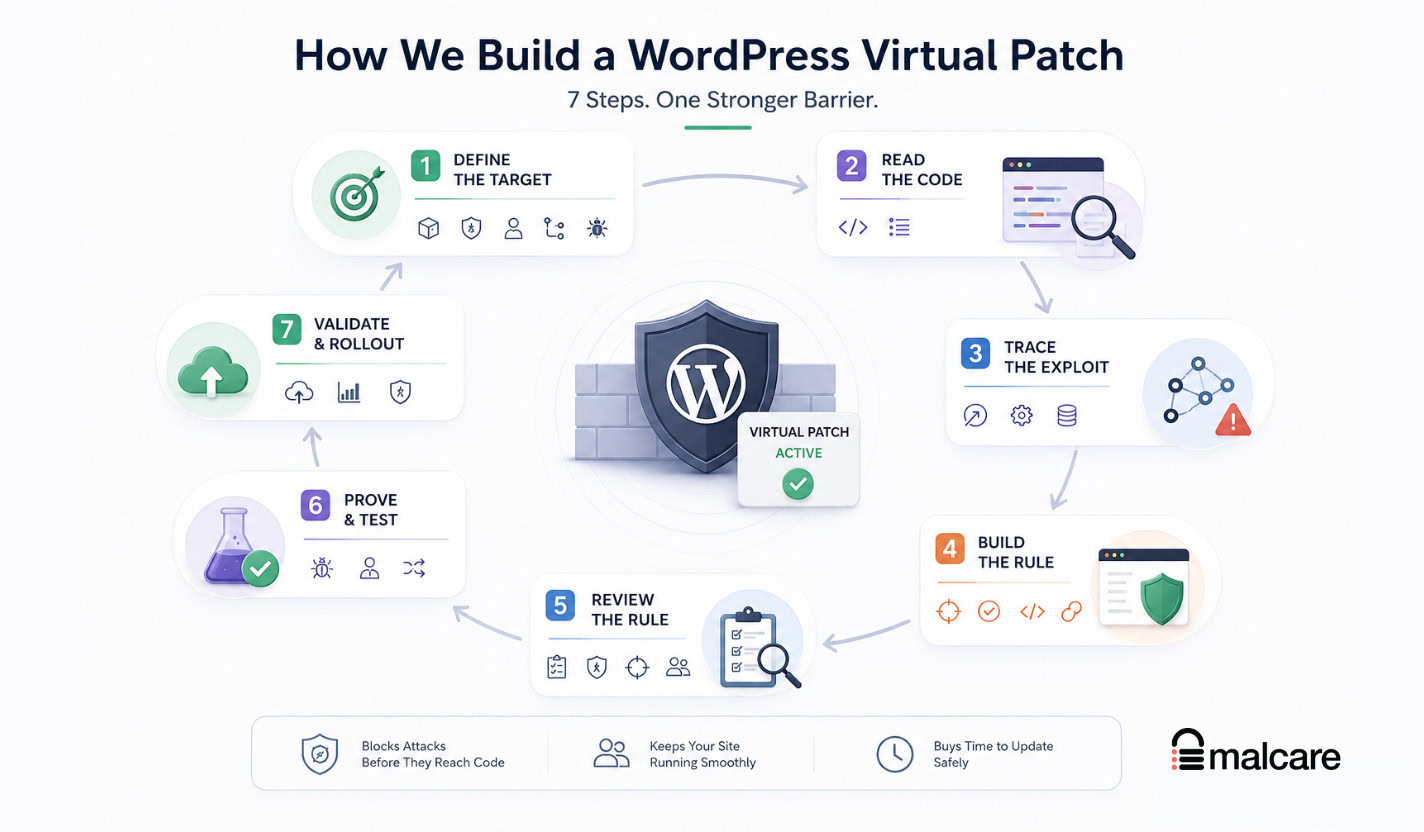
MalCare builds a WordPress virtual patch by turning a vulnerability disclosure into a precise security target, reading the vulnerable and patched source code, tracing the exploit path, designing a narrow firewall rule, testing it against the real attack, replaying legitimate WordPress traffic to catch false positives, trying common bypasses, and validating rollout before broad deployment.
A patch has to pass three tests:
- Block the exploit. Not just the published proof of concept, but the actual vulnerable behavior.
- Allow legitimate traffic. Checkout, login, admin saves, uploads, comments, forms, and API calls should keep working.
- Resist obvious bypasses. Reordered parameters, re-encoded payloads, method changes, and alternate routes should not slip through.
If those three conditions cannot be proven, we do not treat the patch as complete protection.
The Standard A Patch Has To Meet
The visible part of a virtual patch is usually a green “protected” status or a blocked request.
The hidden work is much bigger.
A good patch has to match something stable across the gap between what the firewall sees and what the vulnerable code eventually receives. That is the central idea.
An attacker can change the surface of a request. They can reorder parameters, swap a GET request for POST, encode a payload differently, use an alternate route, or send input that looks harmless until WordPress or the plugin normalizes it.
The application can also rewrite the request before the dangerous operation sees it. It may decode characters, strip tags, trim whitespace, cast values, merge arrays, route through a shared function, or transform a filename.
So the rule cannot depend on a fragile detail that disappears five seconds later. It has to block on the thing that remains true when the attack reaches the dangerous operation.
That is how you stop the attack without stopping the site.
Stage 1: Turn The Disclosure Into A Precise Target
The first job is not rule-writing. It is scope.
A disclosure may arrive as a CVE, an advisory, a changelog note, a researcher write-up, or a short public warning. Useful, but not enough.
We turn that into a precise record:
- Which plugin, theme, or WordPress component is affected
- Which versions are vulnerable
- Which version fixed it, if a fix exists
- What class of vulnerability it is
- Whether authentication or a specific role is required
- Which endpoints, actions, parameters, routes, or files are involved
- What the exploit has to do to trigger the bug
This is also where a WordPress vulnerability scanner matters for site owners. You cannot protect or prioritize what you do not know is installed. Version matching is the difference between “a plugin has a vulnerability somewhere” and “this site is running an affected version right now.”
Advisories are valuable, but they are not treated as final truth. They can have the wrong parameter name, miss a secondary entry point, understate the required permissions, or describe only the proof of concept rather than the actual vulnerable behavior.
A virtual patch has to protect the affected version range, not just the one build shown in a public example.
Stage 2: Read The Vulnerable And Patched Code
Once the scope is clear, we read the real source code.
That means downloading the actual vulnerable version of the plugin or theme. When a fixed version exists, we read that too.
The patched version is especially useful because the diff shows what behavior the vendor decided to reject. If the fix adds a nonce check, tightens a capability check, sanitizes a value, blocks a file extension, escapes output, or changes a database query, that tells us where the danger lives.
We do not build a virtual patch from the advisory alone.
WordPress plugins are full of shared paths. One vulnerable operation may be reachable through a REST route, an AJAX action, an admin form, a shortcode, and an internal helper that several features call. A disclosure might name only one of them.
Reading the code is how we avoid protecting the front door while leaving the side door open.
Stage 3: Trace The Exploit To The Dangerous Operation
This is where the patch starts becoming real.
We find the attacker-controlled input and follow it through WordPress request handling, plugin routing, permission checks, sanitization, normalization, and internal function calls until it reaches the dangerous operation.
The dangerous operation could be a file write, upload, option update, user role change, SQL query, code execution path, stored XSS sink, arbitrary deletion, redirect, or privilege-sensitive setting.
The goal is to separate what the attack needs from what the proof of concept happens to show.
A public proof of concept might send one parameter to one endpoint. The real vulnerability may be “any unauthenticated request that reaches this shared import function with this kind of file.” Or it may require an editor role, but not an administrator. Or it may fire only after the plugin decodes a value that looked safe in the raw request.
Those differences matter.
They decide whether the rule should look for a route, a capability boundary, a parameter shape, a file type, a normalized value, or a combination of signals.
They also decide whether there are sibling vulnerabilities. If one function writes files unsafely, we look for similar functions. If one AJAX action lacks a permission check, we look for other actions using the same helper. The patch should follow the vulnerable behavior, not just the advisory headline.
Stage 4: Build A Rule That Is Strong, Precise, Simple, And Consolidated
After the exploit path is clear, we translate it into a firewall rule.
The rule has to be strong enough to catch variants, precise enough to avoid false positives, simple enough to review, and consolidated enough to defend shared vulnerable paths cleanly.
Strong means the rule is not tied only to the public payload. If the exploit still works with reordered parameters, a changed method, a different encoding, or an alternate route, the rule has to catch those versions too.
Precise means the rule blocks the malicious shape without blocking the legitimate feature. If the vulnerability is an executable upload, a useful rule blocks the dangerous file type and allows ordinary image uploads. A rule that blocks every upload may stop the exploit, but it also breaks real sites.
Simple means each rule has one clear defensive job. Dense rules with too many unrelated clauses are harder to reason about and easier to get wrong.
Consolidated means shared vulnerable behavior gets one coherent defense where appropriate. If several entry points reach the same dangerous function, the rule should protect the shared risk instead of scattering near-duplicate logic everywhere.
This is where WordPress-specific security context helps. Generic patterns can be too broad or too shallow. MalCare Atomic Security is built around site-specific protection, so the rule can be tied to how WordPress and its plugins actually route, rewrite, and execute requests.
There is also an honest boundary here: sometimes a request cannot be safely distinguished from legitimate traffic at the firewall layer.
When that happens, the right answer is not to ship a sloppy rule and call it protection. The right answer is to document the limitation, reduce risk where possible, and push the software update as the real fix.
Stage 5: Review The Rule Before Live Testing
Before a rule goes into a live test, we review it on paper.
This catches mistakes while they are still cheap to fix.
We check whether the rule uses supported firewall operations, whether every clause has a purpose, whether the version scope matches the source analysis, and whether the entry points match the exploit map.
We also check the assumptions. If the vendor fix requires an administrator capability, the rule should not assume subscriber-level access. If the bug is reachable through REST and AJAX, the rule should not cover only one. If the vulnerable value is dangerous after decoding, the rule should not match only the raw string.
A rule that fails this stage goes back into design. There is no value in proving a rule live if the static review already shows it is aimed at the wrong thing.
Stage 6: Prove The Patch Against The Attack And Real Traffic
The live test has to prove both sides of the claim: the attack is blocked, and the site still works.
First, we reproduce the exploit on a vulnerable setup. This matters because a patch that cannot be tested against the real failure mode is still partly theoretical.
Then we turn on the rule and run the same attack again. The exploit should be blocked before it reaches the vulnerable code.
After that, we test for false positives. Real WordPress sites generate messy, ordinary traffic all day: checkout submissions, contact forms, login attempts, profile updates, image uploads, comment submissions, post saves, REST API calls, search requests, and admin settings changes.
A security rule that breaks those flows is not a win. It has just moved the emergency from security to operations.
So legitimate WordPress activity is replayed against the rule. If normal behavior is blocked, the rule goes back for revision.
Then we attack the rule itself.
We try common evasions: re-encoding payloads, changing parameter order, swapping request methods, using alternate routes, aliasing URLs, changing content types, and sending values that become dangerous only after normalization.
Failures are useful signal. If an evasion works, the rule is not ready. If legitimate traffic breaks, the rule is not ready. If the exploit was misunderstood, the analysis goes back to the source code.
The loop continues until the patch passes cleanly or we conclude that safe firewall-layer protection is only partial.
Stage 7: Validate Rollout In The Real Protection System
A rule that works in isolation still has to work inside the protection system that will enforce it.
At this stage, the rule is added to MalCare’s deployment system and validated in controlled environments before broader rollout. The checks are familiar, but now they happen in the same path the protection will use for real sites:
- The exploit should still be blocked.
- Legitimate traffic should still pass.
- Version scoping should apply correctly.
- The rule should behave consistently in the live firewall path.
- Any rollout signals should be watched before expansion.
Only after that does the patch become the kind of background protection a site owner expects: no emergency file editing, no manual rule-writing, no downtime, and no need to choose between “update blindly” and “stay exposed.”
That is the product value, but it is not magic. It depends on the process before it.
What “Protected” Means
“Protected” should mean something specific.
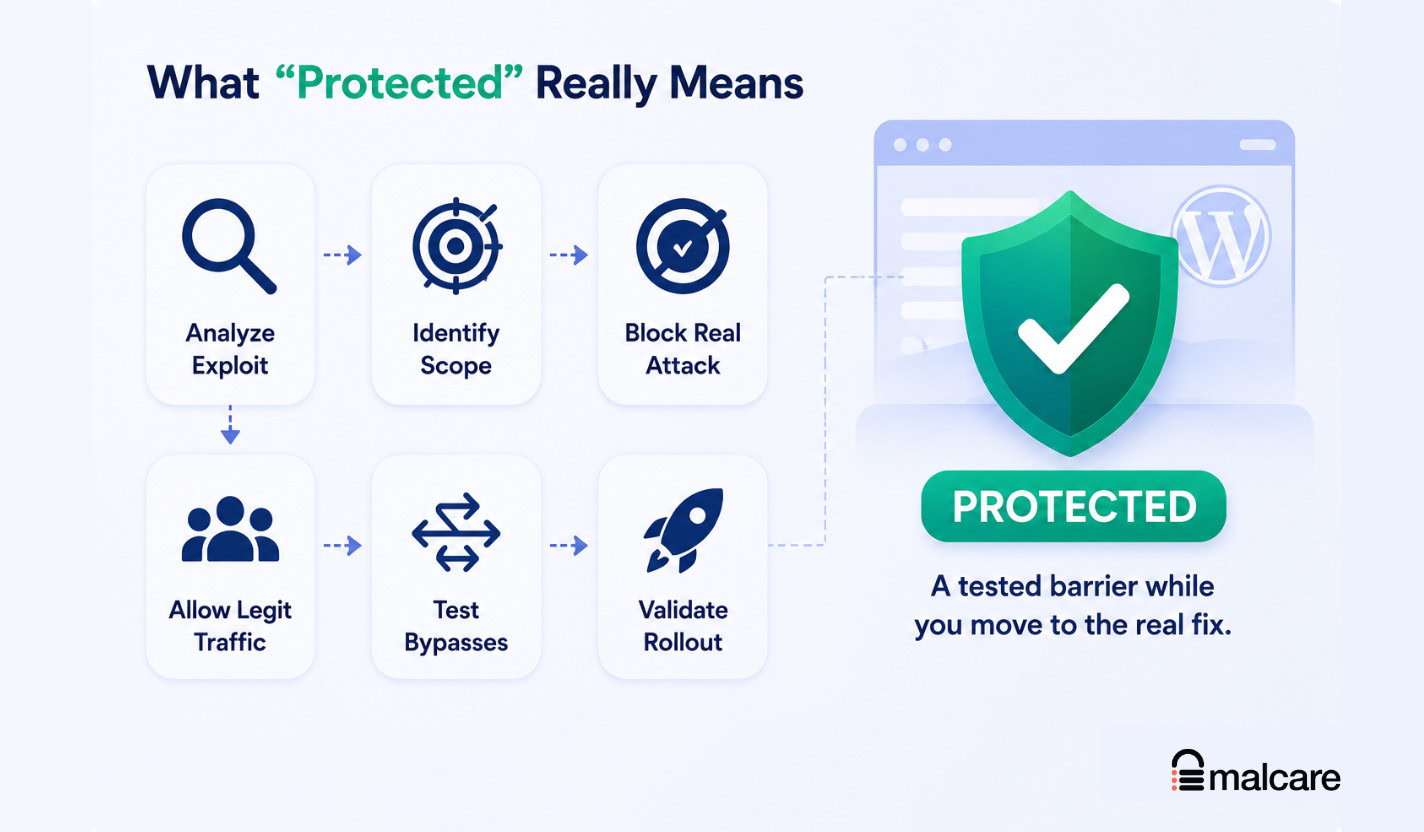
For a known vulnerability, it means the exploit path was analyzed, the affected scope was identified, the real attack was reproduced where possible, the rule blocked that attack, ordinary WordPress traffic was allowed, common bypass attempts were tested, and rollout was validated in the protection system.
It does not mean the vulnerable plugin can be ignored forever.
It does not mean every unknown vulnerability in that plugin is covered.
It does not mean the firewall changed your site files or fixed the vulnerable code.
It means the known exploit has a tested barrier in front of it while you move toward the real fix.
That distinction matters because virtual patching is strongest when it is treated as risk reduction, not as permission to stop maintaining the site.
Where Virtual Patching Goes Wrong
Most bad virtual patches fail in one of four ways.
They match the proof of concept instead of the vulnerability. An attacker changes the encoding, order, route, or method, and the rule misses it.
They are too broad. They block the attack, but they also block contact forms, checkout, uploads, admin saves, or API calls. That creates a different production incident.
They trust the advisory too much. The disclosure names one endpoint, but the vulnerable function is reachable from several places.
They claim too much. A patch for one known vulnerability becomes marketing language for total protection. That is not how a WordPress security plugin should work.
The practical test is boring and strict: can the rule block the exploit, leave the site alone, and survive obvious evasions?
If not, it needs more work.
What Site Owners Should Do When A Vulnerability Is Disclosed
If you see a vulnerability alert for a plugin, theme, or WordPress core, do not start with panic. Start with scope.
Check whether your site is running an affected version. Check whether a fixed version exists. Check whether the vulnerability is being actively exploited or is easy to exploit. Then decide how quickly you can update safely.
For a small brochure site, that may be immediate. For a WooCommerce store, membership site, LMS, booking site, or heavily customized build, the safer path may be:
- Confirm the vulnerable version is installed.
- Make sure firewall or virtual patch protection is active if available.
- Test the vendor update on staging.
- Prioritize based on exploitability and business risk.
- Apply the update as soon as it passes testing.
- Scan the site if there are signs of compromise.
Agencies should add one more layer: group client sites by business criticality and exposed functionality. A low-traffic brochure site and a high-volume checkout flow should not get the same update plan just because the same plugin appears on both.
MalCare’s virtual patching is designed for this exact middle period. The WordPress vulnerability scanner helps identify exposed components, and the firewall layer helps reduce risk while updates are tested and applied.
The Bottom Line
A WordPress virtual patch is not just “a firewall rule.”
It is a security decision that has to survive contact with real code, real attacks, real WordPress traffic, and real rollout conditions.
That is why MalCare’s process starts with source analysis, not guesswork. It traces the exploit, builds a narrow rule, tests for false positives, tries evasions, and validates deployment before treating the patch as protective.
Use virtual patching to close the update gap. Keep updating to remove the vulnerable code.
If you want that protection running while you update safely, MalCare Atomic Security brings WordPress-specific firewall protection, vulnerability detection, and virtual patching into the same security layer.
FAQs
A WordPress virtual patch is a firewall-layer rule that blocks exploit requests for a known vulnerability before they reach vulnerable plugin, theme, or WordPress core code.
No. A virtual patch reduces risk while the real update is tested and applied. The software update remains the permanent fix because it changes the vulnerable code.
Yes, if it is too broad or poorly tested. A trustworthy patch must allow legitimate activity such as checkout, login, admin saves, uploads, comments, forms, and API calls.
MalCare verifies the affected software and versions, studies the vulnerable and patched code, traces the exploit path, builds a precise firewall rule, tests the real attack and legitimate traffic, tries common bypasses, and validates rollout.
It means the known exploit has a tested firewall-layer barrier in front of it. The plugin still needs to be updated, and the protection does not imply coverage for every unknown vulnerability.
Sometimes an immediate update is right. Other sites need staging tests, client approval, compatibility checks, or a vendor fix first, and virtual patching reduces risk during that window.
A safe virtual patch blocks the real exploit, avoids false positives on legitimate WordPress traffic, and resists common evasions such as re-encoding, route changes, method changes, and parameter reordering.