You’ve noticed unexpected changes on your WordPress site, and users are reporting suspicious activity. These red flags are signs of a potential malware attack. They demand immediate attention.
Many underestimate the damage these threats can cause. The impact of Malware on your WordPress site not only disrupts your site’s performance but also erodes user trust. This can severely damage your business’s reputation.
Any kind of Malware must be removed immediately. With years of experience in the WordPress security sphere, we understand these challenges thoroughly. We’re here to explain what these threats mean for your site and guide you on how to remove them effectively.
Malware can harm your WordPress site by compromising security and performance. It can lead to data theft and slow down your site. Always use a WordPress malware scanner to ensure your site stays safe.
What is malware?
Malware stands for “malicious software,” and it’s just as sneaky as it sounds. It can hide in software that appears safe and useful. Without your knowledge, malware might be lurking inside, ready to cause trouble. It’s designed specifically to harm or exploit your device.
Malware comes in many forms, including viruses and spyware. It often tricks you into installing it by making itself seem like a harmless download. Once in, it can cause chaos on your computer, phone, or any device you use.
Why is it so hard to catch? Malware is constantly evolving, much like a shape-shifter that never stays the same.
This means your security systems need regular updates to keep up. If you aren’t scanning your site for Malware using a tool, then removing malware manually can be tricky. It is a time-consuming task, similar to untangling a knot. That’s why staying aware and cautious is so important—prevention is your best defense.
What is the impact of malware on WordPress sites?
Malware can sneak into your WordPress site through different weak spots, causing headaches you definitely don’t need. Even a little bit of it can create big problems, so it’s crucial to know how it gets in and what it can do.
How does malware get in?
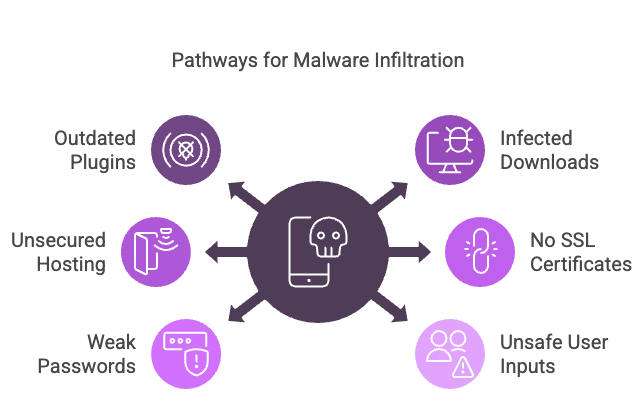
Outdated plugins or themes: If your plugins or themes aren’t updated, they can become open doors for malware. Always keep your site updated with the latest security patches.
Infected downloads: Be careful with file downloads or email attachments. Malware often hides in these, waiting to pounce when you click.
Unsecured hosting: If your hosting service lacks solid protection, it’s like leaving your site’s doors wide open. Choose a host with strong security measures.
No SSL certificates: Without SSL certificates, your data isn’t transferred securely, making it vulnerable to attacks. SSL helps keep data safe between your site and users.
Weak passwords: Using passwords that are easy to guess makes it simple for hackers to break in. Creating strong and unique passwords is your first line of defense.
Unsafe user comments and forms: If comments and forms on your site aren’t properly validated, malware can slip through. Ensure your site checks these inputs for safety.
Vulnerable code: Poor coding practices can leave holes in your website, making it easier for malware to enter. Regularly check and improve your site’s code.
Pirated themes and plugins: Using pirated or nulled themes and plugins can introduce malware. Stick to legitimate sources to keep your site safe.
Shared hosting: On shared hosting, an infection on one site can easily spread to others. Ensure your host has measures to isolate and protect sites.
Improper firewall settings: A poorly configured firewall doesn’t block threats effectively. Make sure your firewall is properly set up to protect your site.
What damage can malware do?
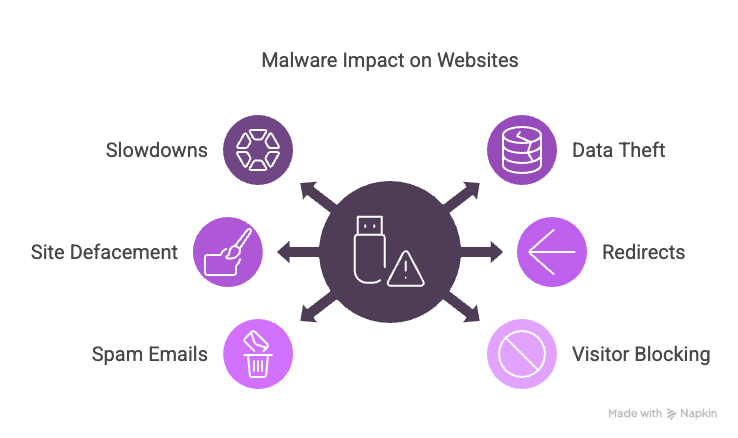
Slowdowns: Malware can slow down your site, leading to a frustrating experience for visitors. A sluggish site can drive people away.
Data theft: It can steal sensitive information like login details and payment info, which is a huge security risk.
Site defacement: Malware might change your site’s content to inappropriate or unwanted material, damaging your reputation.
Redirects to bad sites: It can send your visitors to malicious websites, which can make users lose trust in your site.
Spam emails: Malware can send spam emails from your domain, harming your reputation and possibly getting your email blacklisted.
Visitor blocking: Legitimate visitors might get blocked, causing a loss of traffic and potential sales.
Blacklisting by search engines: If search engines detect malware, they might blacklist your site, severely affecting your site’s visibility and SEO.
Data corruption: Important files and data can get corrupted or deleted, leading to significant losses.
Backdoors for hackers: Malware can create backdoors, allowing hackers to keep accessing your site.
Resource drain: Increased server resource usage can cause your site to crash, leading to downtime and lost visitors.
What’s the big deal? Why should you worry about malware?
The impact of Malware on WordPress sites isn’t just a nuisance—it’s a real threat that can cause a lot of headaches. It affects how your site works, how secure it is, and even how people feel about it.
Whether you’re running a business or just have a personal site, knowing the risks of malware is super important. Understanding the dangers helps you see why stopping malware is such a big deal. By addressing it early, you keep your site safe and stress levels low.
Impact of malware on a WordPress website
Malware can seriously mess with your WordPress site. It might slow things down or cause site crashes. This leads to frustrated users and makes your site look unreliable. You could also find strange changes in your content, or worse, your visitors might get redirected to bad sites.
If search engines notice malware, they might hide your site from search results, making it hard for people to find you.
Malware can also create hidden access points for hackers, and it might use up too many resources, leading to shutdowns. Plus, your sensitive info—like passwords—could be at risk, making it harder to manage your site.
Impact of malware on a WordPress business
If you run a business, malware can shake your customers’ trust, making them think twice about working with you. There might be legal issues if there’s a data breach, and fixing damage caused by malware can get expensive fast.
Malware can lead to financial losses from missed sales and, in some cases, ransom demands. Your brand’s reputation might suffer, which can make customers wary of doing business with you.
Dealing with malware can disrupt your operations, causing delays and inefficiencies. If sensitive information is stolen, it could mean losing your competitive edge.
Additionally, communicating with customers during such crises can be challenging, and there’s also the risk of impacting partners or clients, further complicating the situation.
Impact of malware on WordPress individuals
For individuals, malware can lead to personal data theft, like passwords and banking info, upping the risk of identity theft. Losing access to personal websites or social media can be really upsetting.
Trying to regain control over compromised accounts isn’t easy, and there’s the worry of being watched or tracked without your permission. Phishing attacks might increase, causing stress and anxiety about future threats. You may find it hard to trust online resources and need to spend more time and energy on boosting your personal security.
What to do if your site has been attacked
Finding out that your site has been attacked by malware can be very stressful. Your first thought might be to restore a backup, but hold off for a moment. Jumping to restore right away can be risky because you might not know what’s been changed or what might still be dangerous.
Here’s what you should do instead:
Contact your hosting provider: Let them know about the attack. They can offer assistance and help with the cleanup.
Inform your users: Let your users know about what happened. Advise them to take necessary precautions, like changing their passwords.
Cleaning and securing the site
Scan and remove malware: Use a tool like MalCare to scan your site. Identify and remove any malicious code or files that have been planted.

Update everything: Make sure all your plugins, themes, and the WordPress core are updated to the latest versions. This helps close any security gaps.

Clear out suspicious files: Delete or quarantine any suspicious files and remove plugins or themes you don’t use. This reduces potential entry points for malware.
Change passwords: Update all passwords related to your site and hosting accounts. Use strong, unique passwords to enhance security.
Install security measures: Add a firewall and a reliable security plugin to your site. These tools provide an extra layer of protection against future attacks.
Parting thoughts
Malware is a real threat to WordPress sites, messing with both security and how well things work. To keep your site safe, make sure everything’s up to date and you’ve got strong security in place. If things go wrong, catching and fixing the problem quickly can save you a lot of trouble.
Learning about WordPress security can really help, too. It’s much easier to stop problems before they start, so staying proactive is key to keeping your site running smoothly.
FAQs
Malware can sneak into your website through outdated plugins, weak passwords, or unsecured networks. Hackers often exploit these vulnerabilities to inject malicious code or files. Once inside, malware can disrupt your site, steal data, or create backdoors for further attacks.
Yes, WordPress sites can get hacked, especially if they aren’t properly secured. Common reasons include outdated software, weak passwords, and vulnerabilities in plugins or themes. However, by keeping everything updated and using security plugins, you can significantly reduce the risk of hacking and keep your site safe.
Yes, WordPress websites can crash for various reasons. These include server issues, plugin conflicts, or malware infections. These crashes can lead to downtime and affect user experience. Regular maintenance, using reliable hosting, and monitoring your site’s performance can help prevent crashes and ensure your site runs smoothly.
Your WordPress site might not be safe if it’s using outdated software, has weak security settings, or lacks proper monitoring. Vulnerabilities can make it easy for hackers to gain access and cause harm. Enhancing security with strong passwords, SSL certificates, and security plugins can help protect your site from threats.
Restoring a WordPress site without a backup can be challenging but not impossible. You can try using your hosting provider’s recovery options, if available, or use WordPress recovery plugins that scan and repair issues. Alternatively, seek professional help to reconstruct your site based on cached versions from search engines or archives.