

Ever visited a WordPress website and wondered how your data is used? That’s what a WordPress privacy policy explains. It tells you what kind of data a site collects and how it uses it.
If you have a WordPress site, crafting a privacy policy is crucial. It’s not just about checking a legal box. It’s about building trust with your visitors.
Think of it like a welcome sign for your site. It tells visitors you care about their privacy. Whether they fill out a form, browse your pages, or make a purchase, they want to know their info is safe.
Let’s dig into how to create a solid privacy policy for your WordPress site. We’ll explore tools and tips to make the process smooth and simple.
Creating a WordPress privacy policy is easy with plugins, generators, or by writing your own. It builds trust and ensures legal compliance. To further protect your site and its users’ data, invest in a reliable WordPress security plugin.
1. Use a WordPress privacy policy plugin
Using a WordPress privacy policy plugin is the easiest way to create a privacy policy for your site. It saves you time and ensures you’re covering all privacy regulations.
Plugins like Privacy Policy Generator, Legal Pages, and WP AutoTerms simplify the process.

Just install and activate the plugin you choose. The plugin’s dashboard then guides you through everything.
These plugins come with pre-made templates. All you need to do is add a few details, like your company name and website. The templates handle the rest, ensuring compliance with laws like GDPR and CCPA.
Most of these plugins are free, though some might charge for extra templates or features. This method is convenient and effective, making it a great choice for many website owners.
2. Use a WordPress privacy policy generator
Another great option for creating a privacy policy is using a WordPress privacy plugin generator. It offers flexibility and ease, just like plugins.
Services like PrivacyPolicyGenerator, Termly, and FreePrivacyPolicy are popular choices. These tools need you to sign up, which is a bit different from the standard plugins.
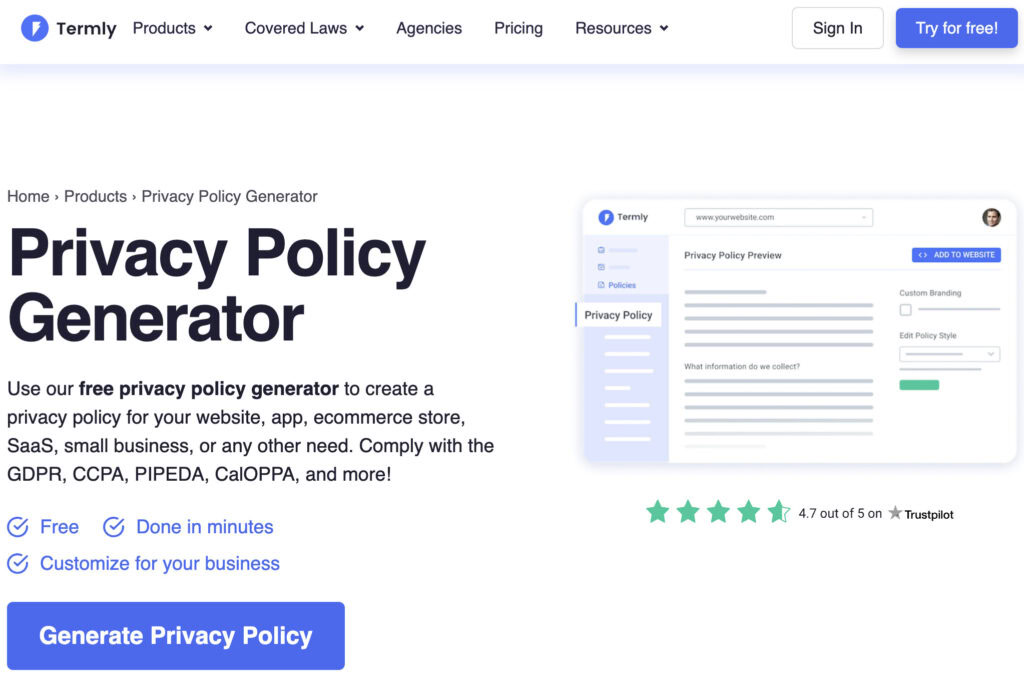
Once you’re signed up, these generators provide templates for you. You can select one that fits your needs. Most templates are free, but some premium options might have a cost.
This method is straightforward and provides a professional-looking policy. It’s a solid choice if you’re looking for a quick and easy solution.
3. Write your own WordPress privacy policy
If you’re cautious about sharing sensitive information, writing your own WordPress privacy policy might be the way to go. It’s a more hands-on approach that puts you in control.
This process can be tedious, but using online templates can help. Find a template, and fill in your site information as needed. Be careful, though, as missing details or errors could make the policy invalid.
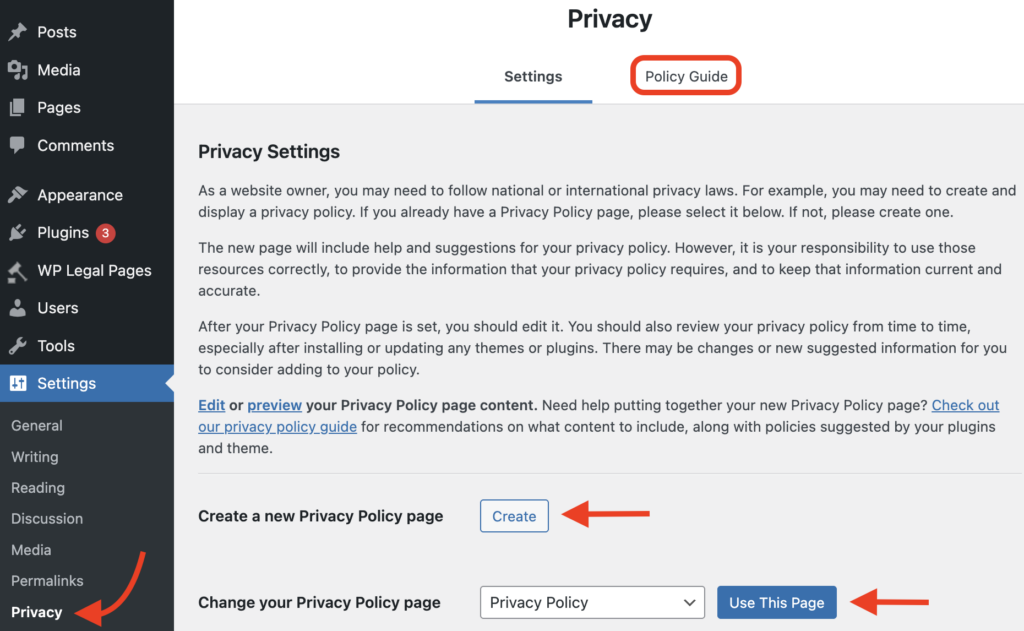
To start, get a template and go to Settings > Privacy in your WordPress dashboard. Click on Create next to the Create a new Privacy Policy page section. Add your content here and use the Policy Guide tab for tips.
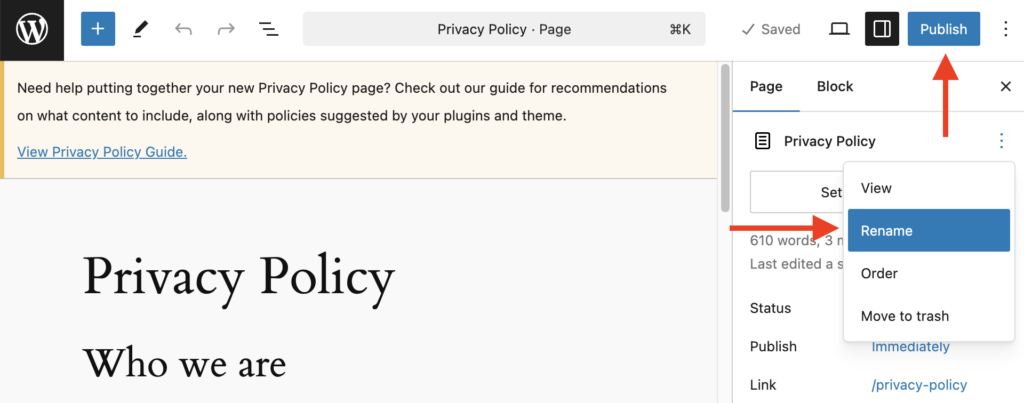
After you’ve written your policy, name it and hit Publish. Head back to the Privacy Settings tab, choose your new policy, and set it as the default. Now, your personalized privacy policy is ready to use.
What should I include in my WordPress privacy policy?
When crafting your WordPress privacy policy, you need to include some important details. These elements ensure clarity and compliance.
- Introduction: Explain the purpose of the policy and who it applies to. Let users know it’s there to protect their privacy.
- Types of data collected: List personal data like names and emails. Include non-personal data such as browser types.
- Data collection methods: Describe how you gather data. Common methods include forms and cookies.
- Purpose of data usage: Explain why you collect data and how you use it. Be clear about the benefits for the user.
- Third-party sharing: Detail if and how data is shared with third parties. Be transparent about who gets access.
- Cookies and tracking: Provide information on cookies used and tracking practices. Tell users how this impacts their experience.
- User rights: Outline the rights users have, like accessing, correcting, or deleting data. Explain how they can exercise these rights.
- Data protection measures: Describe the security measures in place to protect user data. Ensure users feel their data is safe.
- Policy changes: Let users know how they will be informed about changes to the policy. Maintain open communication.
- Contact information: Provide contact details for privacy-related questions. Make sure users know who to reach out to.
- Legal basis: State the legal basis for data processing, especially for GDPR compliance. This explains your lawful reason for data handling.
Why should I include a WordPress privacy policy?
Including a privacy policy on your WordPress site is crucial for several reasons, such as:
- Legal compliance: Laws like GDPR and CCPA require your sites to have privacy policies. They mandate transparency about how you handle user data.
- User transparency: A clear policy builds trust. It shows users what data you collect and how it’s used.
- Data collection disclosure: If you collect personal data, use analytics, or run ads, you need to disclose this information. A privacy policy is the best way to do it.
- Third-party services: If your site uses plugins or services that gather user data, a policy is essential. It explains these practices transparently.
- Building trust: A privacy policy demonstrates a commitment to user privacy. This enhances your credibility and shows that you value your visitors’ privacy.
- Avoiding penalties: Complying with privacy laws helps you avoid legal penalties and fines. Hence, it’s safer for your business to have a proper privacy policy.
- User rights: A privacy policy helps users understand their rights regarding their data. It also explains how they can control their information.
Where should I display the WordPress privacy policy on my site?
Displaying your WordPress privacy policy in the right places ensures that users can easily find it. Here are some key spots to consider:
- Footer: Add a link to the privacy policy in the footer of your site. This makes it accessible on every page.
- Main Menu: Include the policy in the main menu or a dropdown. This ensures it’s visible and easy to find.
- Registration/Sign-up Pages: Link to the policy where users enter their information. They should know how their data is used.
- Checkout Pages: For e-commerce sites, display a link during the checkout process. It’s important for users making purchases.
- Contact Forms: Place a link near forms where you collect user data. Transparency is key here.
- Pop-ups/Notices: Incorporate the policy in cookie consent pop-ups or banners. Make users aware of your data practices.
- Sitemap: Add the policy to your site’s sitemap. This helps with search engine indexing.
Final thoughts
Creating a privacy policy for your WordPress site shows you care about your users. It builds trust and keeps you legally safe. With privacy plugins and policy generators, the task becomes simple and fast. Writing your own policy is also an option but requires extra care.
Security is just as important as privacy. A reliable WordPress security plugin helps protect both your site and its users’ data. We recommend using MalCare for this.
MalCare offers a strong malware scanner, one-click malware removal, and a smart firewall. It also provides real-time backups and vulnerability scanning. Best of all, it doesn’t slow down your site. With MalCare, you can ensure your site stays safe while maintaining user privacy.
FAQs
WordPress itself doesn’t have a privacy policy for users’ websites, but it offers tools to help site owners create their own. These tools are available in the WordPress dashboard under the Privacy section. They include a guide and basic template to get you started with crafting your privacy policy to meet legal needs.
The WordPress GDPR policy applies to any WordPress website handling data from EU users. It requires site owners to protect user data and provide clear information on data collection and usage. WordPress offers tools and features to help comply, such as data export and erasure options. Site owners need to create their own policies to meet GDPR requirements.
To set a page as your privacy policy in WordPress, go to your WordPress dashboard. Navigate to Settings > Privacy. There, you’ll see an option to choose an existing page or create a new one. Select the page you want to use for your privacy policy, then click Use This Page to set it as your default privacy policy.