
On April 28, 2026, cPanel announced a critical vulnerability with a 9.8 severity score (CVE-2026-41940) affecting more than 1 million sites. Hackers could use it to bypass your cPanel login and get full server access.
It took 4 days for the patch to arrive, but a financial crisis had already developed. A massive wave of “sorry” ransomware exposed more than 44,000 websites to ransom demands of up to $7,000.
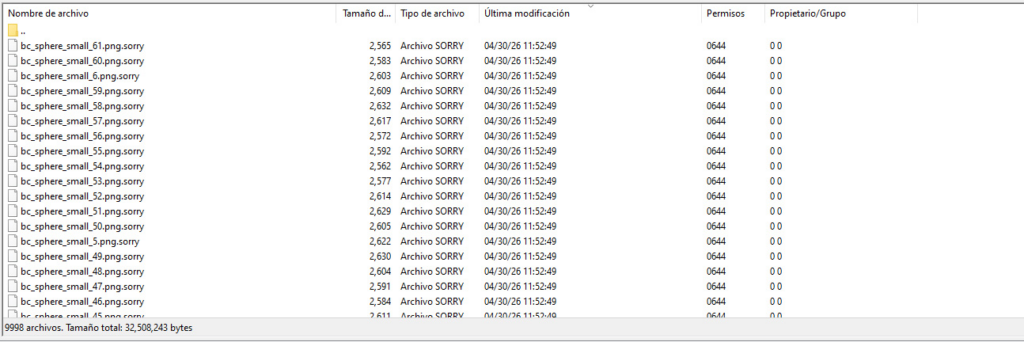
But 3 months before all of this happened, MalCare was already seeing a 30% increase in hacked sites hosted on cPanel environments. Roughly 250-300 new hacked sites were coming in every day.
At first, these looked like ordinary WordPress hacks – malware injections, spam attacks, and redirects, etc. But something did not add up.
There was no single vulnerable plugin or theme tying everything together. Many site owners had already done the things they were supposed to do: updated WordPress, changed passwords, cleaned infected files, and asked their host for help. Still, the infections kept coming.
Then the cPanel vulnerability was declared, and suddenly, the pattern made sense. The problem was not in WordPress; it was in the underlying infrastructure. And that changes the way we need to think about WordPress security.
Because when the compromise starts at the hosting level, a patched WordPress site can still become a hacked WordPress site.
For example, in this Reddit post, a developer shared that his host had patched the vulnerability, but he couldn’t run the detection script himself because hackers had already changed his root password.

What the cPanel attack data showed
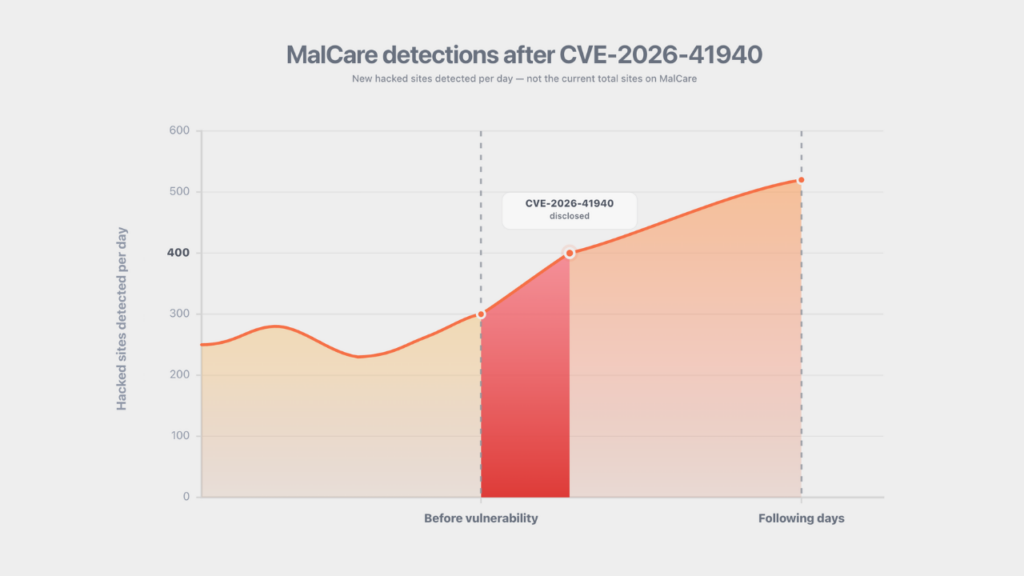
Before the disclosure in April, MalCare was seeing roughly 250-300 hacked cPanel-hosted sites a day. After the vulnerability was disclosed, that number crossed 400 hacked sites a day. In the days that followed, that number climbed to nearly 500. And it has continued rising.
Some admin users tried to move away from the affected versions by downgrading cPanel, assuming older versions would be safer. But from what we were seeing, that did not solve the problem.
The hacked sites were still coming in. The infections were still present. And CERT Santé later warned that previous versions should also be treated as compromised, which meant downgrading was not a clean escape route.
In the month since the patch was released, MalCare has helped more than 20,000 new websites with malware removal. As of May 2026, only 7 out of the listed 4,800+ web hosts had publicly released patches, meaning this wave of attacks will continue rising. Your web host may have patched this vulnerability without publicly declaring it. To get a conclusive answer, you can run this open-source script from WatchTowr, and if you see the “succeeded” message, it means the vulnerability exists.
We’ve also put together a list of the top 50 hosting providers using cPanel, showing which ones have released patches, which ones are in the process of releasing them, and which ones remain undeclared.
But even if your host appears on the patched list, that only answers one part of the problem. It tells you the vulnerability may have been closed. It does not tell you whether your WordPress site was already compromised before that happened.
That is why the next step is to scan the site itself.
If you’re seeing any suspicious activity or if your cPanel server has not been patched yet, do not wait for the symptoms to get worse. Then you need to run a free, deep malware scan on your WordPress site in 3 simple steps:
- Go to this page and enter your email address and site URL.
- Install MalCare on your site and start the scan.
- Check whether your site is clean or hacked.
Other scanners rely heavily on signature matching. They look for malware patterns they already know. And so they can miss newer or hidden malware that does not match an existing signature exactly.
MalCare’s scanner is able to detect malware in WordPress core files, plugin and theme files, and in the database using an AI-based detection algorithm, along with more than 100+ custom rules to catch even the tiniest of suspicious behavior that simpler scanners may miss.
That matters because if malware is found, MalCare offers instant cleanups with 100% guaranteed backdoor removal, so the attacker cannot keep coming back through the same hidden entry point.
Why continuous malware scanning matters
cPanel’s vulnerability and the supply chain attack in March (which is a story for another day) were two of the biggest vulnerabilities in 2026. In both cases, the common need of the hour was:
How do I know if my WordPress site has been compromised, regardless of where the attack started?
That is the question malware scanning answers. It also answers the next one, which is equally (if not more) important:
What needs to be removed so the attacker cannot come back?
- Did a new backdoor appear in wp-content?
- Did a fake plugin get installed?
- Did the database get injected with spam links?
- Did a malicious admin user appear?
- Did a redirect get hidden inside a theme file?
That is the role MalCare played during this wave. 3 months before the vulnerability was disclosed, our scanner was already detecting malware and helping protect sites while the wider ecosystem was still connecting the dots.
For years, WordPress security was mostly framed as prevention.
Keep everything updated. Use strong passwords. Install a firewall. Pick a good host. Remove abandoned plugins. Do not use nulled themes. All of that is good advice. But CVE-2026-41940 showed the limits of prevention-only thinking.
Prevention assumes you know where the danger is. It assumes the risky component has been identified. It assumes the patch exists. It assumes the host applies it quickly. It assumes the site owner hears about the issue in time.
But reality is messy. You almost never have that level of visibility before something breaks.
That is the real value of continuous scanning. It catches vague, easy-to-miss signals and catches hidden threats before they spiral out of control.
How to protect a cPanel-hosted WordPress site
If your WordPress site is hosted on a cPanel environment, follow these steps to get clarity and secure your website.
Step 1: Confirm that cPanel/WHM was patched
Ask your hosting provider whether your server was affected by CVE-2026-41940 and whether it was updated to a patched version.
If they are unresponsive, you can also run this open-source script from WatchTowr. If you see the “succeeded” message, it means the vulnerability exists.
We’ve also put together a list of the top 50 hosting providers using cPanel, showing which ones have released patches, which ones are in the process of releasing them, and which ones remain undeclared.
Step 2: Scan your WordPress site for malware
If you are seeing any suspicious activity or if your cPanel server has not been patched yet, do not wait for the symptoms to get worse.
Run a free, deep malware scan with MalCare using the steps below:
- Go to this page and enter your email address and site URL.
- Install the MalCare plugin on your WordPress site and start the scan.
- Check whether your site is clean or hacked.
Other scanners rely heavily on signature matching, which means they look for patterns they already know. MalCare combines AI-based detection with more than 100\ security rules to catch suspicious file changes, hidden backdoors, malicious code patterns, and database infections that simpler scanners may miss.
If anything is found, MalCare offers instant cleanups with 100% guaranteed backdoor removal, so the attacker cannot keep coming back through the same hidden entry point.
Step 3: Harden your site against future host-level vulnerabilities
A cPanel patch fixes this vulnerability, but it does not protect you from the next host-level issue. So, these are the best practices we recommend after analyzing more than 1 million sites over the years:
| Step | Why it matters | Priority |
|---|---|---|
| Patch cPanel to 136.1.7 or higher immediately | This closes CVE-2026-41940. | Essential |
| Run the IOC checks | If anything matches, your site or server may already be compromised. | Essential |
| Firewall WHM ports 2082, 2083, 2086, and 2087 to your IP only | Do not leave WHM exposed to the entire internet. | Essential |
| Enable 2FA on the WHM root | This makes it harder for attackers to abuse stolen or guessed credentials. | Essential |
| Disable SSH password authentication | Use key-only SSH access to reduce brute-force risk. | Essential |
| Check for the Copy Fail kernel vulnerability, CVE-2026-31431 | An attacker who gets any cPanel shell may be able to escalate to root if your kernel is not patched. | Essential |
| Set up a health-check failover | If your primary site goes down or starts behaving strangely, failover gives you more time to respond. | Good to have |
The goal here is not just to recover from this incident.
It is to make sure the next host-level vulnerability does not leave your WordPress site exposed in the same way.


